
Borer│鑽地器
Can be crafted into a Borer, which can instantly destroy any block. This provides a way to break bedrock without having to exploit a bug.│可以合成出鑽地器,它可以立即摧毀任何方塊。這提供了一種無需利用漏洞即可破壞基岩的方法。
Screenshots
About this Mod
Introduce│介紹
- This data pack adds a new item: Borer. When you hold it and press the attack button on a block, the block will be destroyed immediately and the dropped items (if any) will be generated, no matter what the block is, and the Borer will be consumed.│本資料包加入了一個新的物品:鑽地器,拿著它對方塊按下攻擊鍵之後,該方塊就會被立刻破壞並且會產生掉落物(如有),無論那是甚麼方塊,同時鑽地器會被消耗掉。
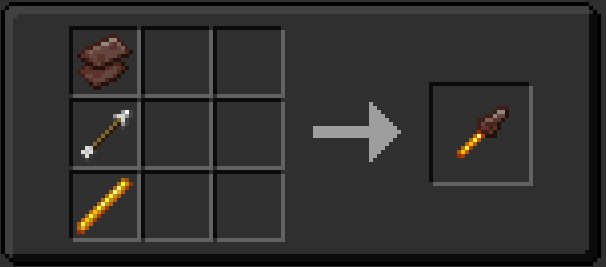
- Borer can be crafted using a crafting table. It can also be obtained using the command:
/loot give @s loot borer:borer│可以透過合成台合成出鑽地器。亦可使用該指令獲取:/loot give @s loot borer:borer
※You can check the specific craft recipe in "Gallery"│你可以在"Gallery"中查看具體合成配方
Usage example video│使用示例影片
Available Versions
How to Install Borer│鑽地器 on Your Server
Order Server
Order a Minecraft Java server with at least 3 GB RAM (4 GB recommended).
Set datapack Loader
In the panel under "Egg", select the datapack loader and matching Minecraft version (1.21.11).
Install Mod
Open the mod browser in the dashboard and search for "Borer│鑽地器". Click "Install" – done! Alternatively, upload the .jar via SFTP to the /mods folder.
Compatibility
Mod Loaders
Minecraft Versions
1.21.11, 1.21.10, 1.21.9 (+3 more)
Server-side
✓ RequiredRecommended RAM
4 GB(min. 3 GB)Frequently Asked Questions
Borer│鑽地器 server crashes on startup – what to do?
Most common cause: wrong datapack version or insufficient RAM. Check the server log (latest.log) for "OutOfMemoryError" or "Mixin" errors. With Mado Hosting: ensure at least 3 GB RAM is allocated and the loader matches the mod version (1.21.11). You can switch loaders with one click in the panel.
Is Borer│鑽地器 compatible with datapack and fabric and forge and neoforge and quilt?
Borer│鑽地器 officially supports datapack, fabric, forge, neoforge, quilt for Minecraft 1.21.11, 1.21.10, 1.21.9. Note: Forge and Fabric mods are NOT cross-compatible – pick one loader and stick with it. The Mado dashboard automatically detects incompatible loader combinations.
Server lagging with Borer│鑽地器 – how to optimize performance?
Recommended RAM: 4 GB (per 8 players). Use /spark profiler to check if Borer│鑽地器 consumes the most tick time. Common fixes: reduce server view-distance to 8-10, install "performant" or "starlight" as supplementary mods on Forge. With Mado Hosting, your server runs on NVMe SSDs with dedicated CPU cores for minimal latency.
Similar Mods



![[TaCZ] Timeless and Classics Zero](https://cdn.modrinth.com/data/SzzJttH8/fd27766d2bb8390d284696b1dbd358f87e081439_96.webp)


Rent Modded Server
Install Borer│鑽地器 with just one click on your server.