
Bossbar
Create health bars for bosses or entities: easy, performance-friendly, feature-rich.
Screenshots
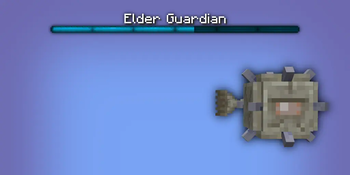
About this Mod
Bossbar
Enhancing Minecraft's bossbar functionality by properly extending it to entities. No more complicated command block setup, lag-inducing detection logic, and cheap attempts at recreating the real deal. This is the real deal now.
✅ Features
- Entity bossbars take the name, health and max health of its entity.
- Range can be specified for entity bossbars, meaning it's only visible to local players.
- Default bossbars can be configured (see Configuration)
- Thicken fog & darken skies with the extended functionality given to entity bossbars.
- Server-side, meaning clients don't need to download it to connect.
- Easy to use with the
/bossbarcommand, swap out a bossbar id with a target selector, and done! - Optimized to a lagless extend, compared to Minecraft's bulky command code.
⚙️ Configuration
Configuration can be found in config\bossbar.json.
default:<entity_type>: resource_locationrange: integer\
Set the entity bossbar's range. Defaults to
64. Any player outside of this range won't see the entity bossbar.darken_sky: bool\
Set if entity bossbar darkens the sky. Defaults to
false.thicken_fog: bool\
Set if entity bossbar thickens the fog. Defaults to
false.color:(blue|green|pink|purple|red|white|yellow)\
Set the entity bossbar's bar color. Defaults to
purple.style:(notched_6|notched_10|notched_12|notched_20|progress)\
Set the entity bossbar's visual amount of segments. Defaults to
progress.
register_before_vanilla: bool\
Register the command extension before vanilla, attempting to parse the bossbar argument as an entity before a server bossbar id. Defaults to false.
📖 Syntax
bossbar set <target> (visible|range|darken_sky|thicken_fog|color|style)... visible <visible>\
Set the entity bossbar's visibility. Defaults to
falsefor every entity, disabling their bossbar.... range <range>\
Set the entity bossbar's range. Defaults to
64. Any player outside of this range won't see the entity bossbar.... darken_sky <darken_sky>\
Set if entity bossbar darkens the sky. Defaults to
false.... thicken_fog <thicken_fog>\
Set if entity bossbar thickens the fog. Defaults to
false.... color (blue|green|pink|purple|red|white|yellow)\
Set the entity bossbar's bar color. Defaults to
purple.... style (notched_6|notched_10|notched_12|notched_20|progress)\
Set the entity bossbar's visual amount of segments. Defaults to
progress.
📦 Arguments
<target>: entity- Specifies the entity whose bossbar is to change.
Must be a player name, a target selector or a UUID.
- Specifies the entity whose bossbar is to change.
<visible>: bool- Specifies the bossbar's visibility.
Must be eithertrueorfalse.
- Specifies the bossbar's visibility.
<range>: integer- Specifies the bossbar's range.
Must be a 32-bit integer number between0and2147483647(inclusive).
- Specifies the bossbar's range.
<darken_sky>: bool- Specifies if the bossbar darkens the sky.
Must be eithertrueorfalse.
- Specifies if the bossbar darkens the sky.
<thicken_fog>: bool- Specifies if the bossbar thickens the fog.
Must be eithertrueorfalse.
- Specifies if the bossbar thickens the fog.
Available Versions
How to Install Bossbar on Your Server
Order Server
Order a Minecraft Java server with at least 3 GB RAM (4 GB recommended).
Set fabric Loader
In the panel under "Egg", select the fabric loader and matching Minecraft version (26.1.2).
Install Mod
Open the mod browser in the dashboard and search for "Bossbar". Click "Install" – done! Alternatively, upload the .jar via SFTP to the /mods folder.
Compatibility
Mod Loaders
Minecraft Versions
26.1.2, 1.21.11, 1.21.10 (+13 more)
Server-side
✓ RequiredRecommended RAM
4 GB(min. 3 GB)Frequently Asked Questions
Bossbar server crashes on startup – what to do?
Most common cause: wrong fabric version or insufficient RAM. Check the server log (latest.log) for "OutOfMemoryError" or "Mixin" errors. With Mado Hosting: ensure at least 3 GB RAM is allocated and the loader matches the mod version (26.1.2). You can switch loaders with one click in the panel.
Is Bossbar compatible with fabric?
Bossbar officially supports fabric for Minecraft 26.1.2, 1.21.11, 1.21.10. The Mado dashboard automatically detects incompatible loader combinations.
Server lagging with Bossbar – how to optimize performance?
Recommended RAM: 4 GB (per 8 players). Use /spark profiler to check if Bossbar consumes the most tick time. Common fixes: reduce server view-distance to 8-10, install "performant" or "starlight" as supplementary mods on Forge. With Mado Hosting, your server runs on NVMe SSDs with dedicated CPU cores for minimal latency.
Similar Mods




Rent Modded Server
Install Bossbar with just one click on your server.