
Better Questing Tweaker (BQTweaker)
Tweaker mod to change some aspects of BetterQuesting
Screenshots
About this Mod
Current Features:
-Adds a button to the home page of BetterQuesting to toggle quest notifications from being displayed.
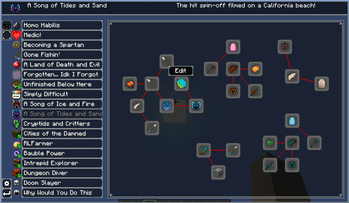
-Redesigns the questline page.
-Adds right-click context menus for adding/editing tasks and opening the questline designer.
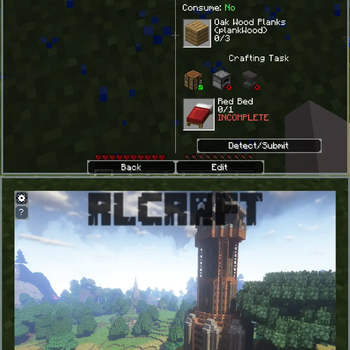
-Wraps tasks of each quest into a single page to allow for scrolling instead of clicking page-to-page.
-Wraps the description and rewards of each quest into a single page to allow for scrolling instead of clicking page-to-page.
-Adds a keybind for quickly returning to the previous page (Backspace by default.)
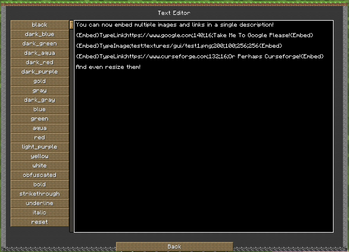
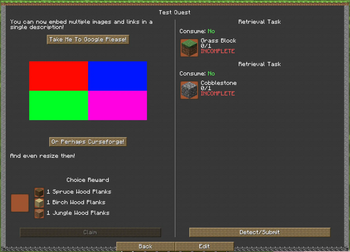
-Adds client-side embedding of links and images into quest descriptions, see below for details.
-Re-adds designer button to questline page.
-Adds patch for compatibility with MoBends to prevent stuttering models in task previews.
-Config allows for everything to be enabled/disabled.
Description Embedding (As of 1.3.0):
-You are able to add embeds (Images and Links) through quest descriptions using this mod.
-This is detected and rendered on the client-side only, and does not modify the BQ Database.
-This means BQ Tweaker can be removed and it will not break your quests.
Embeds are set by specifying an embed type and the embed arguments separated by semi-colons (;), surrounded by {Embed} at the beginning and end:
Image Embed Argument Example:
{Embed}TypeImage;
Link Embed Argument Example:
{Embed}TypeLink;
The embed text will be automatically detected and removed from the description itself.
Multiple embeds of both links and images are allowed, and will be inserted into the description based on where they are placed in the text.
See the images tab for in-game examples.
This mod is currently only required client-side, but shouldn't cause issue if placed on a server.
Some of these features are fairly experimental, if you encounter any bugs please report them to the github.
Need to get in contact with me, or want to support me? Click the badges below:




Available Versions
How to Install Better Questing Tweaker (BQTweaker) on Your Server
Order Server
Order a Minecraft Java server with at least 3 GB RAM (4 GB recommended).
Set forge Loader
In the panel under "Egg", select the forge loader and matching Minecraft version (1.12.2).
Install Mod
Open the mod browser in the dashboard and search for "Better Questing Tweaker (BQTweaker)". Click "Install" – done! Alternatively, upload the .jar via SFTP to the /mods folder.
Compatibility
Mod Loaders
Minecraft Versions
1.12.2
Server-side
✗ UnsupportedRecommended RAM
4 GB(min. 3 GB)Frequently Asked Questions
Better Questing Tweaker (BQTweaker) server crashes on startup – what to do?
Most common cause: wrong forge version or insufficient RAM. Check the server log (latest.log) for "OutOfMemoryError" or "Mixin" errors. With Mado Hosting: ensure at least 3 GB RAM is allocated and the loader matches the mod version (1.12.2). You can switch loaders with one click in the panel.
Is Better Questing Tweaker (BQTweaker) compatible with forge?
Better Questing Tweaker (BQTweaker) officially supports forge for Minecraft 1.12.2. The Mado dashboard automatically detects incompatible loader combinations.
Server lagging with Better Questing Tweaker (BQTweaker) – how to optimize performance?
Recommended RAM: 4 GB (per 8 players). Use /spark profiler to check if Better Questing Tweaker (BQTweaker) consumes the most tick time. Common fixes: reduce server view-distance to 8-10, install "performant" or "starlight" as supplementary mods on Forge. With Mado Hosting, your server runs on NVMe SSDs with dedicated CPU cores for minimal latency.
Similar Mods




Rent Modded Server
Install Better Questing Tweaker (BQTweaker) with just one click on your server.