
Branded Logs
Prints information about your modpack into the logs & crash logs.
Screenshots
About this Mod
Branded Logs
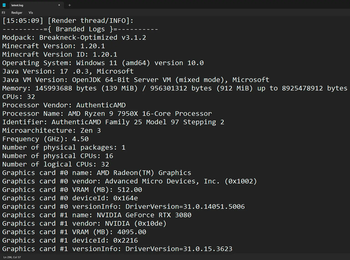
This is a simple mod that allows modpack creators to print additional information about their modpack into the game's logs. This includes the name of the modpack and its version, as well as information about the user's machine, operating system, Java version, and RAM allocation.
This mod was greatly inspired by [Log More Info].



Why would anyone need this?
As a modpack author, you may often receive logs from players asking for help with an issue or crash. With this mod, there will no longer be any confusion about which version of your modpack a log was generated from. You will also no longer have to ask them about the hardware or Java configuration of their system, as that can easily be deduced from the logs!
How to use it
The mod will automatically parse modpack information from supported launchers right out of the box. However, if a configuration file from Better Compatibility Checker (bcc.json) is present, it will always take priority.
Supported Launchers:
- ✅ CurseForge App (minecraftinstance.json)
- ✅ Prism Launcher (instance.cfg)
- ✅ ATLauncher (instance.json)
- ✅ GDLauncher (instance.json)
- ❌ Modrinth App (No longer uses profile.json file)
To enable the mod to retrieve the version number and name of your modpack in an unsupported launcher, you need to include a configuration file from Better Compatibility Checker in your pack. You can either use the Better Compatibility Checker mod to generate the config file, or create one manually using the template below:
./config/bcc.json
{"modpackName": "INSERT_MODPACK_NAME_HERE", "modpackVersion": "INSERT_MODPACK_VERSION_HERE"}
Dependencies

Optional: Better Compatibility Checker
Links



Available Versions
How to Install Branded Logs on Your Server
Order Server
Order a Minecraft Java server with at least 3 GB RAM (4 GB recommended).
Set fabric Loader
In the panel under "Egg", select the fabric loader and matching Minecraft version (1.21.3).
Install Mod
Open the mod browser in the dashboard and search for "Branded Logs". Click "Install" – done! Alternatively, upload the .jar via SFTP to the /mods folder.
Compatibility
Mod Loaders
Minecraft Versions
1.21.3, 1.21.2, 1.21.1 (+8 more)
Server-side
✓ RequiredRecommended RAM
4 GB(min. 3 GB)Frequently Asked Questions
Branded Logs server crashes on startup – what to do?
Most common cause: wrong fabric version or insufficient RAM. Check the server log (latest.log) for "OutOfMemoryError" or "Mixin" errors. With Mado Hosting: ensure at least 3 GB RAM is allocated and the loader matches the mod version (1.21.3). You can switch loaders with one click in the panel.
Is Branded Logs compatible with fabric and forge and neoforge and quilt?
Branded Logs officially supports fabric, forge, neoforge, quilt for Minecraft 1.21.3, 1.21.2, 1.21.1. Note: Forge and Fabric mods are NOT cross-compatible – pick one loader and stick with it. The Mado dashboard automatically detects incompatible loader combinations.
Server lagging with Branded Logs – how to optimize performance?
Recommended RAM: 4 GB (per 8 players). Use /spark profiler to check if Branded Logs consumes the most tick time. Common fixes: reduce server view-distance to 8-10, install "performant" or "starlight" as supplementary mods on Forge. With Mado Hosting, your server runs on NVMe SSDs with dedicated CPU cores for minimal latency.
Similar Mods






Rent Modded Server
Install Branded Logs with just one click on your server.