
Brapi
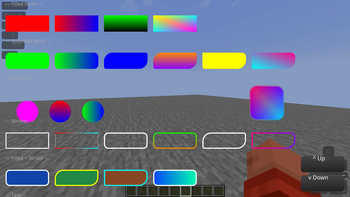
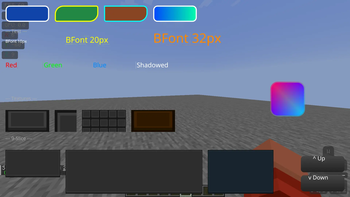
A Fast UI rendering for Fabric mods. Rounded rectangles, gradients, textures and SDF text.
Screenshots
About this Mod
Brapi
A UI rendering library for Fabric mods. Supports rounded rectangles, text, gradients, textures, and 9-slice sprites with a simple API. With future support for SVG rasterizer, shadows, more text options, toggleable immediate mode rendering and lines.
Why
Making good-looking UIs in Minecraft is harder than it should be. Vanilla's tools work fine for basic boxes, but as soon as you want smooth rounded corners, circles, or nice-looking text, you hit a wall.
Normally you're stuck with two options:
- Bring in a heavy graphics library like Skia, but that bloats your mod's file size and can cause compatibility issues.
- Write your own shaders from scratch, which means dealing with extra setup and boilerplate most modders would rather skip.
Brapi gives you a third option. It's a lightweight layer that sits on top of Minecraft's existing rendering system, so you get the nice visuals without the pain.
Key Benefits:
- Zero Boilerplate: No setup hassle. Just create a BRender, add your draw calls, and flush.
- Complex Shapes Made Simple: Draw circles, outlines, and rounded rectangles (even with different corner sizes) in a single line of code.
- Automatic Batching & Layering: Brapi figures out the right draw order on its own, so your UI looks right without you micromanaging it.
📦 Setup
Adding as dependency
Add the repository and dependency to build.gradle:
repositories {
    exclusiveContent {
        forRepository {
            maven {
                name = "Modrinth"
                url = "https://api.modrinth.com/maven"
            }
        }
        filter {
            includeGroup "maven.modrinth"
        }
    }
}
dependencies {
    modImplementation "maven.modrinth:brapi:0.25+${minecraft_version}+fabric" // only supported minecraft version is 1.21.11 right now
}
fabric.mod.json:
"depends": {
    "brapi": "*"
}
Using in code
Create a BRender instance, add draw calls, then call flush(graphics) to submit. Everything renders at end of frame sorted by layer.
🎨 All colors are ARGB: 0xFFFF0000 = opaque red, 0x80FF0000 = 50% transparent red.
📐 Coordinates are in GuiScale units: (100, 100) at scale 3 = (300, 300) pixels.
Filled shapes
bRender.rect(100, 100, 100, 100, 0xFFFF0000, layer);- red 100x100 rectanglebRender.roundRect(100, 100, 100, 100, 0xFFFF0000, 10, layer);- rounded rectangle, 10px radiusbRender.roundRect(100, 100, 100, 100, 0xFFFF0000, 10, 5, layer);- 10px TL/BR, 5px TR/BL radiusbRender.roundRect(100, 100, 100, 100, 0xFFFF0000, 10, 5, 20, 30, layer);- individual corner radiibRender.circle(100, 100, 50, 0xFFFF0000, layer);- circle, 50px radius
Gradients
All filled shapes support gradients via Gradient and GradientDirection:
bRender.roundRect(100, 100, 100, 100, gradient, GradientDirection.LEFT_RIGHT, 10, layer);
Directions: LEFT_RIGHT, TOP_BOTTOM, TOP_LEFT_BOTTOM_RIGHT, TOP_RIGHT_BOTTOM_LEFT
Strokes (outline only)
bRender.stroke(100, 100, 100, 100, 0xFFFF0000, 2, layer);- 2px outline rectanglebRender.strokeRounded(100, 100, 100, 100, 0xFFFF0000, 10, 2, layer);- 2px rounded outline, 10px radiusbRender.strokeRounded(100, 100, 100, 100, 0xFFFF0000, 10, 5, 2, layer);- 10px TL/BR, 5px TR/BLbRender.strokeRounded(100, 100, 100, 100, 0xFFFF0000, 10, 5, 20, 30, 2, layer);- individual radii
Filled + stroke
bRender.roundRectStroked(100, 100, 100, 100, 0xFF0000FF, 0xFFFF0000, 10, 2, layer);- blue fill, 2px red stroke
Text
bRender.drawText(font, "Hello!", 100, 100, 24, 0xFFFFFFFF, layer);- BFont textbRender.drawText(font, formattedCharSequence, 100, 100, 24, 0xFFFFFFFF, layer);- formatted text with per-character colors
Textures
bRender.drawTexture(tex, 100, 100, 200, 150, 0xFFFFFFFF, linear, layer);- stretch to fillbRender.drawTextureCropped(tex, 100, 100, 64, 64, 0, 0, 32, 32, 0xFFFFFFFF, linear, layer);- cropbRender.drawTextureTiled(tex, 100, 100, 200, 200, 0xFFFFFFFF, linear, layer);- tilebRender.drawTexture9Slice(slice, 100, 100, 300, 200, 0xFFFFFFFF, linear, layer);- 9-slice
🔄 Flushing
BRender r = new BRender();
r.roundRect(...);
r.flush(graphics); // submit to draw list
Available Versions
How to Install Brapi on Your Server
Order Server
Order a Minecraft Java server with at least 3 GB RAM (4 GB recommended).
Set fabric Loader
In the panel under "Egg", select the fabric loader and matching Minecraft version (1.21.11).
Install Mod
Open the mod browser in the dashboard and search for "Brapi". Click "Install" – done! Alternatively, upload the .jar via SFTP to the /mods folder.
Compatibility
Mod Loaders
Minecraft Versions
1.21.11
Server-side
✗ UnsupportedRecommended RAM
4 GB(min. 3 GB)Frequently Asked Questions
Brapi server crashes on startup – what to do?
Most common cause: wrong fabric version or insufficient RAM. Check the server log (latest.log) for "OutOfMemoryError" or "Mixin" errors. With Mado Hosting: ensure at least 3 GB RAM is allocated and the loader matches the mod version (1.21.11). You can switch loaders with one click in the panel.
Is Brapi compatible with fabric?
Brapi officially supports fabric for Minecraft 1.21.11. The Mado dashboard automatically detects incompatible loader combinations.
Server lagging with Brapi – how to optimize performance?
Recommended RAM: 4 GB (per 8 players). Use /spark profiler to check if Brapi consumes the most tick time. Common fixes: reduce server view-distance to 8-10, install "performant" or "starlight" as supplementary mods on Forge. With Mado Hosting, your server runs on NVMe SSDs with dedicated CPU cores for minimal latency.
Similar Mods



Rent Modded Server
Install Brapi with just one click on your server.