
BrewingStandSmoke
This mod adds smoke functionality to the brewing stand.
Screenshots
About this Mod
BrewingStandSmoke
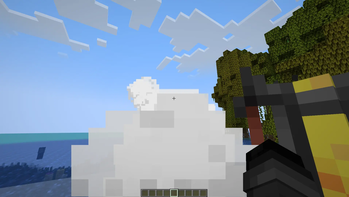
Crouch (Shift) and hold right click on a brewing stand and your character starts smoking. Release and they exhale. The smoke particles come out from the mouth in the direction you're looking.
Depending on what's inside the stand, an effect gets applied while you smoke. It stays active as long as you hold the button and fades a few ticks after you let go.
Ingredients & Effects
| Item | Effect |
|---|---|
| Sugar | Speed |
| Blaze Powder | Strength |
| Glowstone Dust | Haste |
| Redstone | Slowness |
| Fermented Spider Eye | Nausea |
| Any Potion | First effect of that potion |
Multiplayer
Other players with the mod installed see smoke coming from your character, particles follow your eye position and look direction in real time. If an ingredient with an effect is in the stand and particle tinting is enabled, the smoke color matches the effect color.
For Spigot/Paper servers there's a separate plugin BrewingStandSmoke. Players without the mod play normally, players with the mod see each other smoking.
Commands (op / permission brewingStand.admin)
/brewingStand toggle - enable/disable the multiplayer mechanic/brewingStand toggleEffects - enable/disable ingredient effects
Both settings persist across server restarts.
Configuration
Available through ModMenu. You can disable the mod entirely, toggle sounds, particles above the stand, switch to white particles and configure effect color tinting with adjustable intensity.
Compatibility
Requires Fabric API, Cloth Config API and Mod Menu. Works on dedicated servers via the plugin with no mod required server-side.
Smoking is harmful to your health. This mod is purely a game mechanic and does not promote the use of tobacco or any other substances.
Русский
BrewingStandSmoke
Присядь (Shift) и зажми ПКМ на варочной стойке и игрок начнёт курить. Отпусти и выдохнет. Частицы дыма выходят из рта в направлении взгляда.
В зависимости от того что лежит в стойке, при курении накладывается эффект. Он держится пока держишь кнопку и спадает через несколько секунд после отпускания.
Ингредиенты и эффекты
| Предмет | Эффект |
|---|---|
| Сахар | Скорость |
| Порошок ифрита | Сила |
| Светокамень | Спешка |
| Красный камень | Замедление |
| Маринованный паучий глаз | Тошнота |
| Любое зелье | Первый эффект зелья |
Мультиплеер
Другие игроки с модом видят дым от твоего персонажа, частицы следуют за позицией глаз и направлением взгляда в реальном времени. Если в стойке есть ингредиент с эффектом и включено окрашивание частиц, цвет дыма совпадает с цветом эффекта.
Для серверов на Spigot/Paper есть отдельный плагин BrewingStandSmoke. Игроки без мода играют как обычно, игроки с модом видят партиклы друг друга.
Команды (op / permission brewingStand.admin)
/brewingStand toggle — включить/выключить мультиплеер механику/brewingStand toggleEffects — включить/выключить эффекты от ингредиентов
Оба параметра сохраняются между перезагрузками сервера.
Настройки
Открываются через ModMenu. Можно отключить мод целиком, звуки, частицы над стойкой, переключить на белые частицы и настроить окрашивание в цвет эффекта с регулировкой интенсивности.
Совместимость
Требует Fabric API, Cloth Config API и Mod Menu. Работает на выделенных серверах через плагин без необходимости устанавливать мод на сервер.
Курение вредит здоровью. Этот мод является исключительно игровой механикой и не пропагандирует употребление табака или иных веществ.
Available Versions
How to Install BrewingStandSmoke on Your Server
Order Server
Order a Minecraft Java server with at least 3 GB RAM (4 GB recommended).
Set bukkit Loader
In the panel under "Egg", select the bukkit loader and matching Minecraft version (26.1.2).
Install Mod
Open the mod browser in the dashboard and search for "BrewingStandSmoke". Click "Install" – done! Alternatively, upload the .jar via SFTP to the /mods folder.
Compatibility
Mod Loaders
Minecraft Versions
26.1.2, 26.1.1, 26.1 (+12 more)
Server-side
✗ UnsupportedRecommended RAM
4 GB(min. 3 GB)Frequently Asked Questions
BrewingStandSmoke server crashes on startup – what to do?
Most common cause: wrong bukkit version or insufficient RAM. Check the server log (latest.log) for "OutOfMemoryError" or "Mixin" errors. With Mado Hosting: ensure at least 3 GB RAM is allocated and the loader matches the mod version (26.1.2). You can switch loaders with one click in the panel.
Is BrewingStandSmoke compatible with bukkit and fabric and paper and spigot?
BrewingStandSmoke officially supports bukkit, fabric, paper, spigot for Minecraft 26.1.2, 26.1.1, 26.1. The Mado dashboard automatically detects incompatible loader combinations.
Server lagging with BrewingStandSmoke – how to optimize performance?
Recommended RAM: 4 GB (per 8 players). Use /spark profiler to check if BrewingStandSmoke consumes the most tick time. Common fixes: reduce server view-distance to 8-10, install "performant" or "starlight" as supplementary mods on Forge. With Mado Hosting, your server runs on NVMe SSDs with dedicated CPU cores for minimal latency.
Similar Mods





Rent Modded Server
Install BrewingStandSmoke with just one click on your server.