BRNTalk
A simple IM-style dialogue / talk UI mod for Minecraft
Screenshots
About this Mod
BRNTalk
BRNTalk is a dialogue-focused Minecraft (NeoForge) mod built for RPG servers, quest maps, and modpacks.
It helps you deliver story content in a cleaner, more immersive way by unifying NPC conversations, branching narrative, and player-facing message flow in one system.
What can you use it for?
- Build NPC story conversations and branching quest guidance
- Provide a more consistent message-center style UI for players
- Pause at key nodes and continue later to match quest progression
- Run simple command in scripts for feedback, or conduct more complex operations with provided APIs.
For full technical details (script structure, commands, JSON format, and developer API), please check the repository README.
Highlights
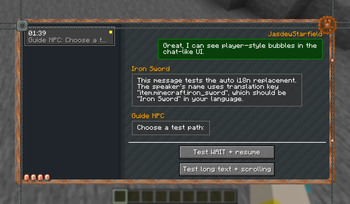
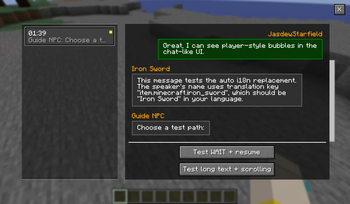
- IM-style UI approach: BRNTalk feels closer to a modern messaging app feed, not a Galgame portrait + big textbox layout, and not direct world-entity click interaction.
- Multi-thread conversation tracking per player
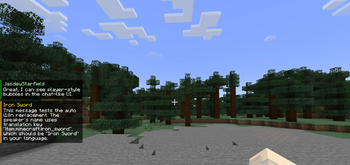
- Immersive reading UI with dedicated talk screen + new message notifications; cogwork-style or vanilla-style is available
- Branching + wait nodes for staged quest and narrative flows
- Configurable experience (typing speed, scrolling feel, UI style, notification placement)
- Server-friendly design for managing story progression in multiplayer worlds, as scripts distribution and progress storage are all server-sided
- Hot-reloading with /reload is available for scripts
- Flexible API that allows integrations with other mods or KubeJS Scripts
Quick Start
- Install BRNTalk and launch the game.
- Confirm the BRNTalk message/talk UI can be opened on the client.
- Load sample dialogue content (/brntalk start test_demo) or your own dialogue resources.
- Trigger a conversation in-game and verify the full flow:
- Auto-advanced text
- Branching choices
- Wait node continuation
- Tune UI and notification settings to match your gameplay style.
For advanced customization of dialogue nodes, branching logic, and integrations, see the repository README.
Good Fit For
- RPG survival server onboarding
- Adventure map main/sub quest storytelling
- Stage-based guidance in modpacks
- Community event chapters and roleplay dialogue
Compatibility & Environment
- Platform: NeoForge
- Minecraft version: follow the versions listed on this project page / release files
- Optional integrations: Cloth Config / JEI / FTB Library
More Information
- For this project, parts of the architecture design and code implementation were created with AI tooling support
- Licensing: open-sourced with MIT license
- Full usage docs, development notes, and script structure: see the repository README and internal demo conversation json
- Issues and suggestions: feel free to open an Issue in the project repository
Available Versions
How to Install BRNTalk on Your Server
Order Server
Order a Minecraft Java server with at least 3 GB RAM (4 GB recommended).
Set neoforge Loader
In the panel under "Egg", select the neoforge loader and matching Minecraft version (1.21.1).
Install Mod
Open the mod browser in the dashboard and search for "BRNTalk". Click "Install" – done! Alternatively, upload the .jar via SFTP to the /mods folder.
Compatibility
Mod Loaders
Minecraft Versions
1.21.1
Server-side
✓ RequiredRecommended RAM
4 GB(min. 3 GB)Frequently Asked Questions
BRNTalk server crashes on startup – what to do?
Most common cause: wrong neoforge version or insufficient RAM. Check the server log (latest.log) for "OutOfMemoryError" or "Mixin" errors. With Mado Hosting: ensure at least 3 GB RAM is allocated and the loader matches the mod version (1.21.1). You can switch loaders with one click in the panel.
Is BRNTalk compatible with neoforge?
BRNTalk officially supports neoforge for Minecraft 1.21.1. The Mado dashboard automatically detects incompatible loader combinations.
Server lagging with BRNTalk – how to optimize performance?
Recommended RAM: 4 GB (per 8 players). Use /spark profiler to check if BRNTalk consumes the most tick time. Common fixes: reduce server view-distance to 8-10, install "performant" or "starlight" as supplementary mods on Forge. With Mado Hosting, your server runs on NVMe SSDs with dedicated CPU cores for minimal latency.
Similar Mods




Rent Modded Server
Install BRNTalk with just one click on your server.