
Brx's Customizable Nextbot
Adds nextbots that chase you everywhere.
Screenshots


About this Mod
English Description
DISCLAIM: This is not theoretically NEXTBOT, named nextbot just to follow the previous fashion.
Nextbot actually means an AI system in Garry's Mod, which has nothing to do with this mod's chasing logic.
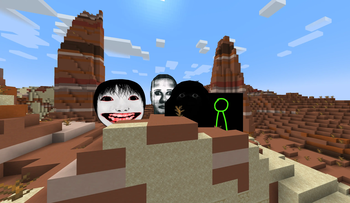
This mod adds a chasing entity with customizable texture into Minecraft.
The entity destroys all blocks in its way (except containers) and performs high jumps so as to literally chase the player wherever they are (as long as they are within 512 blocks' distance). Destroyed blocks will be automatically restored.
The entity will naturally spawn when you mine too many ores in a cave. Do
/gamerule nextbotMiningMoodinessRate 0
to stop it from spawning.
9 nextbots are now available:
- Obunga
- Selene
- Alternate
- Munci
- Yoshie
- Broxliz
- Super Munci
- Follower
- Terminus
How to Customize
The image of the nextbot can be customized via creating a resource pack like this:
Pack Root/
    pack.mcmeta
    pack.png
  - assets/
    - brx_nextbot/
      - entity/
        - nextbot/
            nextbot_a.png
            nextbot_b.png
            nextbot_c.png
            ...
in which nextbot_a, b, c... are resource ids of the nextbot, which you can name anyway you want.
Then, you can summon your own nextbot in the game by using command:
/summon brx_nextbot:selene ~ ~ ~ {"brx_nextbot:rid":"nextbot_a"}
/summon brx_nextbot:selene ~ ~ ~ {"brx_nextbot:rid":"nextbot_b"}
/summon brx_nextbot:selene ~ ~ ~ {"brx_nextbot:rid":"nextbot_c"}
etc., in which brx_nextbot:selene is the base nextbot you want to use. The base nextbot determines HP, speed, attack damage and sounds.
Sounds are not customizable so far.
You can customize which nextbots can be spawned for mining ores. Edit the brx_nextbot-common.toml under the config folder in your .minecraft directory or version directory to do it.
中文说明
免责声明:这并非理论上的NEXTBOT,仅因追随潮流而命名为Nextbot。
Nextbot实际上是指《Garry's Mod》中的一个AI系统,与本模组的追踪逻辑无关。
该模组为《我的世界》添加了一种可自定义纹理的追逐实体。
该实体会摧毁其路径上的所有方块(容器除外)并进行高跳,从而追着玩家到处跑(只要玩家在512方块范围内)。被摧毁的方块将自动恢复。
当你在洞穴中挖掘过多矿石时,该实体会自然生成。搞一个
/gamerule nextbotMiningMoodinessRate 0
来阻止其生成。
现在默认有9个Nextbot可用:
- Obunga
- Selene
- Alternate
- Munci
- Yoshie
- Broxliz
- Super Munci
- Follower
- Terminus
如何自定义
Nextbot的图片可以用资源包这样自定义:
资源包/
    pack.mcmeta
    pack.png
  - assets/
    - brx_nextbot/
      - entity/
        - nextbot/
            nextbot_a.png
            nextbot_b.png
            nextbot_c.png
            ...
其中 nextbot_a, b, c... 是Nextbot的资源id,随便命名,等下有用。
然后你就可以在游戏里用命令召唤自定义Nextbot:
/summon brx_nextbot:selene ~ ~ ~ {"brx_nextbot:rid":"nextbot_a"}
/summon brx_nextbot:selene ~ ~ ~ {"brx_nextbot:rid":"nextbot_b"}
/summon brx_nextbot:selene ~ ~ ~ {"brx_nextbot:rid":"nextbot_c"}
等等。其中 brx_nextbot:selene 是你想使用的基础Nextbot,决定了Nextbot的血量,速度,伤害和声音。
声音暂不可自定义。
你可以自定义哪些Nextbot能因为挖矿生成。在你的版本目录下或.minecraft目录的config文件夹中找到 brx_nextbot-common.toml 并修改来自定义。
Available Versions
How to Install Brx's Customizable Nextbot on Your Server
Order Server
Order a Minecraft Java server with at least 3 GB RAM (4 GB recommended).
Set forge Loader
In the panel under "Egg", select the forge loader and matching Minecraft version (1.21.1).
Install Mod
Open the mod browser in the dashboard and search for "Brx's Customizable Nextbot". Click "Install" – done! Alternatively, upload the .jar via SFTP to the /mods folder.
Compatibility
Mod Loaders
Minecraft Versions
1.21.1, 1.20.1
Server-side
✓ RequiredRecommended RAM
4 GB(min. 3 GB)Frequently Asked Questions
Brx's Customizable Nextbot server crashes on startup – what to do?
Most common cause: wrong forge version or insufficient RAM. Check the server log (latest.log) for "OutOfMemoryError" or "Mixin" errors. With Mado Hosting: ensure at least 3 GB RAM is allocated and the loader matches the mod version (1.21.1). You can switch loaders with one click in the panel.
Is Brx's Customizable Nextbot compatible with forge and neoforge?
Brx's Customizable Nextbot officially supports forge, neoforge for Minecraft 1.21.1, 1.20.1. The Mado dashboard automatically detects incompatible loader combinations.
Server lagging with Brx's Customizable Nextbot – how to optimize performance?
Recommended RAM: 4 GB (per 8 players). Use /spark profiler to check if Brx's Customizable Nextbot consumes the most tick time. Common fixes: reduce server view-distance to 8-10, install "performant" or "starlight" as supplementary mods on Forge. With Mado Hosting, your server runs on NVMe SSDs with dedicated CPU cores for minimal latency.
Similar Mods




Rent Modded Server
Install Brx's Customizable Nextbot with just one click on your server.