
Bubbled
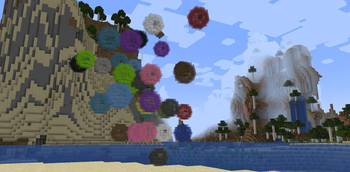
Adds bubbles that can hold your items and be sent back home with a flick of your wrist. Inspired by Steven Universe.
Screenshots
About this Mod

Bubbled
Bubble your items and send them home instantly!
A lightweight utility mod that lets you magically bubble up dropped items and teleport them back to a designated "home point" using a bubble wand.
✨ | Features
- Bubble Wand — A magical tool that lets you collect loose items with style
- Bubble Items — Right-click dropped items to encase them in bubbles
- Designated Return Point — Crouch + right-click any block to set a permanent "bubble home" attached to your bubble wand
- Instant Delivery — Bubble items and send them straight to your chosen return point
Perfect for mining sessions, mob farms, item sorting, or just making item collection less of a hassle!
📖 | Usage
- Craft the Bubble Wand
- Recipe: Two sticks + an emerald diagonally with the emerald in the top right corner of the crafting table.
- Set Your Bubble Point
- Crouch + Right-click any block with the wand
- This becomes your item return destination
- Bubble Items
- Right-click on dropped items to bubble them up
- Multiple items can be in the same bubble (as long as they're the same item)
- Send Them Home
- Right-click the bubbles (with or without the wand) to send them flying back to their destination. (works across dimensions)
Bubbled items are safely stored in the bubble until you decide to send (or pop) them.
🎨 | Gallery
Click the "Gallery" button at the top of the project page to view photos.
Compatibility
- Minecraft: 1.20.1 (1.21.1 coming soon)
- Forge + NeoForge
Installation
- Install Forge 1.20.1
- Download Bubbled from Modrinth
- Drop the
.jarinto yourmodsfolder
Enjoy cleaner inventory management and magical item transport!
Made with ✨ bubbles and love
Inspired by Cartoon Network's Steven Universe
Available Versions
How to Install Bubbled on Your Server
Order Server
Order a Minecraft Java server with at least 3 GB RAM (4 GB recommended).
Set forge Loader
In the panel under "Egg", select the forge loader and matching Minecraft version (1.20.1).
Install Mod
Open the mod browser in the dashboard and search for "Bubbled". Click "Install" – done! Alternatively, upload the .jar via SFTP to the /mods folder.
Compatibility
Mod Loaders
Minecraft Versions
1.20.1
Server-side
✓ RequiredRecommended RAM
4 GB(min. 3 GB)Frequently Asked Questions
Bubbled server crashes on startup – what to do?
Most common cause: wrong forge version or insufficient RAM. Check the server log (latest.log) for "OutOfMemoryError" or "Mixin" errors. With Mado Hosting: ensure at least 3 GB RAM is allocated and the loader matches the mod version (1.20.1). You can switch loaders with one click in the panel.
Is Bubbled compatible with forge and neoforge?
Bubbled officially supports forge, neoforge for Minecraft 1.20.1. The Mado dashboard automatically detects incompatible loader combinations.
Server lagging with Bubbled – how to optimize performance?
Recommended RAM: 4 GB (per 8 players). Use /spark profiler to check if Bubbled consumes the most tick time. Common fixes: reduce server view-distance to 8-10, install "performant" or "starlight" as supplementary mods on Forge. With Mado Hosting, your server runs on NVMe SSDs with dedicated CPU cores for minimal latency.
Rent Modded Server
Install Bubbled with just one click on your server.