
Bubblegum Arsenal
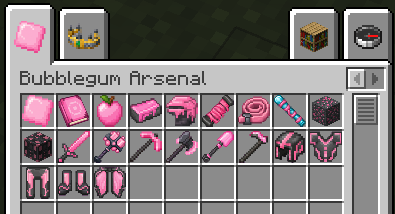
This mod adds a new ore, that drops a bubblegum item, that can craft a bubblegum smithing table, that can turn your weapons/armor into bubblegum.
Screenshots
About this Mod
Bubblegum Arsenal
Tired of Netherite gear? Bubblegum Arsenal adds an powerful tier of gear for players who have reached the end of the game. By digging underground to find rare bubblegum you can make your weapons and armor better. This lets you unlock abilities add custom features and use new items. When you join a game you get a guidebook with all the recipes you need.
Features
Bubblegum Ore: This ore is found underground and is even rarer than diamonds. You need least a diamond pickaxe to mine it.
Special Abilities: You can upgrade your sword, pickaxe, axe, hoe, shovel and mace. Each weapon has an ability. For example the mace has a knockback smash. You can see what each ability does by looking at the weapons tooltip. Press the key you set to use the ability. You can change this key with the
/abilitykeybindcommand. All abilities can only be used once every 45 seconds.Armor and Elytra: You can get a set of armor and a better Elytra. Wearing the full armor set gives you benefits. You can turn these benefits on or off by holding the armor piece and pressing your key.
Custom Traits: You can make your gear better by adding one of four special traits to your weapons and armor. This helps you play the way you want.
The Bubblegum Apple: To make this put an apple in the middle of a crafting grid. Surround it with 4 raw bubblegum. This apple gives benefits than a golden apple. When you eat it your character blows a bubble. Then pops it.
How, to Craft and Upgrade
Netherite Bubblegum: Put 1 Netherite Ingot in the middle of a crafting grid. Surround it with 8 Bubblegum.
Bubblegum Smithing Table: Put a smithing table in the middle of a crafting grid. Surround it with 4 Netherite Bubblegum.
Upgrading Gear: Open the Bubblegum Smithing Table. Put your Netherite item in the slot and 1 Netherite Bubblegum in the right slot. This makes your gear better.
Available Versions
How to Install Bubblegum Arsenal on Your Server
Order Server
Order a Minecraft Java server with at least 3 GB RAM (4 GB recommended).
Set fabric Loader
In the panel under "Egg", select the fabric loader and matching Minecraft version (26.1.2).
Install Mod
Open the mod browser in the dashboard and search for "Bubblegum Arsenal". Click "Install" – done! Alternatively, upload the .jar via SFTP to the /mods folder.
Compatibility
Mod Loaders
Minecraft Versions
26.1.2, 26.1.1, 26.1
Server-side
✓ RequiredRecommended RAM
4 GB(min. 3 GB)Frequently Asked Questions
Bubblegum Arsenal server crashes on startup – what to do?
Most common cause: wrong fabric version or insufficient RAM. Check the server log (latest.log) for "OutOfMemoryError" or "Mixin" errors. With Mado Hosting: ensure at least 3 GB RAM is allocated and the loader matches the mod version (26.1.2). You can switch loaders with one click in the panel.
Is Bubblegum Arsenal compatible with fabric?
Bubblegum Arsenal officially supports fabric for Minecraft 26.1.2, 26.1.1, 26.1. The Mado dashboard automatically detects incompatible loader combinations.
Server lagging with Bubblegum Arsenal – how to optimize performance?
Recommended RAM: 4 GB (per 8 players). Use /spark profiler to check if Bubblegum Arsenal consumes the most tick time. Common fixes: reduce server view-distance to 8-10, install "performant" or "starlight" as supplementary mods on Forge. With Mado Hosting, your server runs on NVMe SSDs with dedicated CPU cores for minimal latency.
Rent Modded Server
Install Bubblegum Arsenal with just one click on your server.