
Buff Mobs
BuffMobs enhances mob attributes like health, attack speed, and armor, with full customization via in-game gui. Includes optional day-based scaling that increases mob strength over time.
Screenshots



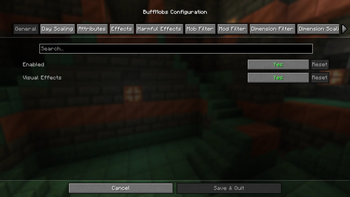
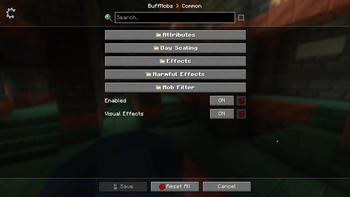
About this Mod





Help translate the mod by clicking here:

Transform your Minecraft experience with progressive, customizable mob scaling that keeps the challenge fresh!
📋 Overview
BuffMobs is a comprehensive mod that intelligently buffs hostile and neutral mobs to provide a more challenging and engaging survival experience. Whether you want tougher early-game encounters or exponentially scaling late-game difficulty, BuffMobs has you covered with its flexible configuration system.
✨ Key Features
🏹 Smart Ranged Combat System
- Ranged mobs (Skeletons, Pillagers, etc.) dynamically switch to melee weapons when players get too close
- Automatic weapon generation with enchantments based on difficulty and dimension
- Configurable trigger distance and weapon quality scaling
🌍 Dimension-Specific Scaling
- Configure unique multipliers for different dimensions
- Perfect for modded dimensions - make the Nether truly hellish!
- Independent scaling for health, damage, speed, armor, and more
- Up to 5 configurable dimension slots
📅 Progressive Day Scaling
- Mobs get stronger as your world ages
- Configurable intervals (default: every 7 days)
- Optional chat notifications to track scaling progression
- Maximum scaling caps prevent infinite difficulty spikes
⚔️ Comprehensive Attribute Buffing
- Health Multiplier: Tankier mobs that survive longer
- Damage Multiplier: Hits that actually hurt
- Attack Speed: Faster, more aggressive combat
- Movement Speed: No more slow zombie walks
- Armor & Toughness: Damage reduction for elite encounters
🧪 Potion Effect System
- Apply Strength, Speed, Resistance, and Regeneration to mobs
- Infinite duration effects that refresh automatically
- Visual effect control for performance optimization
- Smart undead detection (no regeneration for zombies/skeletons)
⚡ Enhanced Combat Mechanics
- Harmful effects on player attacks (Poison, Slowness, Wither)
- Projectile attack debuffs
- Configurable effect chances and durations
- True attack speed scaling with internal timer overrides
🎨 Visual Feedback
- Color-coded particle effects for different buff types
- Health Boost visual indicators
- Enchantment table particles for magical mobs
- Toggleable visual effects for performance
🎯 Advanced Filtering System
- Mob Filtering: Whitelist/blacklist specific mobs
- Mod ID Filtering: Target mobs from specific mods
- Dimension Filtering: Enable/disable per dimension
- Respects vanilla mob categories (only affects hostile/neutral mobs)
⚙️ Configuration Highlights
Easy Setup: Works out of the box with sensible defaults Highly Customizable: Every feature can be fine-tuned or disabled Performance Friendly: Efficient algorithms with minimal server impact Modpack Ready: Extensive filtering options for mod compatibility
Example Configurations
Hardcore Survival: High multipliers with fast day scaling Balanced Challenge: Moderate buffs with dimension-specific tweaks
Boss Preparation: Dimension-locked extreme scaling for end-game areas PvP Server: Disable harmful effects, focus on attribute scaling
🔧 Technical Details
- Server-Side: Core logic runs server-side for multiplayer compatibility
- Client Effects: Visual effects handled client-side for smooth performance
- Memory Efficient: Uses WeakHashMap caching and optimized tick handling
- Error Resilient: Comprehensive error handling prevents crashes
- Reflection Safe: Careful use of reflection with fallback mechanisms
🎮 Perfect For
- Players seeking progressive difficulty scaling
- Modpack developers wanting customizable mob enhancement
- Servers needing balanced late-game challenge
- Anyone tired of trivial mob encounters after early game
📦 Available For
- Fabric: Full feature parity with Fabric API integration
- NeoForge: Complete NeoForge implementation with advanced features
- Both versions maintain identical functionality and configuration options
Ready to face truly challenging mobs? Download BuffMobs and experience Minecraft combat like never before!
Available Versions
How to Install Buff Mobs on Your Server
Order Server
Order a Minecraft Java server with at least 3 GB RAM (4 GB recommended).
Set fabric Loader
In the panel under "Egg", select the fabric loader and matching Minecraft version (26.1.2).
Install Mod
Open the mod browser in the dashboard and search for "Buff Mobs". Click "Install" – done! Alternatively, upload the .jar via SFTP to the /mods folder.
Compatibility
Mod Loaders
Minecraft Versions
26.1.2, 26.1.1, 26.1 (+11 more)
Server-side
✓ RequiredRecommended RAM
4 GB(min. 3 GB)Frequently Asked Questions
Buff Mobs server crashes on startup – what to do?
Most common cause: wrong fabric version or insufficient RAM. Check the server log (latest.log) for "OutOfMemoryError" or "Mixin" errors. With Mado Hosting: ensure at least 3 GB RAM is allocated and the loader matches the mod version (26.1.2). You can switch loaders with one click in the panel.
Is Buff Mobs compatible with fabric and neoforge?
Buff Mobs officially supports fabric, neoforge for Minecraft 26.1.2, 26.1.1, 26.1. The Mado dashboard automatically detects incompatible loader combinations.
Server lagging with Buff Mobs – how to optimize performance?
Recommended RAM: 4 GB (per 8 players). Use /spark profiler to check if Buff Mobs consumes the most tick time. Common fixes: reduce server view-distance to 8-10, install "performant" or "starlight" as supplementary mods on Forge. With Mado Hosting, your server runs on NVMe SSDs with dedicated CPU cores for minimal latency.
Similar Mods




Rent Modded Server
Install Buff Mobs with just one click on your server.