
Bulking
A Diet plugin that turns the tedium of constantly nibbling on carrots into a daily quest for deliciousness!
Screenshots

About this Mod
Bulking
A mod about mad gains
Bulking is a Diet plugin
inspired by Spice of Life: Valheim Edition,
written with the intention of making food more interesting and unique.

Where is my health!?
Bulking introduces a harsh penalty to your default maximum health. You will
no longer start with ten hearts: now it's only three! But worry not, you can
recover them, along with many more bonuses, by eating balanced meals. Not only
has your maximum health been reduced, but natural regeneration is also disabled.
This may seem harsh, but eating meals will gradually restore your health cap,
and now, just like in Beta Minecraft, you can heal instantly by eating
snacks!
Meals and snacks
Foodstuffs have been divided into two different categories: meals and
snacks.
Snacks represent small, easy to eat pieces of food that are
usually easy to find; this includes things like apples, carrots, or sweet
berries. Snacks are handy little things that will restore part of your health
the moment you finish eating them, so make sure to keep a healthy stack of them
in your hotbar, because you are not getting health back from anywhere else!
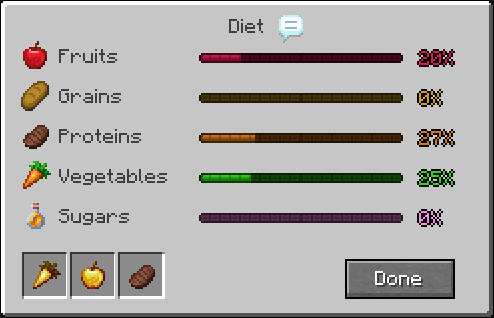
Meals, on the other hand, represent elaborate cuisine meant to be enjoyed
slowly, possibly at home or sitting next to a campfire. These will contribute
to your nutrition values, which will aid you in recovering your lost health,
among other things! The default Diet suite offers various attribute boosts and
long-lasting effects based on how diverse (or specialized) your diet is.
Discover your favourite meals!
Digestion
In addition to the contents of your stomach, your previous days' diet will also
influence your current status. If you go to bed with a full stomach, you will
keep some of yesterday's nutritional values, which can help you break through
some of those higher nutrient requirements, or simply help you have a more
varied diet. The number of days that are taken into account and the importance
they have over the "theoretical maximum" are configurable.
Furthermore, if you go to bed with a full belly, you will wake up feeling
better than ever! For the following 20 minutes (a Minecraft day), you will
enjoy a 10% to all stats thanks to the Sumptuous Feast effect. The
stats Sumptuous Feast boosts are configurable via a data pack, so you can
boost modded stats too!
Configurable?
Yes, many aspects of the mod can be configured, one way or another. The health
penalty, the number of days that the digestion mechanic takes into account,
whether to keep the contents of your stomach after death... all of these can be
configured through Bulking's settings system. Diet configurations are also
respected where possible, and the size of your stomach is actually an attribute
you could modify with other commands or mods! In addition, whether something is
a snack or not can be configured via datapacks by adding the tag bulking:snack
to them.
FAQ
What if I ate a meal I didn't want?
You can eat Rotten Flesh to empty the contents of your stomach and clear your
status effects, but beware: it's nasty, and you could die of puke damage.
Can I use this in my modpack?
Of course! It's MIT licensed! If you end up using it, though, I would love to
hear about it.
Available Versions
How to Install Bulking on Your Server
Order Server
Order a Minecraft Java server with at least 3 GB RAM (4 GB recommended).
Set fabric Loader
In the panel under "Egg", select the fabric loader and matching Minecraft version (1.20.1).
Install Mod
Open the mod browser in the dashboard and search for "Bulking". Click "Install" – done! Alternatively, upload the .jar via SFTP to the /mods folder.
Compatibility
Mod Loaders
Minecraft Versions
1.20.1
Server-side
✓ RequiredRecommended RAM
4 GB(min. 3 GB)Frequently Asked Questions
Bulking server crashes on startup – what to do?
Most common cause: wrong fabric version or insufficient RAM. Check the server log (latest.log) for "OutOfMemoryError" or "Mixin" errors. With Mado Hosting: ensure at least 3 GB RAM is allocated and the loader matches the mod version (1.20.1). You can switch loaders with one click in the panel.
Is Bulking compatible with fabric and forge?
Bulking officially supports fabric, forge for Minecraft 1.20.1. Note: Forge and Fabric mods are NOT cross-compatible – pick one loader and stick with it. The Mado dashboard automatically detects incompatible loader combinations.
Server lagging with Bulking – how to optimize performance?
Recommended RAM: 4 GB (per 8 players). Use /spark profiler to check if Bulking consumes the most tick time. Common fixes: reduce server view-distance to 8-10, install "performant" or "starlight" as supplementary mods on Forge. With Mado Hosting, your server runs on NVMe SSDs with dedicated CPU cores for minimal latency.
Similar Mods





Rent Modded Server
Install Bulking with just one click on your server.