
Bulletin Board
The mod adds a notice board where players can leave their notes for other players to read or take with them.
Screenshots
About this Mod
General
Adds bulletin boards for exchanging announcements, notes or orders between players. Who might this mod be for? Players who want to create a special atmosphere on their server, exchange messages without using chat (for example, if it's disabled), leave notes for offline players (so they can read them even when you're not in the game), make announcements to players, and place orders. This mod is not intended for single-player play (at least for now), except perhaps for some decorative purposes. The mod is also well suited for players who create their own maps, modpacks, or maps with story-driven progression.
Features
Bulletin Board
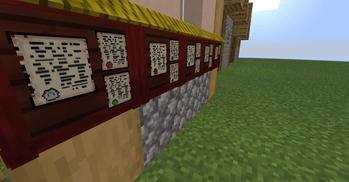
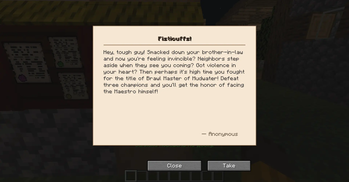
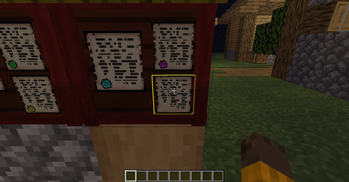
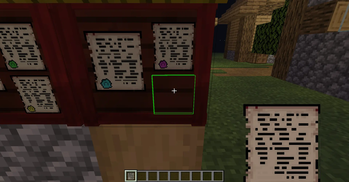
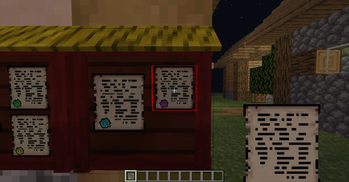
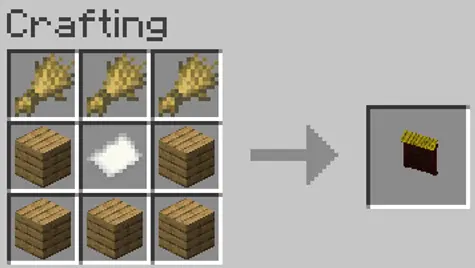
The game now features a craftable notice board that can be placed on the wall. Starting with version 1.2, the board actually has five slots: one large one (which can only hold a full-size note) and four small slots, each suitable for smaller notes. However, two small slots can be combined into one full-size slot by placing a full-size note there. When hovering over an empty slot with a signed note in hand, the slot will be outlined with a green border, indicating that the note can be placed there. If hovering over a slot with an existing note, the slot will be outlined with a red border, indicating that you cannot place your own note there. When hovering over a note with an empty hand, it will be outlined with a yellow border, indicating that it can be interacted with: right-clicking opens a graphical window containing the note's title, text, and author (unless the note was written anonymously – see "Note" below). The player has two options when reading a note: close the window, leaving the note in place, or take the note, after which it is placed in the player's inventory and the space on the board is freed up.
Notes
Full-size note
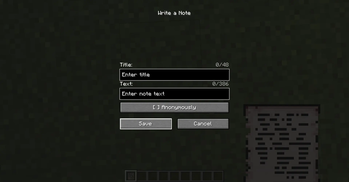
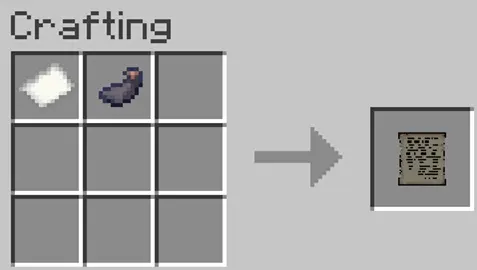
A note is made from paper and an ink sac. Initially, it is blank, with no text or anything else. It cannot be placed, nor can it be stamped (see "Seal" below). Right-clicking with a note in hand opens the note editor, where the player can enter the note's title and text, as well as check the anonymity box (checking this box changes the note's nickname to "Anonymous"). Once a note is signed, it cannot be rewritten. A signed note can be viewed by right-clicking or posted on the board.
Small note
Two small notes are made from one full-size note. The functionality of the small note is identical to that of the full-size note, with a couple of exceptions. First, the character count is halved, reaching 256 characters. Second, more small notes can be posted on the board, as two full-size slots equal four slots for small notes.
Time Update
After the 1.1.1 "Time Update" update, notes without a seal will disappear an hour after they were posted.
Seal
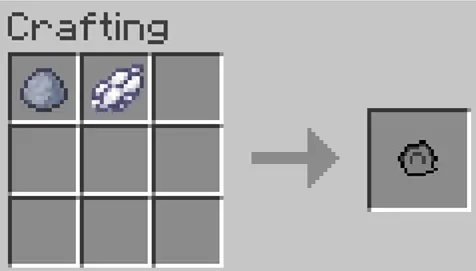
A seal is merely a decorative element and is not required for creating and attaching a note. However, it makes it easier to identify the player who created it (if players have agreed on the colors for the notes) or to attract attention. To apply a seal to a note, equip the note in your off-hand, equip a seal of the desired color in your main hand, and right-click. The seal will then disappear from the player's inventory, and the note will receive its own seal (it won't appear in the inventory, but a signature is added when you hover over the note). Once the note is placed on the board, the seal will be visible.
Time Update
After the 1.1 "Time Update", the presence of a seal ensures that the note will remain on the board until the note is removed by a player or until the notice board is destroyed.
What's next?
In the future, we plan to expand the mod's functionality:
v1.0 - Release ✅
v1.1 - Time Update ✅
v1.2 - Compact Notes✅
1.21.1 port✅
Forge port 📌
v1.3 - Living World 📌
v1.4 - Quest Update
v1.5 - Polish (QoL improvements)
Try with…
This mod works even better with gameplay that limits players' communication methods. For example, you can add this mod, any voice chat mod, or a mod that disables the ability to write in-game chat (Simple Chat Disabler), which somewhat undermines the social aspect of some of the game's original designs.
Available Versions
How to Install Bulletin Board on Your Server
Order Server
Order a Minecraft Java server with at least 3 GB RAM (4 GB recommended).
Set fabric Loader
In the panel under "Egg", select the fabric loader and matching Minecraft version (1.21.1).
Install Mod
Open the mod browser in the dashboard and search for "Bulletin Board". Click "Install" – done! Alternatively, upload the .jar via SFTP to the /mods folder.
Compatibility
Mod Loaders
Minecraft Versions
1.21.1, 1.20.1
Server-side
✓ RequiredRecommended RAM
4 GB(min. 3 GB)Frequently Asked Questions
Bulletin Board server crashes on startup – what to do?
Most common cause: wrong fabric version or insufficient RAM. Check the server log (latest.log) for "OutOfMemoryError" or "Mixin" errors. With Mado Hosting: ensure at least 3 GB RAM is allocated and the loader matches the mod version (1.21.1). You can switch loaders with one click in the panel.
Is Bulletin Board compatible with fabric?
Bulletin Board officially supports fabric for Minecraft 1.21.1, 1.20.1. The Mado dashboard automatically detects incompatible loader combinations.
Server lagging with Bulletin Board – how to optimize performance?
Recommended RAM: 4 GB (per 8 players). Use /spark profiler to check if Bulletin Board consumes the most tick time. Common fixes: reduce server view-distance to 8-10, install "performant" or "starlight" as supplementary mods on Forge. With Mado Hosting, your server runs on NVMe SSDs with dedicated CPU cores for minimal latency.
Similar Mods




Rent Modded Server
Install Bulletin Board with just one click on your server.