
Bundle Backport-ish
A backport of bundle mechanics using the original UI
Screenshots
About this Mod
Bundle Backport-ish

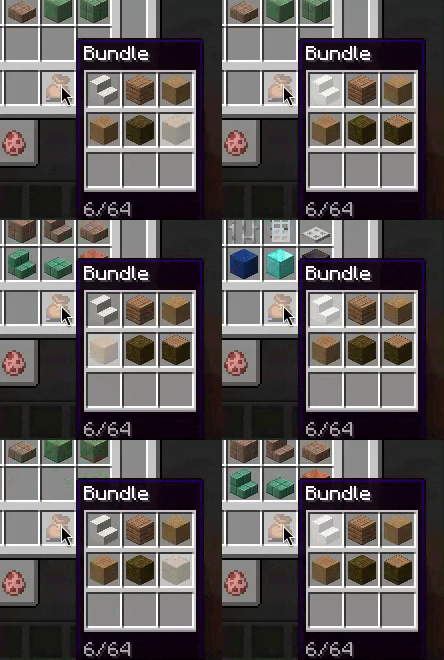
An opinionated backport of the bundle scrolling and dyeing mechanics from 1.21.2. The UI is unchanged (other than showing which slot is selected), so you still can see all the items.
Details
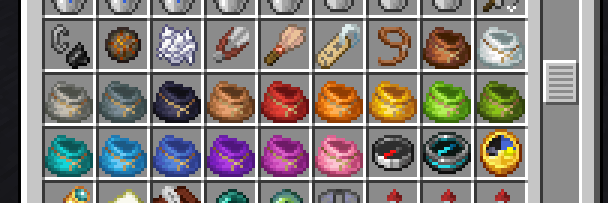
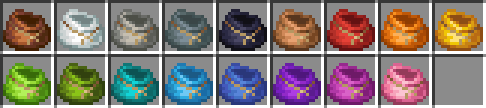
- You can dye a bundle by combining it with the respective dye in a crafting grid.
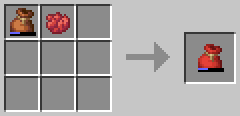
- It retains its items, like a shulker box.
- You can scroll the mouse wheel to select different slots in the bundle which determines what item you pull out of it.
- Currently, the slot stays selected when you mouse off the bundle or pass it to another player.
- All interactions are still through right click, like in 1.21.1-.
- The recipe is updated to only require one leather and one string, like 1.21.2.
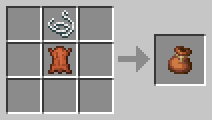
- There is also a datapack you can enable with
/datapack enable "bundle-backportish:rabbithide"or in the world creation menu which lets you craft it with either leather or rabbit hide.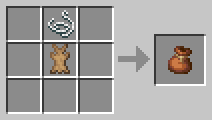
- There is also a datapack you can enable with
- You do not need to enable the bundles experiment, it is enabled by default and hidden.
- Currently, right clicking a bundle in the world still dumps all the items out, although this may be changed in the future.
Compat
Contains integration with EMI to show the bundle dyeing recipes, as they are NBT crafting and wouldn't show up normally.
Works with Mouse Tweaks: scrolling will change bundle selection instead of extracting items
Also check out Backbundled if you're looking for a more accurate backport of vanilla bundles
Credits
Scrolling implementation based on Bundle Tweaks by zacharybarbanell (MIT License)
Known Bugs
- If you make the crafting recipe for a dyed bundle but then manipulate the contents of the bundle, it will not update the result bundle. Hopefully this will be fixed in a future release.
Available Versions
How to Install Bundle Backport-ish on Your Server
Order Server
Order a Minecraft Java server with at least 3 GB RAM (4 GB recommended).
Set fabric Loader
In the panel under "Egg", select the fabric loader and matching Minecraft version (1.21.1).
Install Mod
Open the mod browser in the dashboard and search for "Bundle Backport-ish". Click "Install" – done! Alternatively, upload the .jar via SFTP to the /mods folder.
Compatibility
Mod Loaders
Minecraft Versions
1.21.1, 1.21, 1.20.1
Server-side
✓ RequiredRecommended RAM
4 GB(min. 3 GB)Frequently Asked Questions
Bundle Backport-ish server crashes on startup – what to do?
Most common cause: wrong fabric version or insufficient RAM. Check the server log (latest.log) for "OutOfMemoryError" or "Mixin" errors. With Mado Hosting: ensure at least 3 GB RAM is allocated and the loader matches the mod version (1.21.1). You can switch loaders with one click in the panel.
Is Bundle Backport-ish compatible with fabric and quilt?
Bundle Backport-ish officially supports fabric, quilt for Minecraft 1.21.1, 1.21, 1.20.1. The Mado dashboard automatically detects incompatible loader combinations.
Server lagging with Bundle Backport-ish – how to optimize performance?
Recommended RAM: 4 GB (per 8 players). Use /spark profiler to check if Bundle Backport-ish consumes the most tick time. Common fixes: reduce server view-distance to 8-10, install "performant" or "starlight" as supplementary mods on Forge. With Mado Hosting, your server runs on NVMe SSDs with dedicated CPU cores for minimal latency.
Similar Mods




![[TaCZ] Timeless and Classics Zero](https://cdn.modrinth.com/data/SzzJttH8/fd27766d2bb8390d284696b1dbd358f87e081439_96.webp)

Rent Modded Server
Install Bundle Backport-ish with just one click on your server.