
Buro
A simple, client-side visual mod that plunges your world into an endless, atmospheric night.
Screenshots
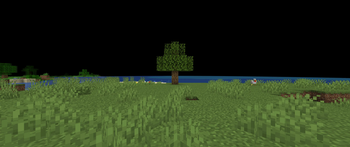
About this Mod
Buro
A client-side mod for a world of atmospheric darkness.
Overview
Buro is a lightweight, client-side utility mod that gives you control over the world's atmosphere, allowing you to create a perpetual, moody darkness. If you've ever wanted a spooky setting for an adventure map or the perfect backdrop for cinematic shots, this mod is for you.
Features
The mod combines two key visual effects to create its unique atmosphere, which can be enabled or disabled with a single click in the config menu:
- Pitch Black Fog: Replaces the default distance fog with a solid, oppressive black void. What lurks in the darkness is for you to find out.
- Void Sky: The sky is rendered as a pure black canvas. The sun, moon, and stars are completely hidden, creating a sense of timeless, endless night.
Configuration
- You must have Mod Menu and Cloth Config API installed.
- Navigate to the Mods list from the main menu or pause screen.
- Find Buro and click the config button (the gear icon).
- Toggle the "Enable Mod" switch to turn the effects on or off instantly. (A world reload may be required for all changes to apply correctly).
Available Versions
How to Install Buro on Your Server
Order Server
Order a Minecraft Java server with at least 3 GB RAM (4 GB recommended).
Set fabric Loader
In the panel under "Egg", select the fabric loader and matching Minecraft version (1.21.8).
Install Mod
Open the mod browser in the dashboard and search for "Buro". Click "Install" – done! Alternatively, upload the .jar via SFTP to the /mods folder.
Compatibility
Mod Loaders
Minecraft Versions
1.21.8
Server-side
✗ UnsupportedRecommended RAM
4 GB(min. 3 GB)Frequently Asked Questions
Buro server crashes on startup – what to do?
Most common cause: wrong fabric version or insufficient RAM. Check the server log (latest.log) for "OutOfMemoryError" or "Mixin" errors. With Mado Hosting: ensure at least 3 GB RAM is allocated and the loader matches the mod version (1.21.8). You can switch loaders with one click in the panel.
Is Buro compatible with fabric?
Buro officially supports fabric for Minecraft 1.21.8. The Mado dashboard automatically detects incompatible loader combinations.
Server lagging with Buro – how to optimize performance?
Recommended RAM: 4 GB (per 8 players). Use /spark profiler to check if Buro consumes the most tick time. Common fixes: reduce server view-distance to 8-10, install "performant" or "starlight" as supplementary mods on Forge. With Mado Hosting, your server runs on NVMe SSDs with dedicated CPU cores for minimal latency.
Similar Mods





Rent Modded Server
Install Buro with just one click on your server.