
Callout
Client-side Fabric chat alerts for mentions, keywords, and regex triggers, with sound notifications and persistent ping history with context.
Screenshots
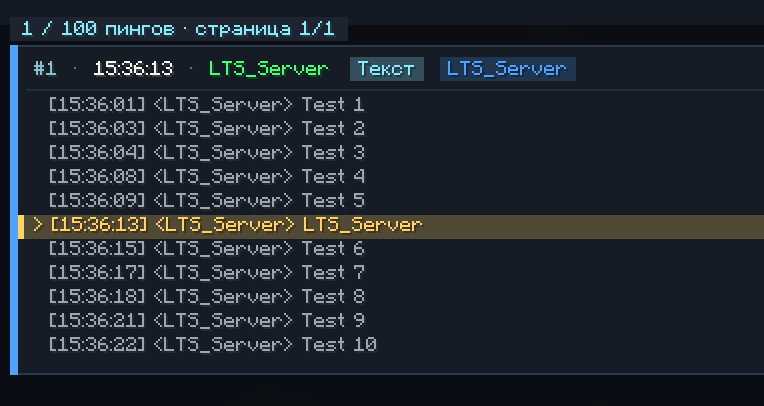
About this Mod
What It Is
Callout is a client-side Fabric mod for Minecraft that helps you never miss important chat messages, nickname mentions, or custom keywords while playing or AFK.
It is useful when:
- you are AFK or focused on another window;
- fast-scrolling server chat makes important messages easy to miss;
- you need immediate audio alerts for staff callouts, personal mentions, or specific server events;
- you want to review recent ping history and see what happened in chat before and after the mention.
What It Adds
Callout extends the standard Minecraft chat with:
- configurable sound alerts for your nickname and custom keywords;
- support for regular expressions for advanced chat matching;
- separate volume and pitch settings for each trigger;
- a dedicated mention history screen with highlighted ping messages;
- saved chat context around every detected mention;
- persistent history that survives world exits and game restarts.
Features
The mod includes:
- nickname-based mention detection;
- up to 5 additional custom triggers;
TextandRegextrigger modes;- case-sensitive or case-insensitive matching;
- optional alerts for your own chat messages;
- automatic cleanup of service artifacts and third-party chat tags;
- filtering for technical sender prefixes in singleplayer and LAN;
- 5 messages of context before and 5 messages after each ping;
- mouse wheel navigation and pagination in the history screen;
- persistent storage in
config/callout_history.json; - Mod Menu integration for easier configuration.
Controls & Settings
Open mention history:
Ctrl + K— open the ping history and chat context screen.
Available settings:
Enabled: main toggle for the mod;Case Sensitive: toggles letter case matching;Ping Own: enables or disables alerts for your own messages;Main Trigger: nickname or primary word trigger with custom sound, volume, and pitch;Additional Triggers: up to 5 extra triggers withTextorRegexmatching.
Installation
Required:
- Fabric Loader
0.19.0+ - Fabric API
Recommended:
- Mod Menu, for configuration through an in-game GUI
Important:
- this is a purely client-side mod;
- it does not need to be installed on the server;
- mention history is saved automatically in
config/callout_history.json.
Available Versions
How to Install Callout on Your Server
Order Server
Order a Minecraft Java server with at least 3 GB RAM (4 GB recommended).
Set fabric Loader
In the panel under "Egg", select the fabric loader and matching Minecraft version (26.2).
Install Mod
Open the mod browser in the dashboard and search for "Callout". Click "Install" – done! Alternatively, upload the .jar via SFTP to the /mods folder.
Compatibility
Mod Loaders
Minecraft Versions
26.2, 26.1.2
Server-side
✗ UnsupportedRecommended RAM
4 GB(min. 3 GB)Frequently Asked Questions
Callout server crashes on startup – what to do?
Most common cause: wrong fabric version or insufficient RAM. Check the server log (latest.log) for "OutOfMemoryError" or "Mixin" errors. With Mado Hosting: ensure at least 3 GB RAM is allocated and the loader matches the mod version (26.2). You can switch loaders with one click in the panel.
Is Callout compatible with fabric?
Callout officially supports fabric for Minecraft 26.2, 26.1.2. The Mado dashboard automatically detects incompatible loader combinations.
Server lagging with Callout – how to optimize performance?
Recommended RAM: 4 GB (per 8 players). Use /spark profiler to check if Callout consumes the most tick time. Common fixes: reduce server view-distance to 8-10, install "performant" or "starlight" as supplementary mods on Forge. With Mado Hosting, your server runs on NVMe SSDs with dedicated CPU cores for minimal latency.
Similar Mods






Rent Modded Server
Install Callout with just one click on your server.