
Camp Board
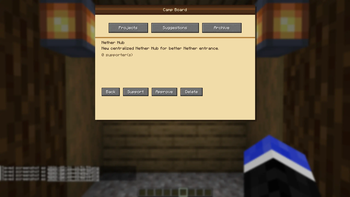
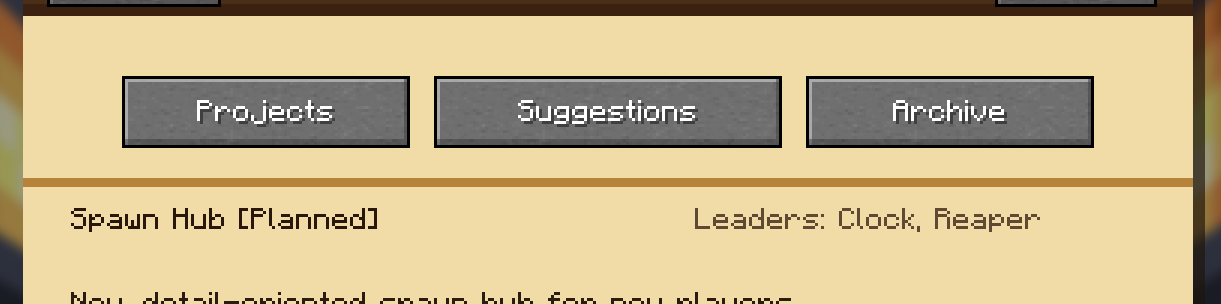
A physical project board for tracking shared builds, tasks, suggestions, locations, and materials on Fabric servers.
Screenshots
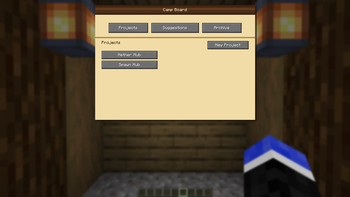
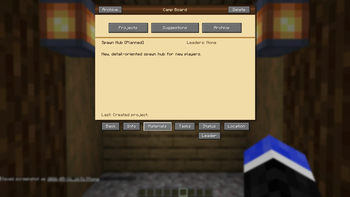
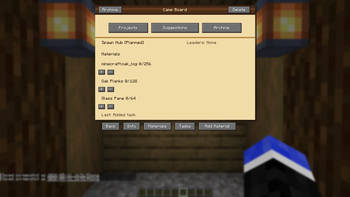
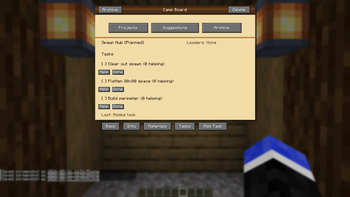
About this Mod
Camp Board
A physical project board for camps, towns, SMPs, and community builds.
Camp Board adds a placeable in-world board where players can organize shared projects, track tasks, list needed materials, suggest new builds, and keep completed work archived without relying on Discord pins, signs everywhere, or memory alone.
What It Does
Camp Board is built for collaborative servers where players are constantly asking:
- What are we building next?
- What materials do we still need?
- Who is helping with this project?
- Where is this build located?
- What ideas have players suggested?
Place a Camp Board, open it, and use it as a shared planning hub.
Features
Physical Camp Board
- Placeable Camp Board block
- Freestanding placement
- Wall-mounted placement
- Custom model and texture
- Opens an in-game project board UI
Project Tracking
- Create official server projects
- Track project descriptions
- Assign project leaders
- Set project status
- Archive completed or inactive projects
Project statuses include:
- Planned
- Active
- Paused
- Back Burner
- Completed
- Archived
Tasks
Break projects into smaller tasks so players can see what needs doing.
Players can mark that they are helping with a task, and project leaders/admins can mark tasks as complete.
Materials
Track requested materials for large builds.
Camp Board uses virtual material storage so players can contribute items directly through the board and withdraw them later if needed.
Useful for builds planned with tools like Litematica, where you know exactly how many blocks are needed.
Suggestions
Players can submit project suggestions separately from official projects.
Admins can review suggestions and decide what should become an official project.
Locations
Projects can store build coordinates.
Camp Board automatically pairs Overworld and Nether coordinates so players can plan routes from either dimension.
Archive
Completed and inactive projects can be moved into the archive instead of being deleted.
Keep the board clean without losing the history of what your server has built.
Server Friendly
Camp Board is designed for small, trust-based servers.
Data is saved as editable JSON inside the world folder:
serverconfig/campboard/
Per-board project data is stored in:
serverconfig/campboard/boards/
The mod also includes automatic backups and admin maintenance commands.
Integrations
JEI
Camp Board includes optional JEI support.
With JEI installed, Camp Board can appear in search with extra info and recipe support.
Mod Menu
Camp Board includes optional Mod Menu support for basic configuration.
Crafting Recipe
| Slot | Item |
|---|---|
| Top Left | Spruce Planks |
| Top Middle | Spruce Planks |
| Top Right | Spruce Planks |
| Middle Left | Spruce Planks |
| Center | Book |
| Middle Right | Spruce Planks |
| Bottom Left | Chest |
| Bottom Middle | Birch Sign |
| Bottom Right | Chest |
Recipe layout:
| Spruce Planks | Spruce Planks | Spruce Planks |
| Spruce Planks | Book | Spruce Planks |
| Chest | Birch Sign | Chest |
Requirements
- Minecraft Java 26.1.2
- Fabric Loader 0.18.4 or newer
- Fabric API 0.150.0+26.1.2 or newer
- Java 25
Install Info
Camp Board must be installed on both the server and every client joining the server.
- Environment: Client and Server
- Requirement: Required on both
Good For
- SMP servers
- Town projects
- Community builds
- Build planning
- Material collection
- Shared task boards
- Camp/village coordination
Notes
This is an early beta release intended for testing before use on a live server.
Back up your world before installing any new mod on a server.
Available Versions
How to Install Camp Board on Your Server
Order Server
Order a Minecraft Java server with at least 3 GB RAM (4 GB recommended).
Set fabric Loader
In the panel under "Egg", select the fabric loader and matching Minecraft version (26.1.2).
Install Mod
Open the mod browser in the dashboard and search for "Camp Board". Click "Install" – done! Alternatively, upload the .jar via SFTP to the /mods folder.
Compatibility
Mod Loaders
Minecraft Versions
26.1.2
Server-side
✓ RequiredRecommended RAM
4 GB(min. 3 GB)Frequently Asked Questions
Camp Board server crashes on startup – what to do?
Most common cause: wrong fabric version or insufficient RAM. Check the server log (latest.log) for "OutOfMemoryError" or "Mixin" errors. With Mado Hosting: ensure at least 3 GB RAM is allocated and the loader matches the mod version (26.1.2). You can switch loaders with one click in the panel.
Is Camp Board compatible with fabric?
Camp Board officially supports fabric for Minecraft 26.1.2. The Mado dashboard automatically detects incompatible loader combinations.
Server lagging with Camp Board – how to optimize performance?
Recommended RAM: 4 GB (per 8 players). Use /spark profiler to check if Camp Board consumes the most tick time. Common fixes: reduce server view-distance to 8-10, install "performant" or "starlight" as supplementary mods on Forge. With Mado Hosting, your server runs on NVMe SSDs with dedicated CPU cores for minimal latency.
Similar Mods






Rent Modded Server
Install Camp Board with just one click on your server.