
Canvas Crafter
Draw your imagination. Forge your ultimate weapon!
Screenshots
About this Mod
CanvasCrafter
Draw your imagination. Forge your ultimate weapon!
Have you ever wanted to wield a custom-designed sword or a wacky pickaxe without leaving the game to mess with resource packs? CanvasCrafter is an innovative Fabric mod that introduces an in-game pixel art editor, allowing you to draw and instantly forge your own 3D weapons and tools!
✨ Key Features
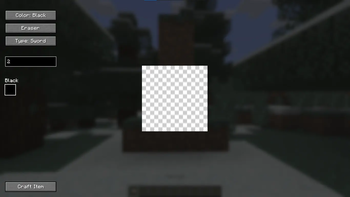
- In-Game Pixel Editor: Smooth drawing system with customizable brush sizes, multiple colors, and an eraser.
- Dynamic Weapon Forging: Click "Craft Item" and watch your 2D drawing instantly transform into a fully functional 3D item in your hand.
- Infinite Unique Designs: Thanks to the latest Minecraft 1.21 Data Components, you can draw 100 different swords, and they will all coexist peacefully without overriding each other's textures!
- God-Tier Power: All crafted tools are based on Diamond gear and are automatically infused with Level 255 enchantments (Sharpness for Swords/Axes, Efficiency for Pickaxes/Shovels). They are not just toys; they are weapons of mass destruction!
📖 How to Use
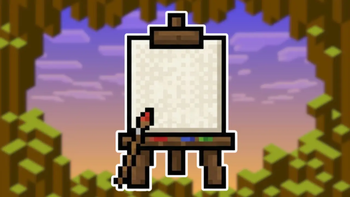
- Craft the Canvas: Surround 1 Diamond with 8 Sticks in a Crafting Table.
- Start Drawing: Hold the Canvas and right-click to open the editor. Select your tool type (Sword, Pickaxe, Axe, Shovel), pick a color, and draw!
- Forge: Click the "Craft Item" button.
- ⚠️ IMPORTANT: The first time you use it, press ESC, go to Options -> Resource Packs, and enable the "CanvasCrafter_Pack". You only need to do this ONCE! After that, all new weapons you draw will load automatically.
⚙️ Technical Details
- Requires: Fabric API
- Version: Minecraft 1.21+ (Built specifically for the newest 1.21.8 component system)
- Note: This mod dynamically generates items using underlying commands and components. You must have OP permissions (cheats enabled) in your world/server for the dynamic forging to work perfectly.
Available Versions
How to Install Canvas Crafter on Your Server
Order Server
Order a Minecraft Java server with at least 3 GB RAM (4 GB recommended).
Set fabric Loader
In the panel under "Egg", select the fabric loader and matching Minecraft version (1.21.11).
Install Mod
Open the mod browser in the dashboard and search for "Canvas Crafter". Click "Install" – done! Alternatively, upload the .jar via SFTP to the /mods folder.
Compatibility
Mod Loaders
Minecraft Versions
1.21.11, 1.21.10, 1.21.9 (+1 more)
Server-side
✓ RequiredRecommended RAM
4 GB(min. 3 GB)Frequently Asked Questions
Canvas Crafter server crashes on startup – what to do?
Most common cause: wrong fabric version or insufficient RAM. Check the server log (latest.log) for "OutOfMemoryError" or "Mixin" errors. With Mado Hosting: ensure at least 3 GB RAM is allocated and the loader matches the mod version (1.21.11). You can switch loaders with one click in the panel.
Is Canvas Crafter compatible with fabric?
Canvas Crafter officially supports fabric for Minecraft 1.21.11, 1.21.10, 1.21.9. The Mado dashboard automatically detects incompatible loader combinations.
Server lagging with Canvas Crafter – how to optimize performance?
Recommended RAM: 4 GB (per 8 players). Use /spark profiler to check if Canvas Crafter consumes the most tick time. Common fixes: reduce server view-distance to 8-10, install "performant" or "starlight" as supplementary mods on Forge. With Mado Hosting, your server runs on NVMe SSDs with dedicated CPU cores for minimal latency.
Similar Mods




![[TaCZ] Timeless and Classics Zero](https://cdn.modrinth.com/data/SzzJttH8/fd27766d2bb8390d284696b1dbd358f87e081439_96.webp)

Rent Modded Server
Install Canvas Crafter with just one click on your server.