
CanvasGLSL
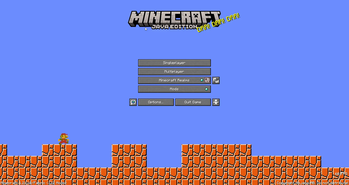
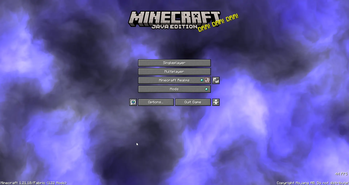
Replace every menu background with custom GLSL shaders. with a live, in-game shader editor with syntax highlighting, auto-compile, Shadertoy support, and shader file management.
Screenshots
About this Mod
CanvasGLSL
Replace Minecraft's menu backgrounds with custom GLSL shaders. Includes a built-in shader editor with syntax highlighting.
Features
- Live shader editor (press
Insertto open) - Works on all menu screens (title, singleplayer, multiplayer, options, etc.)
- Shadertoy compatible - paste shaders directly from Shadertoy
- Auto-compile or manual compile modes
- File manager for organizing shaders
- Syntax highlighting
Installation
- Install Fabric loader for Minecraft 1.21.10
- Download the latest release JAR
- Put it in your
.minecraft/modsfolder - Launch the game
Usage
Opening the Editor
Press Insert while in any menu to open the shader IDE. Press Insert or Esc to close it.
Writing Shaders
Shaders are saved in .minecraft/canvasglsl/. You can create folders to organize them.
Supported uniforms:
uniform float iTime;- Time in secondsuniform vec3 iResolution;- Screen resolution (width, height, aspect)uniform vec4 iMouse;- Mouse position (x, y, click x, click y)uniform int iFrame;- Frame counteruniform sampler2D iChannel0;- Procedural noise textures (iChannel0 through iChannel3)uniform float iTimeDelta;- Time since last frameuniform vec4 iDate;- Current date/time (year, month, day, seconds)uniform float iSampleRate;- Audio sample rate (44100)
Example shader:
void mainImage(out vec4 fragColor, in vec2 fragCoord) {
    vec2 uv = fragCoord / iResolution.xy;
    vec3 col = 0.5 + 0.5 * cos(iTime + uv.xyx + vec3(0, 2, 4));
    fragColor = vec4(col, 1.0);
}
Using Shadertoy Shaders
- Copy shader code from Shadertoy
- Paste into the editor
- Click "Compile" or enable auto-compile
- Done! The shader will render as your menu background
Controls
Insert- Toggle shader editorEsc- Close editorCtrl+S- Save current shader- Compile button - Compile shader manually
- Auto-compile toggle - Auto-compile on save
Available Versions
How to Install CanvasGLSL on Your Server
Order Server
Order a Minecraft Java server with at least 3 GB RAM (4 GB recommended).
Set fabric Loader
In the panel under "Egg", select the fabric loader and matching Minecraft version (1.21.10).
Install Mod
Open the mod browser in the dashboard and search for "CanvasGLSL". Click "Install" – done! Alternatively, upload the .jar via SFTP to the /mods folder.
Compatibility
Mod Loaders
Minecraft Versions
1.21.10, 1.21.4, 1.21
Server-side
✗ UnsupportedRecommended RAM
4 GB(min. 3 GB)Frequently Asked Questions
CanvasGLSL server crashes on startup – what to do?
Most common cause: wrong fabric version or insufficient RAM. Check the server log (latest.log) for "OutOfMemoryError" or "Mixin" errors. With Mado Hosting: ensure at least 3 GB RAM is allocated and the loader matches the mod version (1.21.10). You can switch loaders with one click in the panel.
Is CanvasGLSL compatible with fabric?
CanvasGLSL officially supports fabric for Minecraft 1.21.10, 1.21.4, 1.21. The Mado dashboard automatically detects incompatible loader combinations.
Server lagging with CanvasGLSL – how to optimize performance?
Recommended RAM: 4 GB (per 8 players). Use /spark profiler to check if CanvasGLSL consumes the most tick time. Common fixes: reduce server view-distance to 8-10, install "performant" or "starlight" as supplementary mods on Forge. With Mado Hosting, your server runs on NVMe SSDs with dedicated CPU cores for minimal latency.
Rent Modded Server
Install CanvasGLSL with just one click on your server.