
CardEngine
A lightweight framework that adds an interactive card-drafting system for custom player upgrades and RPG mechanics.
Screenshots
About this Mod
🃏 CardEngine
The easiest way to create and render interactive RPG upgrade cards in Minecraft!
💡 Check out the Wiki for full integration details and advanced custom logic binding!
CardEngine is a lightweight, high-performance framework library designed for mod developers to implement card-based upgrade systems effortlessly. It handles all the heavy lifting—from capability storage, client-server packet synchronization, and smooth render overlays, to interactive card drafting interfaces.
⚡ Why Choose CardEngine?
🛠️ 2-Line Setup
Register cards and bind upgrade mechanisms with just 2 lines of code! CardEngine automatically handles rendering, capability tracking, and networking under the hood.
⚙️ Auto-Generated Templates & @CardParam
Save time by skipping manual JSON generation. Simply register cards programmatically in Java, and CardEngine will automatically write clean, editable JSON configuration files to the config folder on the first startup.
Smart Parameter Exporting: Use the @CardParam annotation on your fields! CardEngine will automatically detect them and export these values as configurable parameters inside the card's JSON file.
Dynamic UI Syncing: Once the JSON is generated, any manual tweaks you make to the values will be dynamically reloaded and reflected directly on the framework's UI overlays without rewriting a single line of Java code.
🎮 Built-in Interfaces
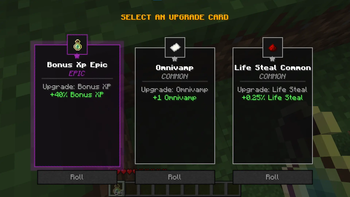
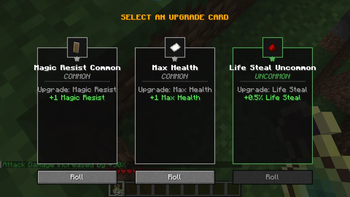
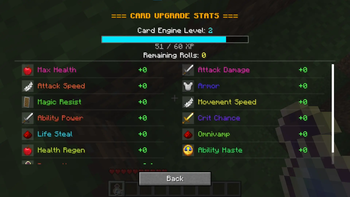
Comes out-of-the-box with a premium card drafting select screen (featuring smooth fade-in transitions) and a scrollable overlay showing consolidated player stats (toggled using the [ L ] key).
🚀 Quick Example
// Line 1: Register upgrade mechanism (Binds to Minecraft Attributes or custom logic)
CardRegistry.registerCard("my_mod:attack_damage", Attributes.ATTACK_DAMAGE);
// Line 2: Register a card and add it to the selection pool
CardRegistry.register("my_mod:ad_common", "my_mod:attack_damage");
Available Versions
How to Install CardEngine on Your Server
Order Server
Order a Minecraft Java server with at least 3 GB RAM (4 GB recommended).
Set forge Loader
In the panel under "Egg", select the forge loader and matching Minecraft version (1.20.1).
Install Mod
Open the mod browser in the dashboard and search for "CardEngine". Click "Install" – done! Alternatively, upload the .jar via SFTP to the /mods folder.
Compatibility
Mod Loaders
Minecraft Versions
1.20.1
Server-side
✓ RequiredRecommended RAM
4 GB(min. 3 GB)Frequently Asked Questions
CardEngine server crashes on startup – what to do?
Most common cause: wrong forge version or insufficient RAM. Check the server log (latest.log) for "OutOfMemoryError" or "Mixin" errors. With Mado Hosting: ensure at least 3 GB RAM is allocated and the loader matches the mod version (1.20.1). You can switch loaders with one click in the panel.
Is CardEngine compatible with forge?
CardEngine officially supports forge for Minecraft 1.20.1. The Mado dashboard automatically detects incompatible loader combinations.
Server lagging with CardEngine – how to optimize performance?
Recommended RAM: 4 GB (per 8 players). Use /spark profiler to check if CardEngine consumes the most tick time. Common fixes: reduce server view-distance to 8-10, install "performant" or "starlight" as supplementary mods on Forge. With Mado Hosting, your server runs on NVMe SSDs with dedicated CPU cores for minimal latency.
Similar Mods



Rent Modded Server
Install CardEngine with just one click on your server.