
Cargo Boats
Automated motorboats for cheap long distance logistics
About this Mod
Cargo Boats
This mod adds item and fluid motorboats that can be automated for cheap long-distance logistics.
Discord: https://discord.gg/aXQExaHfgR
Patchouli guide is available for this mod
Getting Started
Craft a motorboat as follows (there is a fluid version as well; check JEI):
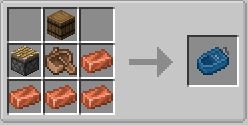
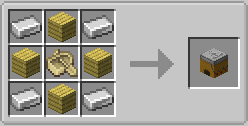
The motorboat loads a 3x3 of chunks around itself and can be placed just like a regular boat. Then craft 2 or more docks; items, fluids, and/or energy (to power up the motorboat) can be transferred from/to docked boats in range. Note that the front of the dock is the side marked with the anchor.
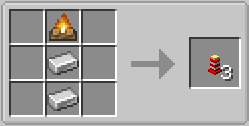
Optionally craft buoys, which can be placed on water and can function as intermediate nodes in motorboat pathing (and needed at least every 200 meters for longer paths). Buoys can have their position offset; furthermore with clever placement they can be used with e.g. bubble columns or drops for boat elevators. Buoys also have no collision box.
Once the docks have been placed, craft a Motorboat Programmer.
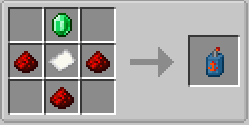
With the Motorboat Programmer, right-click the docks and buoys with it in the order that you wish to visit them. (The path can also be edited as well to specify e.g. the time to stop at a dock.) Afterwards, right-click a motorboat to program it with the schedule. The motorboat will then follow the schedule, consuming 5 RF/t when moving automatically. Note that the motorboat needs 3x3 of free space for pathfinding.
Available Versions
How to Install Cargo Boats on Your Server
Order Server
Order a Minecraft Java server with at least 3 GB RAM (4 GB recommended).
Set neoforge Loader
In the panel under "Egg", select the neoforge loader and matching Minecraft version (26.1.2).
Install Mod
Open the mod browser in the dashboard and search for "Cargo Boats". Click "Install" – done! Alternatively, upload the .jar via SFTP to the /mods folder.
Compatibility
Mod Loaders
Minecraft Versions
26.1.2, 26.1.1, 26.1 (+1 more)
Server-side
✓ RequiredRecommended RAM
4 GB(min. 3 GB)Frequently Asked Questions
Cargo Boats server crashes on startup – what to do?
Most common cause: wrong neoforge version or insufficient RAM. Check the server log (latest.log) for "OutOfMemoryError" or "Mixin" errors. With Mado Hosting: ensure at least 3 GB RAM is allocated and the loader matches the mod version (26.1.2). You can switch loaders with one click in the panel.
Is Cargo Boats compatible with neoforge?
Cargo Boats officially supports neoforge for Minecraft 26.1.2, 26.1.1, 26.1. The Mado dashboard automatically detects incompatible loader combinations.
Server lagging with Cargo Boats – how to optimize performance?
Recommended RAM: 4 GB (per 8 players). Use /spark profiler to check if Cargo Boats consumes the most tick time. Common fixes: reduce server view-distance to 8-10, install "performant" or "starlight" as supplementary mods on Forge. With Mado Hosting, your server runs on NVMe SSDs with dedicated CPU cores for minimal latency.
Similar Mods





Rent Modded Server
Install Cargo Boats with just one click on your server.