
CarryBabyAnimals
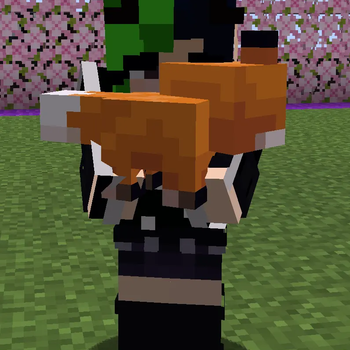
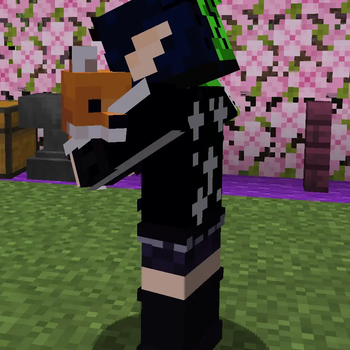
This project adds the ability to pick up and carry baby animals.
Screenshots
About this Mod
Carry Baby Animals
Carry Baby Animals is a Minecraft mod that lets players pick up, carry, pet, and safely put down baby animals.
This is a father-daughter project by Tyler and Jasmine, built around the kind of small Minecraft moment that should feel gentle, useful, and a little bit magical.
The mod is built around a simple idea: baby animals stay as real world entities, not inventory items. A carried baby remains attached to the player on the server, so the behavior is visible, multiplayer-safe, and tolerant of clients that do not have the mod installed.
Highlights
- Pick up one baby animal at a time by sneak-right-clicking it with empty hands.
- Carry the baby while walking, sprinting, jumping, and swimming.
- Put the baby down again by sneak-right-clicking while carrying with empty hands.
- Pet the carried baby with left-click for heart particles and cozy feedback.
- Nursery Mode refuses dangerous set-downs near lava, fire, damaging blocks, cramped spaces, and unsafe drops.
- Parent Reunion adds cosmetic hearts and a warm action-bar message when a safely set-down baby is returned near a matching adult.
- Modded clients get improved carried baby visuals, including tucked placement for larger babies and sleepy carry poses for smaller babies.
- Server owners can opt into compatible baby animal entity types from other mods with full entity IDs in config.
- Vanilla clients can still join and use the server-side carry behavior through Minecraft's passenger fallback.
- Fabric clients can use ModMenu and NeoForge clients can use NeoForge's built-in Mods screen to edit Carry Baby Animals visual settings in-game.
Server And Client Setup
Install Carry Baby Animals on the server to enable the gameplay.
For players and server admins, Carry Baby Animals is server-required and the client mod is highly recommended.
Marketplace environment metadata may list the client as optional because vanilla clients can still join and use the server-side carry behavior.
Players can also install the mod on their clients for the nicer held-in-arms rendering, first-person petting feedback, carried baby reactions, sleepy visuals, and optional in-game visual configuration. Players without the mod can still join a modded server and use the carry behavior, but they will see the baby animal through Minecraft's normal passenger rendering.
Carry Baby Animals does not make another mod's custom entity compatible with vanilla clients by itself. If another animal mod requires matching client mods, that requirement still belongs to that mod and server setup.
Requirements
- Minecraft 26.2
- Fabric Loader 0.19.3 or newer, or NeoForge 26.2.0.6-beta or newer
- Java 25 or newer
- Fabric API 0.152.2+26.2 or newer when running on Fabric
Optional:
- Permission providers are optional, not required. On Fabric, providers integrate through Fabric API's permission API. On NeoForge, providers integrate through NeoForge's built-in permission API.
- ModMenu is optional on Fabric clients. Install it only if you want an in-game Fabric screen for Carry Baby Animals client visual settings.
How To Use
- Empty both hands.
- Sneak-right-click a supported baby animal to pick it up.
- Left-click while carrying to pet the baby.
- Sneak-right-click again with empty hands to set the baby down.
Pickup and set-down messages use the animal's custom name when it has one, such as Carrying KittyKat and Set down KittyKat. Unnamed animals use the baby animal type, such as Carrying baby Pig and Set down baby Pig.
Doors and trapdoors can still be used while carrying a baby animal.
Nursery Mode
Nursery Mode is server-owned and vanilla-client compatible. It validates the server's planned set-down position before the baby is detached.
When enabled, Nursery Mode refuses unsafe set-downs near lava, fire, damaging blocks, suffocating spaces, and dangerous drops. If the spot is unsafe, the baby stays carried and the player sees a playful action-bar message when Nursery Mode messages are enabled.
Server operators can configure each safety check, the dangerous fall distance, and whether Nursery Mode messages are shown. A permission node is also reserved for bypassing Nursery Mode when a server wants staff-only override behavior.
Parent Reunion
Parent Reunion is server-owned, cosmetic, and vanilla-client compatible. It only runs after Nursery Mode allows a deliberate set-down and never moves the baby or adult.
When enabled, a safely set-down baby returned near a compatible adult gets heart particles with the adult, and the player sees a short reunion message. Compatible adults are the same animal type, adult, alive, nearby, and in the same loaded server level. Tamed animals only reunite with adults that have the same owner identity.
Server operators can configure the reunion radius, cooldown, messages, and particles.
Client Visuals
The server owns the gameplay state. Client visuals are cosmetic.
Players with the mod installed get the nicer client-side presentation: the normal passenger render is hidden and the baby is drawn near the carrier's hands.
Modded clients also get optional creature polish for carried babies. Tall and bulky babies such as horses, camels, llamas, pandas, and turtles use a safer tucked-side placement so first-person play stays readable. Petting can trigger small client-only reactions for animals such as chickens, rabbits, foxes, pandas, and turtles.
After the client has observed a small carried baby for a while, sleepy carry visuals progress from a tucked drowsy pose into a clearer asleep presentation with calmer motion and, where the renderer supports it, a subtle breathing-style cue.
Client visual settings are stored in:
config/carrybabyanimals-client.json
Fabric clients can change these same client visual settings from ModMenu's Carry Baby Animals config screen when ModMenu is installed. NeoForge clients can change them from NeoForge's built-in Mods screen. Without an in-game config screen, Carry Baby Animals still uses config/carrybabyanimals-client.json.
Client visual options include carried baby reactions, large baby tucked placement, first-person large baby visibility, sleepy carry visuals, reaction intensity, and disabled reaction animal IDs.
These client settings do not add permissions, do not affect pickup or set-down rules, and are never required by vanilla clients.
Configuration
Carry Baby Animals creates this file the first time the server starts:
config/carrybabyanimals.json
Main server options include:
allowedAnimals: List of animal names or full entity IDs that are allowed to be carried. Leave this empty to allow the full default supported set.blockedAnimals: List of animal names or full entity IDs to block.allowCarryingOtherPlayersTamedAnimals: Allows players to carry another player's tamed baby animal when the permission node also allows it.pettingCooldownTicks: Cooldown between successful petting effects, in server ticks.cozyFeedbackEnabled: Master switch for cosmetic carried-baby feedback.carriedIdleSoundsEnabled: Allows occasional carried-baby ambient sounds.pettingMessagesEnabled: Enables varied petting and sleepy action-bar messages.nameAwareMessagesEnabled: Uses a baby's custom name in cozy feedback messages when it has one.cozyParticlesEnabled: Enables gentle cosmetic carried-baby feedback particles.sleepyBabiesEnabled: Enables sleepy carried-baby moments after a baby has been held for a while.nurseryModeEnabled: Master switch for refusing unsafe player set-downs.nurseryBlockLava: Refuses set-downs in or next to lava.nurseryBlockFire: Refuses set-downs on fire, campfires, soul campfires, magma blocks, and similar burning hazards.nurseryBlockCactusAndDamage: Refuses set-downs on cactus and other obvious damaging blocks.nurseryBlockSuffocation: Refuses cramped set-downs where the baby would collide or suffocate.nurseryBlockDangerousFalls: Refuses set-downs over unsafe drops.nurseryDangerousFallDistanceBlocks: Drop distance that counts as unsafe for Nursery Mode.nurseryMessagesEnabled: Enables playful Nursery Mode refusal action-bar messages.parentReunionEnabled: Master switch for cosmetic Parent Reunion feedback after safe player set-downs.parentReunionRadiusBlocks: Search radius for a compatible adult near the set-down baby.parentReunionCooldownTicks: Minimum spacing between reunion feedback for the same baby or carrier.parentReunionMessagesEnabled: Enables warm Parent Reunion action-bar messages.parentReunionParticlesEnabled: Enables heart particles around the baby and adult.
Cozy Feedback is cosmetic and server-owned. It uses ordinary Minecraft sounds, particles, and action-bar messages, so vanilla clients can see or hear the feedback without installing the mod.
Supported Animals
By default, Carry Baby Animals supports the normal passive baby animals that are reasonable to carry, including animals such as cows, pigs, sheep, chickens, goats, rabbits, cats, foxes, horses, donkeys, llamas, camels, pandas, turtles, and wolves.
Supported animal names:
cow, pig, sheep, chicken, goat, rabbit, cat, fox, horse, donkey, mule, llama, trader_llama, camel, panda, turtle, wolf, dog
Animal name notes:
dogmeans tamed wolves only.wolfmeans wolves generally, with normal tamed ownership rules still applied.- Full entity IDs such as
examplemod:duckare accepted inallowedAnimalsandblockedAnimals. - Unknown names, malformed IDs, and IDs for entity types that are not present on the server are logged and ignored.
- Modded entities are never allowed by default. They must be explicitly listed in
allowedAnimals, and existing carry permission nodes still apply. - Carrying occupying the player's hands is part of the mod design and is not configurable.
Tamed animals follow ownership rules. Players can carry their own tamed baby animals by default. Carrying another player's tamed baby animals is disabled unless the server explicitly allows it.
Permissions
Carry Baby Animals can integrate with loader permission providers, but a permission provider is not required. Fabric servers use Fabric API's permission API. NeoForge servers use NeoForge's built-in permission API.
If a loader permission provider is active:
carrybabyanimals.nursery.bypassdefaults to disabled unless a permission provider explicitly grants it.- All other Carry Baby Animals permissions delegate to your permission provider and use the defaults listed below when the provider has no explicit rule.
If no loader permission provider is active:
- All players can carry untamed baby animals.
- Players can carry their own tamed baby animals.
- Players cannot carry another player's tamed baby animals.
- The reserved reload permission falls back to vanilla game-master command permission when exposed.
- The Nursery Mode bypass permission falls back to vanilla game-master command permission on Fabric. On NeoForge, it is granted only through the loader permission provider.
Permission nodes:
carrybabyanimals.carry
carrybabyanimals.carry.tamed
carrybabyanimals.carry.others_tamed
carrybabyanimals.nursery.bypass
carrybabyanimals.reload
Default behavior:
carrybabyanimals.carry: allowed by default.carrybabyanimals.carry.tamed: allowed by default for the player's own tamed baby animals.carrybabyanimals.carry.others_tamed: denied by default.carrybabyanimals.nursery.bypass: defaults to disabled with a loader permission provider active. Without a provider, Fabric falls back to vanilla game-master command permission, while NeoForge requires an explicit provider grant.carrybabyanimals.reload: reserved for reload support and defaults to vanilla game-master command permission when exposed.
Available Versions
How to Install CarryBabyAnimals on Your Server
Order Server
Order a Minecraft Java server with at least 3 GB RAM (4 GB recommended).
Set fabric Loader
In the panel under "Egg", select the fabric loader and matching Minecraft version (26.2).
Install Mod
Open the mod browser in the dashboard and search for "CarryBabyAnimals". Click "Install" – done! Alternatively, upload the .jar via SFTP to the /mods folder.
Compatibility
Mod Loaders
Minecraft Versions
26.2, 26.1.2
Server-side
✓ RequiredRecommended RAM
4 GB(min. 3 GB)Frequently Asked Questions
CarryBabyAnimals server crashes on startup – what to do?
Most common cause: wrong fabric version or insufficient RAM. Check the server log (latest.log) for "OutOfMemoryError" or "Mixin" errors. With Mado Hosting: ensure at least 3 GB RAM is allocated and the loader matches the mod version (26.2). You can switch loaders with one click in the panel.
Is CarryBabyAnimals compatible with fabric and neoforge?
CarryBabyAnimals officially supports fabric, neoforge for Minecraft 26.2, 26.1.2. The Mado dashboard automatically detects incompatible loader combinations.
Server lagging with CarryBabyAnimals – how to optimize performance?
Recommended RAM: 4 GB (per 8 players). Use /spark profiler to check if CarryBabyAnimals consumes the most tick time. Common fixes: reduce server view-distance to 8-10, install "performant" or "starlight" as supplementary mods on Forge. With Mado Hosting, your server runs on NVMe SSDs with dedicated CPU cores for minimal latency.
Rent Modded Server
Install CarryBabyAnimals with just one click on your server.