
Casino Helper
CasinoHelper is designed to work on the DonutSMP, and help you enhance the gambling experience.
Screenshots
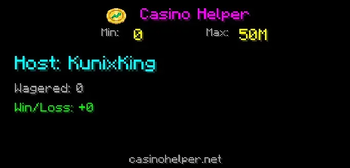
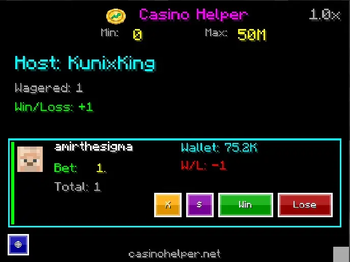
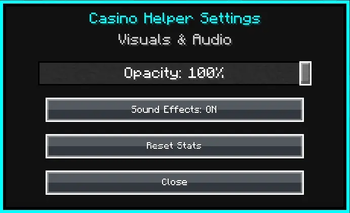
About this Mod
Casino Helper
Casino Helper is the ultimate utility mod for DonutSMP casino hosts, designed to streamline operations and enhance the gambling experience. Stop calculating payouts manually and start hosting like a pro.
🚀 Key Features
- ⚡ Automated Payouts: When a player wins, just enter the multiplier and the mod automatically copies the
/paycommand to your clipboard. - Real-time HUD: Track live bets, session profits, and player stats instantly on your screen.
- Live Dashboard: Automatically syncs with casinohelper.online for advanced analytics, leaderboards, and public host profiles.
- Smart Tracking: Automatically monitors chat for "paid you" messages to detect bets.
- Anti-Scam Tools: Tracks total volume and profit to ensure fair play.
- Secure & Easy: No API keys required! The backend handles all DonutSMP API connections securely.
Requirements
- Minecraft Java Edition
- Fabric Loader
- Fabric API: Required - Download here
🎮 How to Use
Installation: Drop the
.jarfile into your.minecraft/modsfolder along with Fabric API.Registration:
- Join DonutSMP.
- The mod will automatically register you with the dashboard on your first login.
The Interface:
- Press
Kto open the Casino Manager GUI. - Press
Hto toggle the HUD overlay. - Press
Oto open Settings. - Note: You can change these keybinds in
Options > Controls > Key Bindsunder the "Casino Helper" category.
- Press
Setting Limits:
- Change Min/Max: In the GUI (
K), click on the Min or Max values at the top.- Left-Click: Increase limit.
- Right-Click: Decrease limit.
- Under Min: If a player pays less than the minimum, it is automatically treated as a donation and does not enter the queue.
- Over Max: If a player pays more than the maximum (e.g., bets $5M when Max is $2M), the mod automatically splits the bet into multiple chunks (e.g., $2M, $2M, $1M) so you can play them out one by one.
- Change Min/Max: In the GUI (
Hosting a Casino:
- When a player pays you, the mod automatically detects the bet and adds them to your queue.
- Open the GUI (
K) to see the active bet. - To Pay a Win: Click Win, enter the multiplier (e.g.,
2or3) and press Enter. The/paycommand is automatically copied to your clipboard!- Then just press
T(chat),Ctrl+V(paste), andEnter.
- Then just press
- To Take a Loss: Click Lose to resolve the bet and update stats.
- Refund/Cancel (X): Click the
Xbutton to void the bet (copies a refund command). This removes it from your stats without counting as a win or loss. - Donation ($): Click the
$button if the payment was a donation. This removes it from your "Wagered" volume stats entirely.
Settings:
- Toggle Sound Effects and Chat Feedback Messages (like "Command Copied") on or off in the settings menu.
Dashboard: Visit casinohelper.online to view your public profile, profit graphs, and rankings.
Elevate your casino hosting with professional tools and a dedicated web dashboard at casinohelper.online.
Not affiliated with DonutSMP.
Available Versions
How to Install Casino Helper on Your Server
Order Server
Order a Minecraft Java server with at least 3 GB RAM (4 GB recommended).
Set fabric Loader
In the panel under "Egg", select the fabric loader and matching Minecraft version (1.21.4).
Install Mod
Open the mod browser in the dashboard and search for "Casino Helper". Click "Install" – done! Alternatively, upload the .jar via SFTP to the /mods folder.
Compatibility
Mod Loaders
Minecraft Versions
1.21.4
Server-side
✗ UnsupportedRecommended RAM
4 GB(min. 3 GB)Frequently Asked Questions
Casino Helper server crashes on startup – what to do?
Most common cause: wrong fabric version or insufficient RAM. Check the server log (latest.log) for "OutOfMemoryError" or "Mixin" errors. With Mado Hosting: ensure at least 3 GB RAM is allocated and the loader matches the mod version (1.21.4). You can switch loaders with one click in the panel.
Is Casino Helper compatible with fabric?
Casino Helper officially supports fabric for Minecraft 1.21.4. The Mado dashboard automatically detects incompatible loader combinations.
Server lagging with Casino Helper – how to optimize performance?
Recommended RAM: 4 GB (per 8 players). Use /spark profiler to check if Casino Helper consumes the most tick time. Common fixes: reduce server view-distance to 8-10, install "performant" or "starlight" as supplementary mods on Forge. With Mado Hosting, your server runs on NVMe SSDs with dedicated CPU cores for minimal latency.
Similar Mods




![CobbleDollars [Cobblemon Addon]](https://cdn.modrinth.com/data/s7N7AsqL/684040a264fc1d7f9b856ec5d2da39767398c7ad.png)
Rent Modded Server
Install Casino Helper with just one click on your server.