
CAT HUD
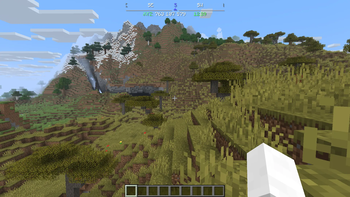
a clean compass ribbon, your coordinates, and the in-game clock right at the top of your screen.
Screenshots
About this Mod
CAT HUD
Compass, Axis & Time HUD — a lightweight Fabric mod for Minecraft 26.2
("Chaos Cubed") that puts a clean compass ribbon, your coordinates, and the in-game
clock right at the top of your screen.
What it does
No more flickering action bar, no boss-bar graphic eating up space — just the
information, rendered as plain text and a scrolling compass strip.
- Compass ribbon scrolls smoothly as you turn, showing N/S/E/W and the
intercardinal directions around your current heading - A small triangle indicator marks exactly where you're facing, and it's colored
to match whichever direction it's pointing at - Coordinates + time sit underneath as a single text line, no background box
- Pick 12-hour (AM/PM) or 24-hour time
- Resize the whole thing with a single scale setting, reposition it anywhere on screen
- Every color is customizable, including a separate color for each cardinal direction
(so North can be red, South blue, East green, West gold — or whatever you like) - Show/hide the ribbon and the text line independently
- A keybind to toggle the entire HUD on/off instantly
Installation
- Install Fabric Loader for Minecraft 26.2
- Grab Fabric API — required
- Grab Cloth Config and
Mod Menu for 26.2 — only needed if you want the
in-game settings screen (see below) - Drop
cathud-<version>.jarfrom Releases into your.minecraft/modsfolder
Customizing it
If you have Mod Menu and Cloth Config installed, open Mods → CAT HUD → Config in
game. Settings are grouped into:
- General — master on/off switch, show/hide the ribbon or the text line
independently, 12/24-hour time - Position & Size — a single scale slider for the whole HUD, plus X/Y offset to move
it anywhere on screen - Ribbon — how wide it is, how many degrees of heading are visible across it, and
how close to dead-center counts as "facing that direction" - Colors — the ribbon's normal/edge-fade text colors and the coordinates/time text
colors - Directions — a dedicated color for North, South, East, and West. Whichever one
you're currently facing (or closest to) controls both the highlighted ribbon label
and the triangle indicator's color
Don't have Mod Menu/Cloth Config? Every setting also lives in a plain JSON file at.minecraft/config/cathud.json — edit it by hand and restart the game.
License
CC0-1.0 (public domain)
Credits
- Author: xAtomicManx
- Logo: hand-designed in Affinity Designer
Want to build it yourself or poke at the code? See
https://github.com/xAtomicManx/CAT-HUD
Available Versions
How to Install CAT HUD on Your Server
Order Server
Order a Minecraft Java server with at least 3 GB RAM (4 GB recommended).
Set fabric Loader
In the panel under "Egg", select the fabric loader and matching Minecraft version (26.2).
Install Mod
Open the mod browser in the dashboard and search for "CAT HUD". Click "Install" – done! Alternatively, upload the .jar via SFTP to the /mods folder.
Compatibility
Mod Loaders
Minecraft Versions
26.2
Server-side
✗ UnsupportedRecommended RAM
4 GB(min. 3 GB)Frequently Asked Questions
CAT HUD server crashes on startup – what to do?
Most common cause: wrong fabric version or insufficient RAM. Check the server log (latest.log) for "OutOfMemoryError" or "Mixin" errors. With Mado Hosting: ensure at least 3 GB RAM is allocated and the loader matches the mod version (26.2). You can switch loaders with one click in the panel.
Is CAT HUD compatible with fabric?
CAT HUD officially supports fabric for Minecraft 26.2. The Mado dashboard automatically detects incompatible loader combinations.
Server lagging with CAT HUD – how to optimize performance?
Recommended RAM: 4 GB (per 8 players). Use /spark profiler to check if CAT HUD consumes the most tick time. Common fixes: reduce server view-distance to 8-10, install "performant" or "starlight" as supplementary mods on Forge. With Mado Hosting, your server runs on NVMe SSDs with dedicated CPU cores for minimal latency.
Similar Mods




Rent Modded Server
Install CAT HUD with just one click on your server.