
Cauldron Expansion
Extends the functionality of cauldrons to include bedrock features and more!
Screenshots
About this Mod
Features
- All vanilla interactions should be unaffected
- If you find a bug report it on our discord
Custom Interactions
- Adding water to a lava cauldron will create obsidian
- More custom interactions coming soon
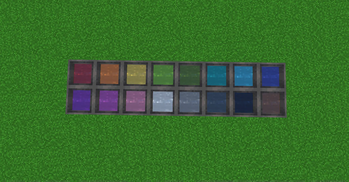
Dyed Water Cauldrons
- Use dye on a cauldron to color the water!
- Dyed cauldrons can be used to dye leather armor, leather horse armor, and wolf armor
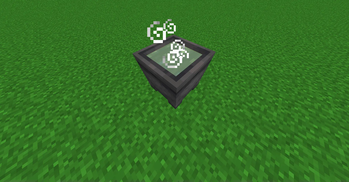
Potion Cauldrons
- Interacting with an empty cauldron while holding a potion to store the potion inside!
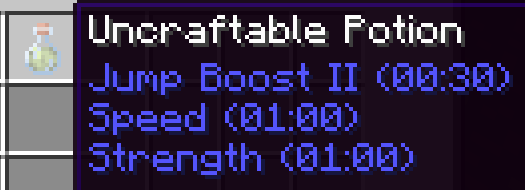
- Multiple potions can be combined in a cauldron reducing their effect durations
- Ex. Combining Strength II (1:30), Speed II (1:30), Jump Boost II (1:30), will create three potions of Strength II (0:30), Speed II (0:30), Jump Boost II (0:30)
- Adding water will also dilute the potions effects
- Strength II (1:30) plus 2 water bottles will provide three Strength II (0:30) potions
- Thick, awkward, and mundane potions behave as water bottles
- Interacting with a potion cauldron while holding arrows will tip them
- Each level of potion can tip up to 16 arrows
Known Issues
You must punch the cauldron before you can mine it
- This works as intended, but useful to know
Interacting with a cauldron less than 5 seconds after punching it will cause it to lose all custom data
Cauldrons pushed by a piston lose all custom data
Custom potions cannot be converted to splash or lingering potions in the brewing stand (MC-270706)
- I have a potential workaround that may be implemented in the future
Available Versions
How to Install Cauldron Expansion on Your Server
Order Server
Order a Minecraft Java server with at least 3 GB RAM (4 GB recommended).
Set datapack Loader
In the panel under "Egg", select the datapack loader and matching Minecraft version (1.21.1).
Install Mod
Open the mod browser in the dashboard and search for "Cauldron Expansion". Click "Install" – done! Alternatively, upload the .jar via SFTP to the /mods folder.
Compatibility
Mod Loaders
Minecraft Versions
1.21.1, 1.21
Server-side
✓ RequiredRecommended RAM
4 GB(min. 3 GB)Frequently Asked Questions
Cauldron Expansion server crashes on startup – what to do?
Most common cause: wrong datapack version or insufficient RAM. Check the server log (latest.log) for "OutOfMemoryError" or "Mixin" errors. With Mado Hosting: ensure at least 3 GB RAM is allocated and the loader matches the mod version (1.21.1). You can switch loaders with one click in the panel.
Is Cauldron Expansion compatible with datapack and fabric and forge and neoforge and quilt?
Cauldron Expansion officially supports datapack, fabric, forge, neoforge, quilt for Minecraft 1.21.1, 1.21. Note: Forge and Fabric mods are NOT cross-compatible – pick one loader and stick with it. The Mado dashboard automatically detects incompatible loader combinations.
Server lagging with Cauldron Expansion – how to optimize performance?
Recommended RAM: 4 GB (per 8 players). Use /spark profiler to check if Cauldron Expansion consumes the most tick time. Common fixes: reduce server view-distance to 8-10, install "performant" or "starlight" as supplementary mods on Forge. With Mado Hosting, your server runs on NVMe SSDs with dedicated CPU cores for minimal latency.
Similar Mods




![[TaCZ] Timeless and Classics Zero](https://cdn.modrinth.com/data/SzzJttH8/fd27766d2bb8390d284696b1dbd358f87e081439_96.webp)

Rent Modded Server
Install Cauldron Expansion with just one click on your server.
Details
- License
- Creative Commons Attribution Non Commercial Share Alike 4.0 International
- Server-side
- Required