
CC-Harddisks
The CC-Harddisks mod is an extension for CC:Tweaked which adds more storage options compatible with the mod. Currently only supports NeoForge.
Screenshots
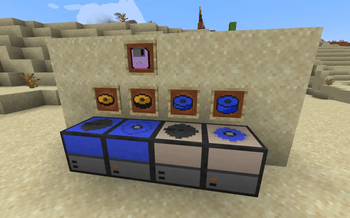
About this Mod
CC-Harddisks
The CC-Harddisks mod is an extension for CC:Tweaked which adds more storage options compatible with the mod.
Currently, CC-Harddisks supports Minecraft 1.21.1 with NeoForge >= 21.1.211 and CC:Tweaked >= 1.117.
About
CC-Harddisks aims to add more balanced mass storage options to computercraft. The default CC:Tweaked mods storage concept uses floppies and computers as storage media, each holding 120k / 1 MB respectively. Projects with large storage requirements like bulletin boards, neural networks and machine learning as well as emulators will quickly run into storage capacity issues. The "vanilla" solution to this has been to build arrays of floppy drives but this is not very lag friendly and often not something server owners like to see. This is where CC-Harddisks aims to provide an improvement with craftable hard disk drives and platters of different large capacities. While they are somewhat expensive, they should be survival friendly as obtaining netherite to craft the drives takes around the same time as collecting the resources for a floppy drive array of the same capacity.
Blocks
This mod adds the following blocks:
Sparrow Drive: A hard disk drive with one fixed and one removable platter, each of 2 MB capacity.
Magpie Drive: A hard disk drive with one fixed and one removable platter, each of 4 MB capacity.
Note: Platter sizes are configurable in the server-side config file.
Items
This mod adds the following items:
Sparrow Platter: A raw platter for the sparrow drive.
Sparrow Cartridge: A removable platter assembly for the sparrow drive, works similar to a floppy disk.
Magpie Platter: A raw platter for the magpie drive.
Magpie Cartridge: A removable platter assembly for the Magpie drive, works the same way as the sparrow cartridge.
Recovery Disk: A floppy disk which can be placed in a normal floppy disk drive to force the computer to boot into a shell, regardless of it how it was configured. This is useful, as the CC-Harddisks mod removes the ability to place computers inside floppy drives by default (this can be disabled in the server-side configuration file).
Crafting recipes
Below you can find a list of all crafting recipes for this mod:
Sparrow Platter:
| Gold Ingot | Redstone Dust | Gold Ingot |
| Iron Ingot | Netherite Ingot | Iron Ingot |
| Gold Ingot | Redstone Dust | Gold Ingot |
Magpie Platter:
| Gold Ingot | Redstone Dust | Gold Ingot |
| Netherite Ingot | Iron Ingot | Netherite Ingot |
| Gold Ingot | Redstone Dust | Gold Ingot |
Sparrow Cartridge
| Lapiz Lazuli | ||
| Lapiz Lazuli | Sparrow Platter | Lapiz Lazuli |
| Lapiz Lazuli |
Magpie Cartridge
| Lapiz Lazuli | ||
| Lapiz Lazuli | Magpie Platter | Lapiz Lazuli |
| Lapiz Lazuli |
Recovery Disk
| Lapiz Lazuli | ||
| Lapiz Lazuli | Floppy Disk | Lapiz Lazuli |
| Lapiz Lazuli |
Sparrow Drive
| Redstone Dust | Observer | Repeater |
| Piston | Sparrow Platter | Andesite |
Magpie Drive
| Redstone Dust | Observer | Repeater |
| Piston | Magpie Platter | Andesite |
| Piston | Observer | Repeater |
Available Versions
How to Install CC-Harddisks on Your Server
Order Server
Order a Minecraft Java server with at least 3 GB RAM (4 GB recommended).
Set neoforge Loader
In the panel under "Egg", select the neoforge loader and matching Minecraft version (1.21.1).
Install Mod
Open the mod browser in the dashboard and search for "CC-Harddisks". Click "Install" – done! Alternatively, upload the .jar via SFTP to the /mods folder.
Compatibility
Mod Loaders
Minecraft Versions
1.21.1
Server-side
✓ RequiredRecommended RAM
4 GB(min. 3 GB)Frequently Asked Questions
CC-Harddisks server crashes on startup – what to do?
Most common cause: wrong neoforge version or insufficient RAM. Check the server log (latest.log) for "OutOfMemoryError" or "Mixin" errors. With Mado Hosting: ensure at least 3 GB RAM is allocated and the loader matches the mod version (1.21.1). You can switch loaders with one click in the panel.
Is CC-Harddisks compatible with neoforge?
CC-Harddisks officially supports neoforge for Minecraft 1.21.1. The Mado dashboard automatically detects incompatible loader combinations.
Server lagging with CC-Harddisks – how to optimize performance?
Recommended RAM: 4 GB (per 8 players). Use /spark profiler to check if CC-Harddisks consumes the most tick time. Common fixes: reduce server view-distance to 8-10, install "performant" or "starlight" as supplementary mods on Forge. With Mado Hosting, your server runs on NVMe SSDs with dedicated CPU cores for minimal latency.
Similar Mods


Rent Modded Server
Install CC-Harddisks with just one click on your server.