
CCChunkloader
Chunkloader for cc:tweaked Fabric only
Screenshots
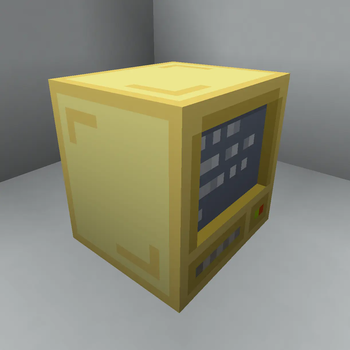
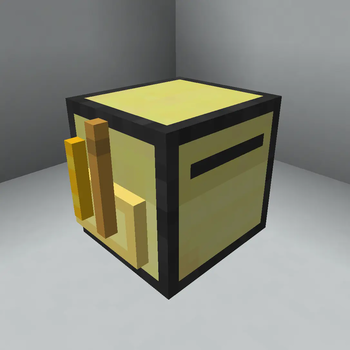
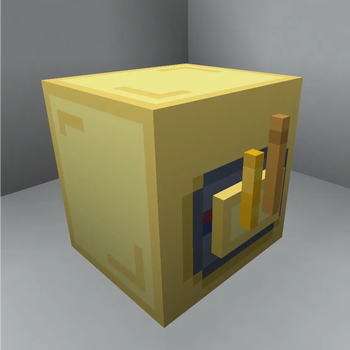
About this Mod
CC Chunk Loader
A dynamic chunk loading mod for ComputerCraft turtles that goes beyond traditional always-on/always-off chunk loaders.
Why This Mod?
I wasn't happy with existing chunk loading options for ComputerCraft setups. Standard chunk loaders are either always active or completely off - there's no middle ground for dynamic, intelligent chunk management.
CC Chunk Loader solves this by giving turtles the ability to dynamically scale their chunk loading based on what they're actually doing, with remote management capabilities for distributed automation systems.
Core Features
🔄 Dynamic Chunk Loading
- Turtles can adjust their chunk loading radius through code (0 to 2.5 chunks by default)
- Perfect for tasks that need different area coverage at different times
- Automatic shutdown when fuel runs out prevents abandoned chunk loaders
🔋 Fuel-Based Balancing
- Powered by turtle fuel with exponential cost scaling by distance loaded
- Random ticking support for farms (doubles fuel cost)
- Fractional fuel debt system for precise cost calculation
- All costs are fully configurable
📡 Remote Management
- Wake up dormant turtles by ID even in unloaded chunks
- Control any turtle's chunk loading remotely through the manager block
- Perfect for managing distributed automation without keeping everything loaded
⚙️ Smart Persistence
- Complete state preservation across server restarts/world reloads
- Wake-on-world-load option for critical turtles
API Reference
Chunkloader Peripheral
local chunkloader = peripheral.find("chunkloader")

-- Core chunk loading control
chunkloader.setRadius(radius)           -- Set loading radius (0-2.5, 0 = disabled)
chunkloader.getRadius()                 -- Get current radius
chunkloader.getFuelRate()              -- Get fuel consumption per tick

-- Wake control
chunkloader.setWakeOnWorldLoad(boolean) -- Auto-resume on server restart
chunkloader.getWakeOnWorldLoad()        -- Check wake setting

-- Random tick control (for farms)
chunkloader.setRandomTick(boolean)      -- Enable random ticking (doubles fuel cost)
chunkloader.getRandomTick()            -- Check random tick status

-- Turtle identification
chunkloader.getTurtleIdString()         -- Get unique turtle ID for remote management
Chunkloader Manager Block
local manager = peripheral.find("chunkloader_manager")

-- Remote turtle management
manager.getTurtleInfo(turtleId)                    -- Get turtle status/stats
manager.setTurtleRadius(turtleId, radius)          -- Wake & control dormant turtles
manager.setTurtleWakeOnWorldLoad(turtleId, boolean) -- Control wake settings remotely
manager.getTurtleWakeOnWorldLoad(turtleId)         -- Check wake settings
manager.listTurtles()                              -- List all active turtles
Use Cases
🌾 Smart Farming Systems
- Turtles enable chunk loading and random ticking only when tending crops
- Scale down to minimal radius when just monitoring
- Remote activation to start the farm remotely
📊 Monitoring Networks
- Wake dormant sensor turtles on-demand
- Collect data across large areas without constant chunk loading
- Centralized management through chunkmanager block
Highlights
- UUID-based persistence - Turtle identities survive world restarts and position changes
- Exponential fuel scaling - Larger areas cost exponentially more fuel to prevent abuse
- Custom block models - Polished visual design
- Comprehensive admin tools - Debug commands for troubleshooting
Configuration
All fuel costs and limits are configurable via in-game commands:
/ccchunkloader get <key>          # View current settings
/ccchunkloader set <key> <value>  # Modify settings
/ccchunkloader list               # Show all config values
Default Settings:
- Max radius: 2.5 chunks (covers ~21 chunks total)
- Base fuel cost: 0.033 per chunk per tick
- Random tick max radius: 1.4 chunks
- Distance multiplier: 2.0 (exponential scaling)
Advanced Features
Debug Commands
/ccchunkloader debug uuids        # List all tracked UUIDs
/ccchunkloader debug stats        # Show system statistics
/ccchunkloader debug orphans      # Find orphaned UUIDs
Remote Bootstrap
- Manager blocks can wake turtles in unloaded chunks
- Persistent state ensures no data loss during dormancy
- Wake-on-world-load for critical automation systems
Perfect for: Dynamic automation systems, large-scale turtle networks, smart resource management, and anyone who wants intelligent chunk loading instead of static always-on solutions.
Available Versions
How to Install CCChunkloader on Your Server
Order Server
Order a Minecraft Java server with at least 3 GB RAM (4 GB recommended).
Set fabric Loader
In the panel under "Egg", select the fabric loader and matching Minecraft version (1.20.6).
Install Mod
Open the mod browser in the dashboard and search for "CCChunkloader". Click "Install" – done! Alternatively, upload the .jar via SFTP to the /mods folder.
Compatibility
Mod Loaders
Minecraft Versions
1.20.6, 1.20.5, 1.20.4 (+3 more)
Server-side
✓ RequiredRecommended RAM
4 GB(min. 3 GB)Frequently Asked Questions
CCChunkloader server crashes on startup – what to do?
Most common cause: wrong fabric version or insufficient RAM. Check the server log (latest.log) for "OutOfMemoryError" or "Mixin" errors. With Mado Hosting: ensure at least 3 GB RAM is allocated and the loader matches the mod version (1.20.6). You can switch loaders with one click in the panel.
Is CCChunkloader compatible with fabric?
CCChunkloader officially supports fabric for Minecraft 1.20.6, 1.20.5, 1.20.4. The Mado dashboard automatically detects incompatible loader combinations.
Server lagging with CCChunkloader – how to optimize performance?
Recommended RAM: 4 GB (per 8 players). Use /spark profiler to check if CCChunkloader consumes the most tick time. Common fixes: reduce server view-distance to 8-10, install "performant" or "starlight" as supplementary mods on Forge. With Mado Hosting, your server runs on NVMe SSDs with dedicated CPU cores for minimal latency.
Similar Mods





Rent Modded Server
Install CCChunkloader with just one click on your server.