
CC:DirectGPU
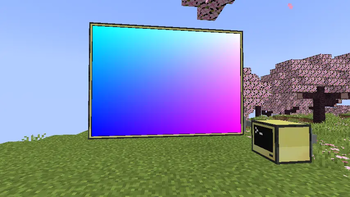
High quality resolution for cc "monitor"
Screenshots

About this Mod
CC:DirectGPU , VS Compatible Now
Next-gen graphics for ComputerCraft.
Unlock true 24-bit colour, GPU-level performance, and real-time interactivity on your ComputerCraft monitors — all inside Minecraft.
💬 Join the Discord • 📦 GitHub Repository
[Reddit Community] (https://www.reddit.com/r/CCDirectGPU/)
Recommended Version of CC:T for this mod is: 1.116.1
What It Adds
Bring your ComputerCraft displays to life with hardware-accelerated rendering, full RGB graphics, and interactive UIs — all plug-and-play.
- True RGB pixel graphics: Up to 164×81 pixels per block, or 656×324 with 4× scaling.
- Auto monitor detection: Works with any monitor array or orientation — no manual setup.
- Fast drawing primitives: Draw pixels, lines, and shapes at GPU-like speeds.
- JPEG + PNG + GIF image support: Decode and render images in milliseconds (≈5–15 ms typical).
- Smart compression: 90%+ bandwidth savings for streamed or repeating frames.
- Interactive input: Detect clicks, drags, and keyboard input directly on monitors.
- Massive displays: Supports up to 16×16 monitor arrays and 50+ total displays.
- Thread-safe design: Multiple computers can safely update the same screen for smooth visuals.
Why You’ll Want It
Turn basic text monitors into vibrant, dynamic displays.
- Create real-time dashboards, control rooms, or media walls.
- Display pixel art, animations, or live webcam feeds.
- Perfect for builders, modpack creators, and creative coders.
Highlights
- Supports Forge & Fabric (requires latest CC:Tweaked).
- Orientation-independent arrays: Works in any direction.
- Resolution scaling: Choose between 1×–4× detail depending on performance.
Code Examples
View Example Scripts on GitHub
Interactive Input
Detect mouse clicks, drags, and keyboard events directly on the monitor surface to build custom UIs, dashboards, or drawing boards.
Setup
- Minecraft Java Edition
- Forge or Fabric
- Latest CC:Tweaked
Supports monitor arrays up to 16×16 blocks with optional 2×–4× resolution scaling.
Larger setups increase pixel count and bandwidth use — plan accordingly.
CC:DirectGPU — because your ComputerCraft screens deserve more than text.
Available Versions
How to Install CC:DirectGPU on Your Server
Order Server
Order a Minecraft Java server with at least 3 GB RAM (4 GB recommended).
Set fabric Loader
In the panel under "Egg", select the fabric loader and matching Minecraft version (1.20.1).
Install Mod
Open the mod browser in the dashboard and search for "CC:DirectGPU". Click "Install" – done! Alternatively, upload the .jar via SFTP to the /mods folder.
Compatibility
Mod Loaders
Minecraft Versions
1.20.1
Server-side
✓ RequiredRecommended RAM
4 GB(min. 3 GB)Frequently Asked Questions
CC:DirectGPU server crashes on startup – what to do?
Most common cause: wrong fabric version or insufficient RAM. Check the server log (latest.log) for "OutOfMemoryError" or "Mixin" errors. With Mado Hosting: ensure at least 3 GB RAM is allocated and the loader matches the mod version (1.20.1). You can switch loaders with one click in the panel.
Is CC:DirectGPU compatible with fabric and forge?
CC:DirectGPU officially supports fabric, forge for Minecraft 1.20.1. Note: Forge and Fabric mods are NOT cross-compatible – pick one loader and stick with it. The Mado dashboard automatically detects incompatible loader combinations.
Server lagging with CC:DirectGPU – how to optimize performance?
Recommended RAM: 4 GB (per 8 players). Use /spark profiler to check if CC:DirectGPU consumes the most tick time. Common fixes: reduce server view-distance to 8-10, install "performant" or "starlight" as supplementary mods on Forge. With Mado Hosting, your server runs on NVMe SSDs with dedicated CPU cores for minimal latency.
Similar Mods



Rent Modded Server
Install CC:DirectGPU with just one click on your server.