
CC:Gamepad
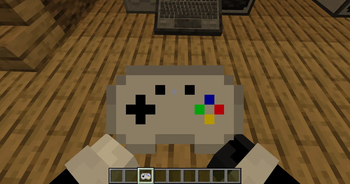
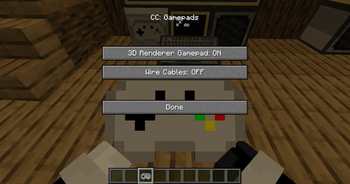
CC: Gamepads adds a CC:Tweaked peripheral block which lets ComputerCraft computers read real gamepad/controller input from players.
Screenshots
About this Mod
CC: Gamepads adds a CC:Tweaked peripheral block which lets ComputerCraft computers read real gamepad/controller input from players.
The controller is read on the player client, sent to the server, and exposed to Lua through a bound Gamepad Peripheral. This works in singleplayer, LAN, and dedicated multiplayer servers.
Requirements
Minecraft 1.21.1
NeoForge 21.1.x
CC:Tweaked 1.117.1
How To Use
Place a Gamepad Peripheral block next to, or connected by modem to, a CC:Tweaked computer.
Hold a Gamepad item.
Sneak-right-click the Gamepad Peripheral with the Gamepad item to bind it.
Keep the bound Gamepad item in your main hand or off hand.
Plug in/connect with bluetooth your/a controller and run Lua code on the computer.
Up to 4 players can send input to the same Gamepad Peripheral at once. Each player gets a slot from 1 to 4.
Lua Peripheral
Wrap the peripheral like any other CC:Tweaked peripheral:
local pad = peripheral.find("gamepad")
Functions
getPlayers()
Returns a list of connected controller states.
Each entry includes:
slot: player slot, 1 to 4
player: player name
playerId: player UUID
controllerId: client controller id
controllerName: controller name
guid: controller GUID
buttons: numbered button table
buttonNames: named button table
axes: numbered axis table
axisNames: named axis table
updatedAt: server timestamp
getState(slot)
Returns the full state table for one slot.
Throws an error if no controller is bound to that slot.
isDown(slot, button)
Returns true if a numbered button is held.
Buttons:
A
B
X
Y
Left bumper
Right bumper
Back/select
Start
Guide/home
Left stick
Right stick
D-pad up
D-pad right
D-pad down
D-pad left
isButtonDown(slot, name)
Returns true if a named button is held.
Names:
a b x y
leftBumper rightBumper
back select start guide home
leftStick rightStick
dpadUp dpadRight dpadDown dpadLeft
getAxis(slot, axis)
Returns a numbered axis value.
Axes:
Left X, -1 to 1
Left Y, -1 to 1
Right X, -1 to 1
Right Y, -1 to 1
Left trigger, 0 to 1
Right trigger, 0 to 1
getAxisValue(slot, name)
Returns a named axis value.
Names:
leftX leftY rightX rightY leftTrigger rightTrigger
getMaxPlayers()
Returns 4.
getButtonCount()
Returns 15.
getAxisCount()
Returns 6.
Events
When controller state changes, attached computers receive:
cc_events, "gamepad", slot, playerName, controllerId
Example:
local event, kind, slot, player, controllerId = os.pullEvent("cc_events")
if kind == "gamepad" then
print(player .. " updated slot " .. slot)
end
Example Lua Program
This prints basic state for slot 1 and exits when Start is pressed.
local pad = peripheral.find("gamepad")
if not pad then
error("No gamepad peripheral found")
end
print("Waiting for gamepad input...")
while true do
local event, kind, slot, player = os.pullEvent("cc_events")
if kind == "gamepad" and slot == 1 then
local lx = pad.getAxisValue(1, "leftX")
local ly = pad.getAxisValue(1, "leftY")
local a = pad.isButtonDown(1, "a")
local b = pad.isButtonDown(1, "b")
term.clear()
term.setCursorPos(1, 1)
print("Player: " .. player)
print(("Left stick: %.2f %.2f"):format(lx, ly))
print("A: " .. tostring(a))
print("B: " .. tostring(b))
print("Start exits")

if pad.isButtonDown(1, "start") then
  break
end
end
end
Multiplayer Notes
Controller input is only accepted from the player who sent it.
The player must be holding a Gamepad item bound to the target peripheral.
Controller IDs and GUIDs are verified server-side.
Packet sizes, string lengths, button counts, axis counts, and axis values are validated before the state is accepted.
Player state is cleared when they disconnect or when their controller list changes.
Available Versions
How to Install CC:Gamepad on Your Server
Order Server
Order a Minecraft Java server with at least 3 GB RAM (4 GB recommended).
Set neoforge Loader
In the panel under "Egg", select the neoforge loader and matching Minecraft version (1.21.1).
Install Mod
Open the mod browser in the dashboard and search for "CC:Gamepad". Click "Install" – done! Alternatively, upload the .jar via SFTP to the /mods folder.
Compatibility
Mod Loaders
Minecraft Versions
1.21.1
Server-side
✓ RequiredRecommended RAM
4 GB(min. 3 GB)Frequently Asked Questions
CC:Gamepad server crashes on startup – what to do?
Most common cause: wrong neoforge version or insufficient RAM. Check the server log (latest.log) for "OutOfMemoryError" or "Mixin" errors. With Mado Hosting: ensure at least 3 GB RAM is allocated and the loader matches the mod version (1.21.1). You can switch loaders with one click in the panel.
Is CC:Gamepad compatible with neoforge?
CC:Gamepad officially supports neoforge for Minecraft 1.21.1. The Mado dashboard automatically detects incompatible loader combinations.
Server lagging with CC:Gamepad – how to optimize performance?
Recommended RAM: 4 GB (per 8 players). Use /spark profiler to check if CC:Gamepad consumes the most tick time. Common fixes: reduce server view-distance to 8-10, install "performant" or "starlight" as supplementary mods on Forge. With Mado Hosting, your server runs on NVMe SSDs with dedicated CPU cores for minimal latency.
Similar Mods





Rent Modded Server
Install CC:Gamepad with just one click on your server.