
CClaims
Server-Side Container Claim Mod
Screenshots
About this Mod
CClaims: A container claim mod for fabric
Claims is a Fabric server-side mod to claim and protect container blocks (e.g. Chest, Barrels and Hoppers).
This mod provides the /cclaim command to work with the claims.
Permissions can be managed by LuckPerms or any other mod implementing the fabric-permissions-api.
Features:
- Supported Container Blocks: Chests, Copper Chests, Barrels, Hoppers, Shelfs, Brewing Stands and Beacons
- Prevents usage and destruction of claimed blocks by other players (except admin mode players)
- Prevents destruction by explosions, headless pistons (aka. the bedrock breaking method) or the Ender dragon
- Players can add ("trust") players to their claims.
- Claims can trust registered groups that can be managed dynamically by players
Note:
Claimed hoppers will push items into unclaimed containers. Therefore, you should not have claimed hoppers facing an unclaimed block (including normal non-container blocks that cannot be claimed).
Commands
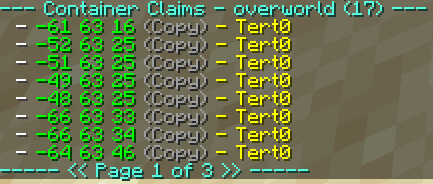
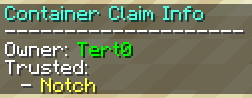
/cclaim claim: Claims the container the player is facing/cclaim unclaim: Unclaims the container the player is facing/cclaim trust <player>: Trusts a player to use the claimed container. Trusted players can only use the container, but neither destroy the block nor manage the claim./cclaim untrust <player>: Untrusts a player from a claimed container/cclaim trust group <group>: Trusts a group to use the claimed container./cclaim untrust group <group>: Untrusts a group to use the claimed container./cclaim info: Shows the current claim status of the container the player is facing/cclaim adminmode: Toggles if the player is in admin mode. The mod treats players in admin mode like they own every claim./cclaim list [<dimension>] [all]: Lists the coordinates of all container claims in a dimension (defaults to the overworld). By default, the list is paginated, but this can be turned off by adding "all" as an argument./cclaim group create <group>: Creates a new group. The group name is limited to lowercase letter, numbers and underscores and has to be between 3 and 16 characters long./cclaim group delete <group>: Deleted a group./cclaim group join <group> <player>: Adds a player to the group./cclaim group leave <group> <player>: Removes a member from the group./cclaim group info <group>: Shows the name, owner and members of the group./cclaim group list: Lists all groups the player is a member of./cclaim group transfer <group> <player>: Changes the owner of a group.
Permissions
cclaim.adminmode: Required to use/cclaim adminmode. By default, it requires OP Level 3cclaim.list: Required to use/cclaim list. By default, it requires OP Level 2cclaim.info.admin: Allows to get all data using/cclaim infoon claims owned by other players and additionally shows the timestamp of claim creation. By default, it requires OP Level 2cclaim.group.create: Allows players to create groups. By default, all players have can do this.cclaim.group.admin: Allows to use group commands on groups that the player does not own. By default, it requires OP Level 3cclaim.group.transfer: Allows to change the owner of a group. By default, it requires OP Level 3
Storage
The claim data is stored in the NBT data of the block entities.
Additional metadata is stored as NBT in world/dimensions/minecraft/{overworld,the_nether,the_end}/data/cclaims/claims.dat and world/data/cclaims/groups.dat.
License
This project is licensed under the GNU Lesser General Public License version 3 only.
Available Versions
How to Install CClaims on Your Server
Order Server
Order a Minecraft Java server with at least 3 GB RAM (4 GB recommended).
Set fabric Loader
In the panel under "Egg", select the fabric loader and matching Minecraft version (26.1.2).
Install Mod
Open the mod browser in the dashboard and search for "CClaims". Click "Install" – done! Alternatively, upload the .jar via SFTP to the /mods folder.
Compatibility
Mod Loaders
Minecraft Versions
26.1.2, 26.1.1, 26.1 (+15 more)
Server-side
✓ RequiredRecommended RAM
4 GB(min. 3 GB)Frequently Asked Questions
CClaims server crashes on startup – what to do?
Most common cause: wrong fabric version or insufficient RAM. Check the server log (latest.log) for "OutOfMemoryError" or "Mixin" errors. With Mado Hosting: ensure at least 3 GB RAM is allocated and the loader matches the mod version (26.1.2). You can switch loaders with one click in the panel.
Is CClaims compatible with fabric?
CClaims officially supports fabric for Minecraft 26.1.2, 26.1.1, 26.1. The Mado dashboard automatically detects incompatible loader combinations.
Server lagging with CClaims – how to optimize performance?
Recommended RAM: 4 GB (per 8 players). Use /spark profiler to check if CClaims consumes the most tick time. Common fixes: reduce server view-distance to 8-10, install "performant" or "starlight" as supplementary mods on Forge. With Mado Hosting, your server runs on NVMe SSDs with dedicated CPU cores for minimal latency.
Similar Mods






Rent Modded Server
Install CClaims with just one click on your server.