
CCLive-Utilities
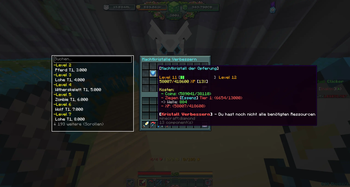
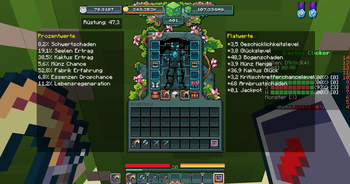
Diese Mod fügt verschiedene Features zum Spielmodus Kaktus Klicker hinzu. (Keine Offizielle Mod von PlayLegend.net!!!) This mod adds a variety of features to the game mode Cactus Clicker . (Not an official mod from PlayLegends.net!!!)
Screenshots
About this Mod


Deutsche Beschreibung
CCLive-Utilities
Diese Mod fügt verschiedene Funktionen und Features zum Spielmodus Kaktus Klicker auf dem playlegend.net Server hinzu. (Keine Offizielle Mod von PlayLegend.net!!!)
Features
- Ausrüstungs Tracker
- Schmied Tracker
- Materialien Tracker
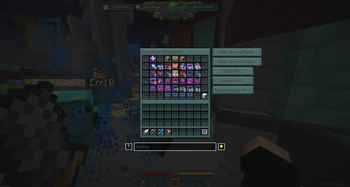
- Suchleiste
- BossHP Tracker
- Karten/Statuen Tracker
- Kill Tracker
- Animation Blocker
- Bauplan Tracker
- Wellen Anzeige
- Aspekt Anzeige
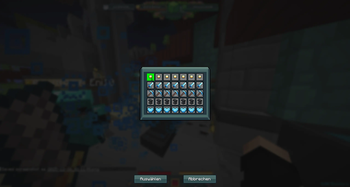
- Kits Filter
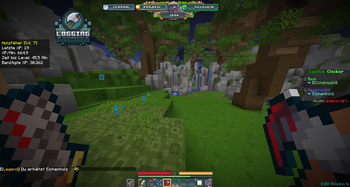
- Bergbau/Holzfäller Overlay
- Machtkristall Essenzenliste
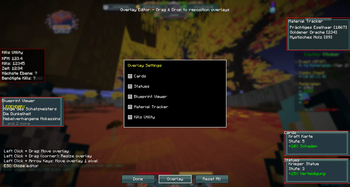
- Overlay Editor
- Custom ChatHoverInfos
- Chat Icons
- Spieler Statistiken
Info
- Mit /bp reset kannst du deine gefundenen Baupläne zurücksetzen. Wenn du den Bauplan Shop öffnest und alle Seiten durchgehst, dann werden alle Baupläne die du bereits gefunden hast abgehakt. Mit den Pfeiltasten kann man zwischen den Seltenheitsstufen wechseln.
- Mit F6 kannst du ein Menü öffnen, in welchem du die Overlays direkt auf dem Bildschirm verschieben kannst.
- Es gibt verschiedene Hotkey, die man in den Einstellungen festlegen kann. Zum Beispiel: Overlays ein- und ausblenden, Kills resetten oder Schmiedezustände toggeln.
Die Mod verfügt über eine weitreichende Config, in der du im ModMenu viele einstellungen Tätigen kannst. Es gibt auch Hotkeys, die in der standart Tastenbelegung von Minecraft eingestellt werden können.
Abhängigkeit
Um CCLive-Utilities benutzen zu können, benötigst du folgende Mods:
Links
Bugs-/Fehlermeldungen, Ideen, Verbesserungen:
Unterstütze uns über Ko-Fi:
English description
CCLive-Utilities
This mod adds a variety of features to the Cactus Clicker gamemode on the playlegend.net minecraft server. (Not an official mod from PlayLegend.net!!!)
Features
- Armor Tracker
- Forge Tracker
- Material Tracker
- Searchbar
- BossHP Tracker
- Cards/Statues Tracker
- Kill Tracker
- Animation Blocker
- Blueprint Tracker
- Wave Tracker
- Aspect Tracker
- Kits Filter
- Mining/Logging Overlay
- Power Crystal Essence List
- Custom ChatHoverInfos
- Chat Icons
- Player Stats
Info
- You can reset your found blueprints with /bp reset. You can check off all your found blueprints when you go to the blueprint shop and go through every page. You can change the rarity with the arrow keys.
- When you press F6 you can open a menu, where you can drag and drop the overlays on the screen
- There are different hotkeys, that you can configure in the controls. Example: Toggle Overlays, reset Kills, Toggle smithing grade
The mod has a big config which you can access through ModMenu. You can also edit hotkeys in the normal minecraft settings.
Dependencies
To use CCLive-Utilities you will need to install following mods:
Links
Bug-/Mistakemessages, Ideas, Changesuggestions:
Support us via Ko-Fi:
Available Versions
How to Install CCLive-Utilities on Your Server
Order Server
Order a Minecraft Java server with at least 3 GB RAM (4 GB recommended).
Set fabric Loader
In the panel under "Egg", select the fabric loader and matching Minecraft version (1.21.8).
Install Mod
Open the mod browser in the dashboard and search for "CCLive-Utilities". Click "Install" – done! Alternatively, upload the .jar via SFTP to the /mods folder.
Compatibility
Mod Loaders
Minecraft Versions
1.21.8, 1.21.7
Server-side
✗ UnsupportedRecommended RAM
4 GB(min. 3 GB)Frequently Asked Questions
CCLive-Utilities server crashes on startup – what to do?
Most common cause: wrong fabric version or insufficient RAM. Check the server log (latest.log) for "OutOfMemoryError" or "Mixin" errors. With Mado Hosting: ensure at least 3 GB RAM is allocated and the loader matches the mod version (1.21.8). You can switch loaders with one click in the panel.
Is CCLive-Utilities compatible with fabric?
CCLive-Utilities officially supports fabric for Minecraft 1.21.8, 1.21.7. The Mado dashboard automatically detects incompatible loader combinations.
Server lagging with CCLive-Utilities – how to optimize performance?
Recommended RAM: 4 GB (per 8 players). Use /spark profiler to check if CCLive-Utilities consumes the most tick time. Common fixes: reduce server view-distance to 8-10, install "performant" or "starlight" as supplementary mods on Forge. With Mado Hosting, your server runs on NVMe SSDs with dedicated CPU cores for minimal latency.
Similar Mods






Rent Modded Server
Install CCLive-Utilities with just one click on your server.
Details
- License
- Creative Commons Attribution Non Commercial Share Alike 4.0 International
- Server-side
- Unsupported