
Cell⁴
One cell. Infinite resources. Any filter you need.
Screenshots
About this Mod
Cell⁴
Infinite ME Storage Cells for Applied Energistics 2
Cell⁴ is an AE2 addon designed for modpack development. It adds three types of Infinity Cells that can be bound to specific items via NBT or data components, allowing infinite extraction from the ME network. Inserted matching items are silently discarded, consuming no actual storage.
Supported versions: 1.20.1 (Forge), 1.21.1 (NeoForge), 26.1.2 (NeoForge)
Infinity Cell Types
- Infinity Item Cell — bind specific items/fluids
- Infinity Tag Cell — bind all items matching tags and/or from specified mods
- Infinity ModID Cell — bind all items from a mod
Cell Configurator
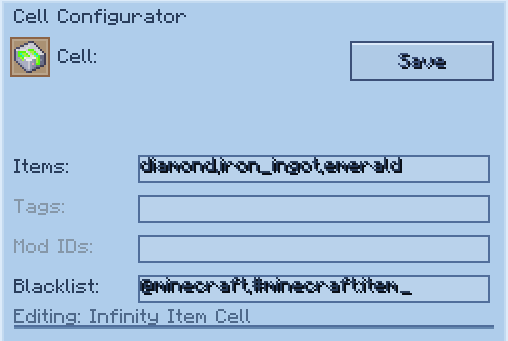
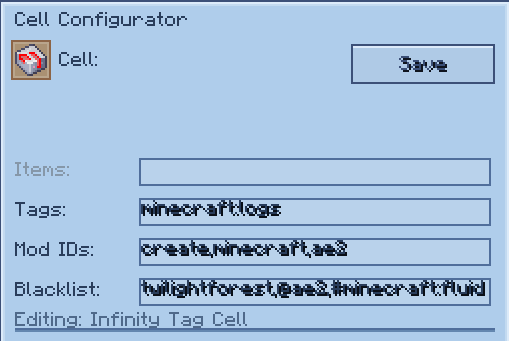
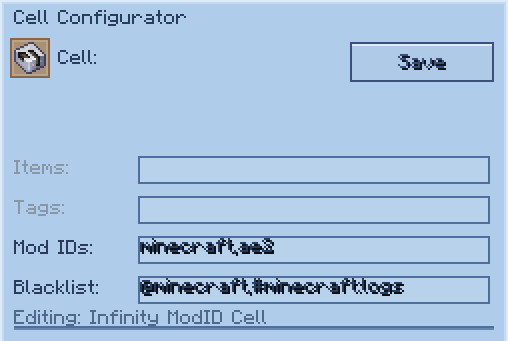
The Cell Configurator is an in-game tool for editing cell data visually. Right-click while holding it to open the configuration GUI, then place a cell into the slot.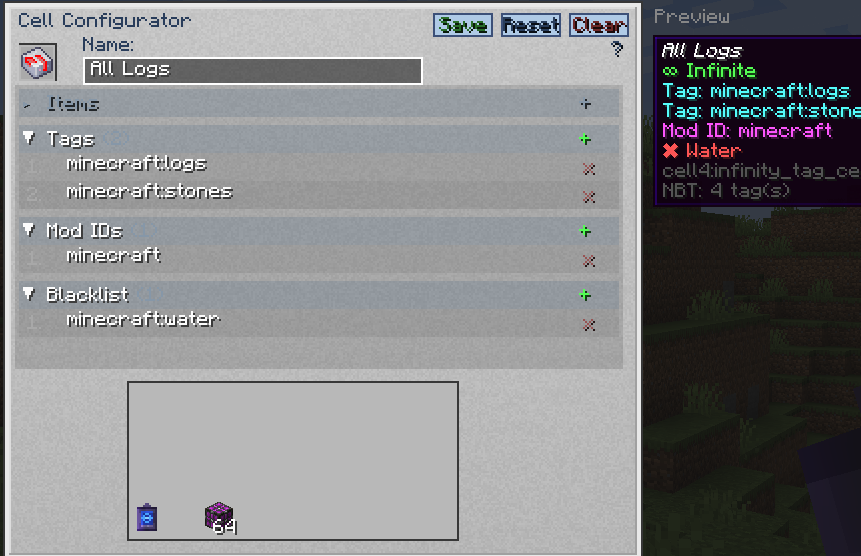
- Editable fields change based on the cell type placed in the slot.
- Inactive fields are shown in gray and cannot be edited.
- Separate multiple values with commas (e.g.
minecraft:diamond,minecraft:oak_log). - In the blacklist field, prefix tags with
#(e.g.#minecraft:birch_logs) and mod IDs with@(e.g.@mekanism). - Press Tab to cycle between editable fields.
- Press Enter to save changes.
- Click Save to apply changes, Reset to revert, or Clear to erase all fields.
| Cell Type | Editable Fields |
|---|---|
| Item Cell | cell4item, cell4blacklist |
| Tag Cell | cell4tag, cell4modid, cell4blacklist |
| ModID Cell | cell4modid, cell4blacklist |
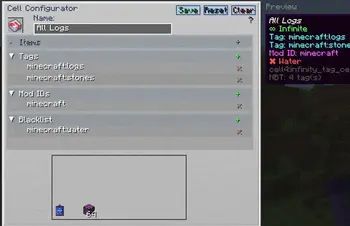
Preview
The right side of the GUI displays a Preview panel showing the cell's tooltip as it would appear in your inventory. If a custom name is set in the name field, the preview updates in real time with the new name shown in italic style.
Data Keys
| Key | Target | Example |
|---|---|---|
cell4item |
Specific items/fluids | "minecraft:diamond" |
cell4tag |
Tag | "minecraft:logs" |
cell4modid |
Mod ID (Tag Cell also supports this) | "mekanism" |
cell4blacklist |
Exclude items/tags/mods (optional) | See below |
cell4name |
Custom display name (optional) | "My Diamond Cell" |
1.20.1 stores these keys as raw NBT (
{...}). 1.21.1 & 26.1.2 store them inside data components ([custom_data={...}]).
Command Examples
1.21.1 & 26.1.2 use [custom_data={...}] syntax; 1.20.1 uses {...} syntax. Tag namespace: c: in 1.21.1/26.1.2, forge: in 1.20.1.
Single Value
# 1.21.1 / 26.1.2
/give @p cell4:infinity_item_cell[custom_data={cell4item:"minecraft:diamond"}]
/give @p cell4:infinity_tag_cell[custom_data={cell4tag:"minecraft:logs"}]
/give @p cell4:infinity_modid_cell[custom_data={cell4modid:"mekanism"}]

# 1.20.1
/give @p cell4:infinity_item_cell{cell4item:"minecraft:diamond"}
/give @p cell4:infinity_tag_cell{cell4tag:"minecraft:logs"}
/give @p cell4:infinity_modid_cell{cell4modid:"mekanism"}
Multiple Values
# 1.21.1 / 26.1.2
/give @p cell4:infinity_item_cell[custom_data={cell4item:["minecraft:diamond","minecraft:oak_log"]}]
/give @p cell4:infinity_tag_cell[custom_data={cell4tag:["minecraft:logs","c:ingots/iron"]}]
/give @p cell4:infinity_modid_cell[custom_data={cell4modid:["mekanism","thermal"]}]

# 1.20.1
/give @p cell4:infinity_item_cell{cell4item:["minecraft:diamond","minecraft:oak_log"]}
/give @p cell4:infinity_tag_cell{cell4tag:["minecraft:logs","forge:ingots/iron"]}
/give @p cell4:infinity_modid_cell{cell4modid:["mekanism","thermal"]}
Tag Cell with Mod ID Filter
The Infinity Tag Cell supports both cell4tag and cell4modid simultaneously:
# 1.21.1 / 26.1.2
/give @p cell4:infinity_tag_cell[custom_data={cell4tag:"minecraft:logs",cell4modid:"mekanism"}]
/give @p cell4:infinity_tag_cell[custom_data={cell4tag:["minecraft:logs","c:ingots/iron"],cell4modid:["mekanism","thermal"]}]

# 1.20.1
/give @p cell4:infinity_tag_cell{cell4tag:"minecraft:logs",cell4modid:"mekanism"}
/give @p cell4:infinity_tag_cell{cell4tag:["minecraft:logs","forge:ingots/iron"],cell4modid:["mekanism","thermal"]}
Blacklist
Blacklist entries support three types:
- Item — plain identifier (e.g.
minecraft:birch_log) - Tag — prefixed with
#(e.g.#minecraft:birch_logs) - Mod ID — prefixed with
@(e.g.@mekanism)
# 1.21.1 / 26.1.2
/give @p cell4:infinity_tag_cell[custom_data={cell4tag:"minecraft:logs",cell4blacklist:"minecraft:birch_log"}]
/give @p cell4:infinity_modid_cell[custom_data={cell4modid:"mekanism",cell4blacklist:["mekanism:steel_ingot","#c:ingots/steel","@thermal"]}]

# 1.20.1
/give @p cell4:infinity_tag_cell{cell4tag:"minecraft:logs",cell4blacklist:"minecraft:birch_log"}
/give @p cell4:infinity_modid_cell{cell4modid:"mekanism",cell4blacklist:["mekanism:steel_ingot","#forge:ingots/steel","@thermal"]}
Blacklisted items are shown in the cell tooltip with a ✖ marker.
Available Versions
How to Install Cell⁴ on Your Server
Order Server
Order a Minecraft Java server with at least 3 GB RAM (4 GB recommended).
Set forge Loader
In the panel under "Egg", select the forge loader and matching Minecraft version (26.1.2).
Install Mod
Open the mod browser in the dashboard and search for "Cell⁴". Click "Install" – done! Alternatively, upload the .jar via SFTP to the /mods folder.
Compatibility
Mod Loaders
Minecraft Versions
26.1.2, 1.21.1, 1.20.1
Server-side
✓ RequiredRecommended RAM
4 GB(min. 3 GB)Frequently Asked Questions
Cell⁴ server crashes on startup – what to do?
Most common cause: wrong forge version or insufficient RAM. Check the server log (latest.log) for "OutOfMemoryError" or "Mixin" errors. With Mado Hosting: ensure at least 3 GB RAM is allocated and the loader matches the mod version (26.1.2). You can switch loaders with one click in the panel.
Is Cell⁴ compatible with forge and neoforge?
Cell⁴ officially supports forge, neoforge for Minecraft 26.1.2, 1.21.1, 1.20.1. The Mado dashboard automatically detects incompatible loader combinations.
Server lagging with Cell⁴ – how to optimize performance?
Recommended RAM: 4 GB (per 8 players). Use /spark profiler to check if Cell⁴ consumes the most tick time. Common fixes: reduce server view-distance to 8-10, install "performant" or "starlight" as supplementary mods on Forge. With Mado Hosting, your server runs on NVMe SSDs with dedicated CPU cores for minimal latency.
Similar Mods


Rent Modded Server
Install Cell⁴ with just one click on your server.