
Censor Chat
Create your own blacklist of words to be removed from all chat messages on a server. (It will replace the word with a single space)
Screenshots
About this Mod
Censor Chat
- Create a blacklist of an infinite number of words to be removed from the chat!
- Any blacklisted word will be replaced with a single space, allowing you to read the rest of the message without the clutter of a bunch of ********
- DO NOT add this to your server mods folder, it is a client-sided mod ONLY!
HOW-TO
- Drag and drop into the mods folder
- Launch the game
- Close the game
- Go into the config folder (should be somewhere above the mods folder)
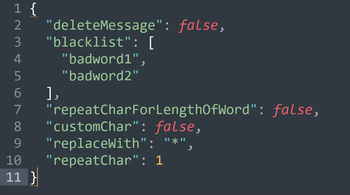
- Open the censor_chat.json with notepad or whatever program you use to edit .json files.
{
  "deleteMessage": false,   // Delete the entire message if a blacklisted word is found
  "blacklist": [    // add your own words here (replace badword1 etc)
    "badword1",
    "badword2",     // make sure you add commas at the end of every entry to the list
    "badword3"      // DON'T add a comma at the end of the final entry in the list
  ],
  "repeatCharForLengthOfWord": false,  // will replace the blacklisted word for the entire length of the word
  "customChar": false,  // if you want to use your own character instead of the default space
  "replaceWith": "*",   // if customChar is set to true, will use this character instead of default space
  "repeatChar": 1       // if this number (integer) is higher than 1, and repeatCharForLengthOfWord is set to false, this will replace the blacklisted word for the length of this number
}
COMING SOON:
Version Support:
- Forge 1.20.X support. (I might do 1.12.2-1.20.4 if people want it on multiple versions I can swiss cheese the version builds since this is such a simple mod it probably wouldn't be too difficult)
Fabric 1.20.X support.DONE- Quilt 1.20.X support.
- Neoforge might be getting 1.20.X support, however, I'm not entirely sure how neoforge works yet so that might have to be placed on hold lmao.
New features:
Adding a new config option to choose what character to replace the blacklisted word, and how many (repeat the character X amount of times; for example, if you set the character to "x" and set it to repeat 4 times, then "badword1" would be replaced with "xxxx"CONFIG OVERHAULED
Available Versions
How to Install Censor Chat on Your Server
Order Server
Order a Minecraft Java server with at least 3 GB RAM (4 GB recommended).
Set fabric Loader
In the panel under "Egg", select the fabric loader and matching Minecraft version (1.21).
Install Mod
Open the mod browser in the dashboard and search for "Censor Chat". Click "Install" – done! Alternatively, upload the .jar via SFTP to the /mods folder.
Compatibility
Mod Loaders
Minecraft Versions
1.21, 1.20.6, 1.20.5 (+5 more)
Server-side
✗ UnsupportedRecommended RAM
4 GB(min. 3 GB)Frequently Asked Questions
Censor Chat server crashes on startup – what to do?
Most common cause: wrong fabric version or insufficient RAM. Check the server log (latest.log) for "OutOfMemoryError" or "Mixin" errors. With Mado Hosting: ensure at least 3 GB RAM is allocated and the loader matches the mod version (1.21). You can switch loaders with one click in the panel.
Is Censor Chat compatible with fabric and forge and quilt?
Censor Chat officially supports fabric, forge, quilt for Minecraft 1.21, 1.20.6, 1.20.5. Note: Forge and Fabric mods are NOT cross-compatible – pick one loader and stick with it. The Mado dashboard automatically detects incompatible loader combinations.
Server lagging with Censor Chat – how to optimize performance?
Recommended RAM: 4 GB (per 8 players). Use /spark profiler to check if Censor Chat consumes the most tick time. Common fixes: reduce server view-distance to 8-10, install "performant" or "starlight" as supplementary mods on Forge. With Mado Hosting, your server runs on NVMe SSDs with dedicated CPU cores for minimal latency.
Similar Mods






Rent Modded Server
Install Censor Chat with just one click on your server.