
Censorship
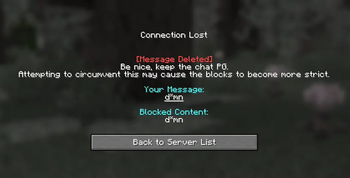
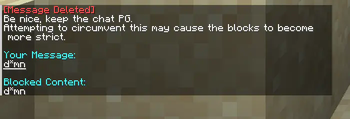
A server-side mod that helps maintain chat civility by filtering inappropriate language and content.
Screenshots
About this Mod
Censorship
A server-side Minecraft mod that helps maintain chat civility by filtering inappropriate language and content.
About
Censorship is primarily designed for the Distant Horizons SMP. It uses the same tested regex filters that are present on the Distant Horizons Discord server for consistent moderation and are constantly updated!
Features
- Support logging to a Discord channel via Webhooks!
- Aiming maximum mod compatibility with the message not even being recognized by the server if it's prohibited.
Configuration
After the first run, a configuration file will be generated. You can adjust the following settings:
[Settings]
  # Whether to kick the player or send them a warning message
  kickPlayer = true

  # Log messages to a Discord webhook
  discordWebhookURL = ""

  [Advanced]
    # DO NOT TOUCH | URL to fetch the regex from
    regexURL = "https://gitlab.com/distant-horizons-team/yagpdb-regex-censor/-/raw/main/discord_bot_censor_code_merge.cs"
    # Show debug logs for the regex parser
    debugMode = false
Credits
- YAGPDB Regex Censor maintained by the Distant Horizons team
Checkout the gallery to see how the mod looks!
Available Versions
How to Install Censorship on Your Server
Order Server
Order a Minecraft Java server with at least 3 GB RAM (4 GB recommended).
Set fabric Loader
In the panel under "Egg", select the fabric loader and matching Minecraft version (1.21.4).
Install Mod
Open the mod browser in the dashboard and search for "Censorship". Click "Install" – done! Alternatively, upload the .jar via SFTP to the /mods folder.
Compatibility
Mod Loaders
Minecraft Versions
1.21.4
Server-side
✓ RequiredRecommended RAM
4 GB(min. 3 GB)Frequently Asked Questions
Censorship server crashes on startup – what to do?
Most common cause: wrong fabric version or insufficient RAM. Check the server log (latest.log) for "OutOfMemoryError" or "Mixin" errors. With Mado Hosting: ensure at least 3 GB RAM is allocated and the loader matches the mod version (1.21.4). You can switch loaders with one click in the panel.
Is Censorship compatible with fabric and neoforge?
Censorship officially supports fabric, neoforge for Minecraft 1.21.4. The Mado dashboard automatically detects incompatible loader combinations.
Server lagging with Censorship – how to optimize performance?
Recommended RAM: 4 GB (per 8 players). Use /spark profiler to check if Censorship consumes the most tick time. Common fixes: reduce server view-distance to 8-10, install "performant" or "starlight" as supplementary mods on Forge. With Mado Hosting, your server runs on NVMe SSDs with dedicated CPU cores for minimal latency.
Similar Mods






Rent Modded Server
Install Censorship with just one click on your server.