
Change My Account
Allows you to change your Minecraft username and skin on the fly, without leaving the game or restarting the client.
Screenshots
About this Mod
Main Features
Account Management
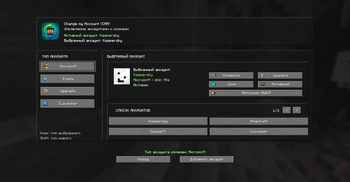
The mod adds a convenient menu for managing accounts directly in the client. You can quickly switch between profiles without unnecessary file handling or manual setup.
Fast Account Switching
Switching between accounts is done through a separate interface, allowing you to quickly log into the desired profile and change the active account in just a couple of clicks.
Skin Selection and Installation
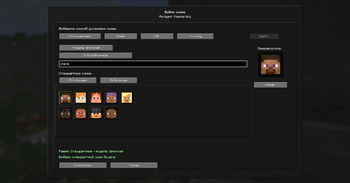
For each account, you can choose a skin in several ways:
- Default — choose from ready-made options
- File — install a skin from a local
.pngfile - URL — load a skin from a link
- By Nickname — get a skin using a player's nickname
Skin Preview
Before saving, the selected skin is shown in a preview so you can immediately see the result before applying it.
Favorite Skins
You can add skins you like to favorites for quick access in the future.
Recent Skins
The mod keeps a history of recently used skins so you can quickly return to them without searching or selecting them again.
Local Skin Storage
Selected skins are stored locally in the mod configuration, making them easy to manage and reuse between sessions.
Convenient Interface
The mod interface includes a separate screen for account management and skin selection, so all main actions are available in one place.
Client-Side Functionality
The mod works on the client side and does not require mandatory installation on the server.
Custom Skin Rendering
Custom skins work correctly for players who have the mod installed. If other players do not have the mod installed, they may not see these skins.
Основные механики
Управление аккаунтами
Мод добавляет удобное меню для работы с аккаунтами прямо в клиенте. Можно быстро переключаться между профилями без лишней возни с файлами и ручной настройкой.
Быстрая смена аккаунта
Переключение между аккаунтами сделано через отдельный интерфейс, чтобы быстро входить в нужный профиль и менять активный аккаунт в пару кликов.
Выбор и установка скина
Для каждого аккаунта можно выбрать скин несколькими способами:
- Стандартные — выбор из готовых вариантов
- Файл — установка скина из локального
.pngфайла - URL — загрузка скина по ссылке
- По нику — получение скина по нику игрока
Предпросмотр скина
Перед сохранением отображается предпросмотр выбранного скина, чтобы можно было сразу увидеть результат до применения.
Избранные скины
Понравившиеся скины можно добавлять в избранное для быстрого доступа в будущем.
Последние скины
Мод сохраняет историю последних использованных скинов, чтобы к ним можно было быстро вернуться без повторного поиска или выбора.
Локальное хранение скинов
Выбранные скины сохраняются локально в конфигурации мода, благодаря чему ими удобно управлять и переиспользовать между сессиями.
Удобный интерфейс
Интерфейс мода сделан с отдельным экраном управления аккаунтами и выбора скинов, чтобы все основные действия были доступны в одном месте.
Клиентская работа
Мод работает на стороне клиента и не требует обязательной установки на сервер.
Отображение кастомных скинов
Кастомные скины корректно работают у игроков с установленным модом. Если у других игроков мод не установлен, они могут не видеть эти скины.
Available Versions
How to Install Change My Account on Your Server
Order Server
Order a Minecraft Java server with at least 3 GB RAM (4 GB recommended).
Set fabric Loader
In the panel under "Egg", select the fabric loader and matching Minecraft version (1.21.6).
Install Mod
Open the mod browser in the dashboard and search for "Change My Account". Click "Install" – done! Alternatively, upload the .jar via SFTP to the /mods folder.
Compatibility
Mod Loaders
Minecraft Versions
1.21.6
Server-side
✗ UnsupportedRecommended RAM
4 GB(min. 3 GB)Frequently Asked Questions
Change My Account server crashes on startup – what to do?
Most common cause: wrong fabric version or insufficient RAM. Check the server log (latest.log) for "OutOfMemoryError" or "Mixin" errors. With Mado Hosting: ensure at least 3 GB RAM is allocated and the loader matches the mod version (1.21.6). You can switch loaders with one click in the panel.
Is Change My Account compatible with fabric?
Change My Account officially supports fabric for Minecraft 1.21.6. The Mado dashboard automatically detects incompatible loader combinations.
Server lagging with Change My Account – how to optimize performance?
Recommended RAM: 4 GB (per 8 players). Use /spark profiler to check if Change My Account consumes the most tick time. Common fixes: reduce server view-distance to 8-10, install "performant" or "starlight" as supplementary mods on Forge. With Mado Hosting, your server runs on NVMe SSDs with dedicated CPU cores for minimal latency.
Similar Mods






Rent Modded Server
Install Change My Account with just one click on your server.