
Changed Cosmetic Patch
A small client side configurable appearance for Changed mod. Formerly known as "Changed AP bean fix".
Screenshots
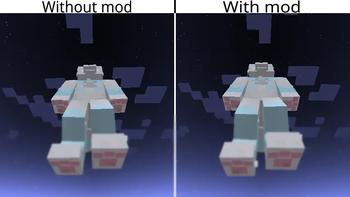
About this Mod
About this mod
This is a simple client side cosmetic fix for the Changed mod. It automatically apply the default patches to the base mod as well as other addons if supported and installed. Version 1.0.0 and 1.0.1 is only fixes for Changed Addon Plus, but I change my mind and try to make this mod apply changes to the base as well.
Environment
This is a client side ONLY mod! Will CRASH dedicated server if installed.
Requirements
Required mod Changed
Configuration
In the config directory, there should be a config file named "changed_cosmetic_patch-client.toml". You can keep the default settings or edit them yourself by using your prefered external text editor.
Paw Beans
For the right and left arms, the config format is "Offset X, Offset Y, Offset Z, Rotation X, Rotation Y, Rotation Z".
Example: "-0.9,-0.5,-1.0,0.0,90.0,0.0".
For an ignored entity, the config format is "form_id", "another_form_id".
Example: "changed_addon:form_experiment009", "changed_addon:form_experiment_10".
Another use of this is to disable some of the form that my mod cannot fixed right away.
Emissive Texture
Apply glowing to some spefific textures or models
glow_roomba_eyestrue(boolean): Enable glows to Changed's Roomba eyes, make it stand out in the dark and glowing if using Shader.always_glowfalse(boolean): By default, my mod will turn off glows if the Roomba's charge level reached 0.0. You can turn off this behaviour by turn to true to making it always glows.roomba_charger_glowtrue(boolean): Make the Roomba Charger light up a bit when chargining. Light level 7, and client side, should not affect spawning.
Note
This is my first ever mod that publish, something will be wrong and I will try to fix it. Sorry if Im also bad at English and make confusion. Thanks for understanding.
Available Versions
How to Install Changed Cosmetic Patch on Your Server
Order Server
Order a Minecraft Java server with at least 3 GB RAM (4 GB recommended).
Set forge Loader
In the panel under "Egg", select the forge loader and matching Minecraft version (1.20.1).
Install Mod
Open the mod browser in the dashboard and search for "Changed Cosmetic Patch". Click "Install" – done! Alternatively, upload the .jar via SFTP to the /mods folder.
Compatibility
Mod Loaders
Minecraft Versions
1.20.1
Server-side
✗ UnsupportedRecommended RAM
4 GB(min. 3 GB)Frequently Asked Questions
Changed Cosmetic Patch server crashes on startup – what to do?
Most common cause: wrong forge version or insufficient RAM. Check the server log (latest.log) for "OutOfMemoryError" or "Mixin" errors. With Mado Hosting: ensure at least 3 GB RAM is allocated and the loader matches the mod version (1.20.1). You can switch loaders with one click in the panel.
Is Changed Cosmetic Patch compatible with forge?
Changed Cosmetic Patch officially supports forge for Minecraft 1.20.1. The Mado dashboard automatically detects incompatible loader combinations.
Server lagging with Changed Cosmetic Patch – how to optimize performance?
Recommended RAM: 4 GB (per 8 players). Use /spark profiler to check if Changed Cosmetic Patch consumes the most tick time. Common fixes: reduce server view-distance to 8-10, install "performant" or "starlight" as supplementary mods on Forge. With Mado Hosting, your server runs on NVMe SSDs with dedicated CPU cores for minimal latency.
Rent Modded Server
Install Changed Cosmetic Patch with just one click on your server.