
Chat Language Translate
A powerful Minecraft Fabric mod that provides real-time chat translation using the Google Translate API. Supporting multiple languages and offering both automatic and manual translation modes, it ensures you never miss a message in multiplayer environment
Screenshots

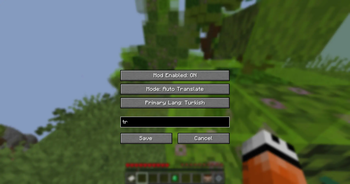

About this Mod
Chat Language Translate (Minecraft Fabric)
A powerful Minecraft Fabric mod that provides real-time chat translation using the Google Translate API. Supporting multiple languages and offering both automatic and manual translation modes, it ensures you never miss a message in a multiplayer environment.
🚀 Features
- Real-time Translation: Automatically translates incoming chat messages.
- Dual Modes:
- Auto-Translate: Instantly shows the translated text below the original message.
- Interactive Button: Appends a
[Translate](or localized) button to messages for manual translation on click.
- Dynamic Localization: The UI and chat buttons update based on your selected primary language.
- Target Language Indicator: Displays the target language code (e.g.,
(TR),(EN)) next to the translation. - High Compatibility: Optimized for Minecraft 1.21 and above (1.21+).
- Clean UI: Uses gray italics for translations to keep the chat readable and professional.
🌍 Supported Languages
The mod currently supports the following primary target languages:
- Turkish (tr)
- English (en)
- German (de)
- French (fr)
- Spanish (es)
- Russian (ru)
- Japanese (ja)
- Chinese (zh-CN)
- Korean (ko)
- Italian (it)
- Portuguese (pt)
Note: The mod can detect almost any language automatically; the list above defines the target languages you can select in the settings.
🛠️ API & Technical Details
- Translation Engine: Uses the Google Translate API (Gtx) for fast and reliable translations without requiring a private API key.
- Async Execution: API calls are handled asynchronously to ensure zero impact on game performance (TPS/FPS).
- Caching System: Includes a temporary session cache to prevent redundant API calls for the same message.
- Mixins: Leverages SpongePowered Mixins to safely intercept chat packets at the
ChatHudlevel.
⚙️ Requirements
To run this mod, you need:
- Fabric Loader
- Fabric API
- Mod Menu (for configuration access)
- Cloth Config API
📖 How to Use
- Install the mod and its dependencies.
- Launch Minecraft and go to Options > Mods > Chat Language Translate > Config.
- Select your Primary Language.
- Choose between Auto Translate or Translate Button mode.
- Enjoy communicating with players from all over the world!
Developed by dukecan
Available Versions
How to Install Chat Language Translate on Your Server
Order Server
Order a Minecraft Java server with at least 3 GB RAM (4 GB recommended).
Set fabric Loader
In the panel under "Egg", select the fabric loader and matching Minecraft version (1.21.11).
Install Mod
Open the mod browser in the dashboard and search for "Chat Language Translate". Click "Install" – done! Alternatively, upload the .jar via SFTP to the /mods folder.
Compatibility
Mod Loaders
Minecraft Versions
1.21.11, 1.21.10, 1.21.9 (+9 more)
Server-side
✗ UnsupportedRecommended RAM
4 GB(min. 3 GB)Frequently Asked Questions
Chat Language Translate server crashes on startup – what to do?
Most common cause: wrong fabric version or insufficient RAM. Check the server log (latest.log) for "OutOfMemoryError" or "Mixin" errors. With Mado Hosting: ensure at least 3 GB RAM is allocated and the loader matches the mod version (1.21.11). You can switch loaders with one click in the panel.
Is Chat Language Translate compatible with fabric?
Chat Language Translate officially supports fabric for Minecraft 1.21.11, 1.21.10, 1.21.9. The Mado dashboard automatically detects incompatible loader combinations.
Server lagging with Chat Language Translate – how to optimize performance?
Recommended RAM: 4 GB (per 8 players). Use /spark profiler to check if Chat Language Translate consumes the most tick time. Common fixes: reduce server view-distance to 8-10, install "performant" or "starlight" as supplementary mods on Forge. With Mado Hosting, your server runs on NVMe SSDs with dedicated CPU cores for minimal latency.
Similar Mods



Rent Modded Server
Install Chat Language Translate with just one click on your server.