
Khat
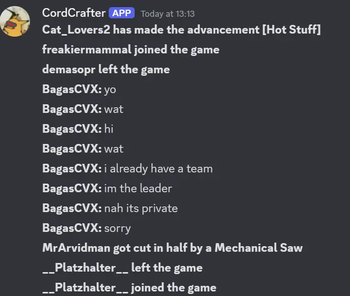
Yet another one of the many mods that allow for one thing: Sending Chat To Discord, and Discord To Chat.
Screenshots
About this Mod
Khat



Chat To Discord, Discord To Chat
About
Khat is a Minecraft mod that creates a bridge between your
Discord and Minecraft server. You give it a webhook and a
bot token, and it can create a seamless experience for you
and your players.
It contains several built-in features:
- Sending Player Messages.
- Sending Game Messages (e.g. Deaths, Advancements).
- Sending Command Messages (e.g. /say).
- Sending a Start and Stop message for the respective server lifecycle events.
- Sending Discord messages straight back to the server.
- Letting you link your profile with Minecraft.
- And also, before your message is sent, it goes through some necessary Compatibility handlers, which most mods lack:
- The message is modified to negate global pings (e.g.
@everyone). - The message is modified to negate invite links.
- The message is modified to negate any role pings that you don't allow in Config.
- The message and player names in it are modified to bypass Discord's native Markdown features (such as Cursive text).
- When sharing a waypoint using Xaero's Mini-/Worldmap, it displays a very "weird" message, this message can actually be deciphered using some logic, and this mod rewrites your message to be more legible.
- The message is modified to negate global pings (e.g.
- If the server crashes, a specialised embed will be sent, displaying the main cause, and also linking to an automatically made Mclogs Site!
And so much more! Check out all the available functions by checking the docs, or trying them out yourself.
Furthermore, you can also download versions of the mod without certain major functionalities, like the bot mode. A good example of this is only including the kRPC server, and having your own custom bot interact with your server!
Available Versions
How to Install Khat on Your Server
Order Server
Order a Minecraft Java server with at least 3 GB RAM (4 GB recommended).
Set fabric Loader
In the panel under "Egg", select the fabric loader and matching Minecraft version (26.1.2).
Install Mod
Open the mod browser in the dashboard and search for "Khat". Click "Install" – done! Alternatively, upload the .jar via SFTP to the /mods folder.
Compatibility
Mod Loaders
Minecraft Versions
26.1.2, 26.1.1, 26.1 (+14 more)
Server-side
✓ RequiredRecommended RAM
4 GB(min. 3 GB)Frequently Asked Questions
Khat server crashes on startup – what to do?
Most common cause: wrong fabric version or insufficient RAM. Check the server log (latest.log) for "OutOfMemoryError" or "Mixin" errors. With Mado Hosting: ensure at least 3 GB RAM is allocated and the loader matches the mod version (26.1.2). You can switch loaders with one click in the panel.
Is Khat compatible with fabric and neoforge and quilt?
Khat officially supports fabric, neoforge, quilt for Minecraft 26.1.2, 26.1.1, 26.1. The Mado dashboard automatically detects incompatible loader combinations.
Server lagging with Khat – how to optimize performance?
Recommended RAM: 4 GB (per 8 players). Use /spark profiler to check if Khat consumes the most tick time. Common fixes: reduce server view-distance to 8-10, install "performant" or "starlight" as supplementary mods on Forge. With Mado Hosting, your server runs on NVMe SSDs with dedicated CPU cores for minimal latency.
Similar Mods






Rent Modded Server
Install Khat with just one click on your server.
Details
- License
- LicenseRef-Tywrap-Studios-Protected-Art-License-v2.0
- Server-side
- Required