
Chat Translator
This mod adds DeepL support for global communication.
Screenshots
About this Mod

Chat Translator Mod
Chat Translator is a Minecraft mod that enhances your chat experience by integrating real-time translation capabilities using the DeepL API. Whether you're playing on a multilingual server or connecting with friends who speak different languages, this mod allows you to translate chat messages seamlessly, making communication effortless and inclusive.
Requirements
Installation Steps
- Install Fabric Loader: Download and install it from fabricmc.net. When you install, use minimum 0.16.10
- Install Fabric API: Get it from Modrinth and place it in your
modsfolder. - Download Chat Translator: Grab the latest JAR file from the releases page.
- Add to Mods Folder: Move the JAR file into your Minecraft
modsfolder. - Launch Minecraft: Start the game using the Fabric profile.
Configuration
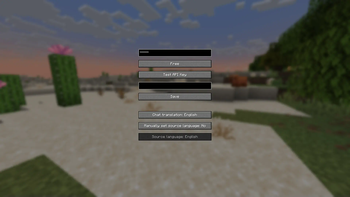
Access the configuration screen in-game by pressing the default keybind KP_ADD (numpad +) or via the Mod Menu if installed.
- API Key: Enter your DeepL API key here. If a key is already set, it appears masked (e.g.,
******). You can overwrite it with a new key. - Free / Pro: Toggles between the free and pro DeepL API modes. Free mode has basic features, while pro mode offers enhanced capabilities and higher limits.
- Test API Key: Tests your API key. The result (success or failure) appears in the result field.
- Result Field: Displays the outcome of the API key test (e.g., a translated sample or an error message).
- Save: Saves your settings and closes the configuration screen.
See messages sent to chat in the language of your choice:
- Chat translation: Sets your preferred language for translations (e.g., "EN" for English, "FR" for French).
- Manually set source language: Toggles whether the source language is manually specified. Shows "Yes" or "No" accordingly.
- Source language: Active only if manual source language is enabled. Selects the language of the text to be translated (e.g., "ES" for Spanish).
The message you want to translate is indicated in purple with [] at the end of each message in the chat.
In-Game Usage
Located above the chat bar, this field lets you type text for translation. Press Enter to process:
- Only you can see:
<text> <sourceLang> <targetLang>(e.g.,Hello EN EStranslates "Hello" from English to Spanish). - Sends to chat:
/send <text> <sourceLang> <targetLang>(e.g.,/send Bonjour FR ENsends "Hello").
See the languages supported by DeepL, along with their language codes: Supported Languages
Multilingual
- This mod supports the following languages: Arabic, Azerbaijani, Danish, German, English (US), Spanish (ES & MX), Finnish, French, Hindi, Dutch, Polish, Portuguese (BR), Russian, Swedish, Turkish, Ukrainian, and Chinese (ZH & TW). It will automatically switch to the language you are using in Minecraft.
Available Versions
How to Install Chat Translator on Your Server
Order Server
Order a Minecraft Java server with at least 3 GB RAM (4 GB recommended).
Set fabric Loader
In the panel under "Egg", select the fabric loader and matching Minecraft version (1.21.5).
Install Mod
Open the mod browser in the dashboard and search for "Chat Translator". Click "Install" – done! Alternatively, upload the .jar via SFTP to the /mods folder.
Compatibility
Mod Loaders
Minecraft Versions
1.21.5
Server-side
~ OptionalRecommended RAM
4 GB(min. 3 GB)Frequently Asked Questions
Chat Translator server crashes on startup – what to do?
Most common cause: wrong fabric version or insufficient RAM. Check the server log (latest.log) for "OutOfMemoryError" or "Mixin" errors. With Mado Hosting: ensure at least 3 GB RAM is allocated and the loader matches the mod version (1.21.5). You can switch loaders with one click in the panel.
Is Chat Translator compatible with fabric?
Chat Translator officially supports fabric for Minecraft 1.21.5. The Mado dashboard automatically detects incompatible loader combinations.
Server lagging with Chat Translator – how to optimize performance?
Recommended RAM: 4 GB (per 8 players). Use /spark profiler to check if Chat Translator consumes the most tick time. Common fixes: reduce server view-distance to 8-10, install "performant" or "starlight" as supplementary mods on Forge. With Mado Hosting, your server runs on NVMe SSDs with dedicated CPU cores for minimal latency.
Similar Mods






Rent Modded Server
Install Chat Translator with just one click on your server.