
Screenshots
About this Mod
=================================================================================
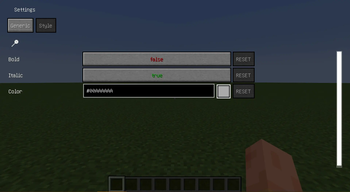
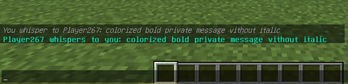
This mod allows you to customize the chat for more convenient work. Now you will not miss a private message because of its nondescript gray color or throw away an item because you did not notice how the chat window was closed during chatting.
Functional:
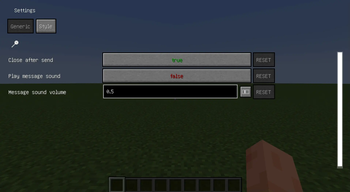
- Sound signal for private message
- Keep chat open after sending a message
- Customize the appearance of incoming messages: bold, italic, color
- Adjust sound notification volume
Requires a malilib
=================================================================================
Этот мод дает возможность настроить чат для более удобной работы. Теперь вы не пропустите личное сообщение из-за его невзрачного серого цвета или не выкинете предмет потому-что не заметили как окно чата закрылось при переписке.
Функционал:
- Звуковой сигнал при личном сообщении
- Оставлять чат открытым после отправки сообщения
- Настройка оформления входящих сообщений: жирный, курсив, цвет
- Настройка громкости звукового уведомления
Требует malilib
=================================================================================
Available Versions
How to Install Chat Twix on Your Server
Order Server
Order a Minecraft Java server with at least 3 GB RAM (4 GB recommended).
Set fabric Loader
In the panel under "Egg", select the fabric loader and matching Minecraft version (1.20.1).
Install Mod
Open the mod browser in the dashboard and search for "Chat Twix". Click "Install" – done! Alternatively, upload the .jar via SFTP to the /mods folder.
Compatibility
Mod Loaders
Minecraft Versions
1.20.1, 1.20
Server-side
✗ UnsupportedRecommended RAM
4 GB(min. 3 GB)Frequently Asked Questions
Chat Twix server crashes on startup – what to do?
Most common cause: wrong fabric version or insufficient RAM. Check the server log (latest.log) for "OutOfMemoryError" or "Mixin" errors. With Mado Hosting: ensure at least 3 GB RAM is allocated and the loader matches the mod version (1.20.1). You can switch loaders with one click in the panel.
Is Chat Twix compatible with fabric?
Chat Twix officially supports fabric for Minecraft 1.20.1, 1.20. The Mado dashboard automatically detects incompatible loader combinations.
Server lagging with Chat Twix – how to optimize performance?
Recommended RAM: 4 GB (per 8 players). Use /spark profiler to check if Chat Twix consumes the most tick time. Common fixes: reduce server view-distance to 8-10, install "performant" or "starlight" as supplementary mods on Forge. With Mado Hosting, your server runs on NVMe SSDs with dedicated CPU cores for minimal latency.
Similar Mods






Rent Modded Server
Install Chat Twix with just one click on your server.