
Chat Upgrade
Add inline image, audio, and video rendering to Minecraft chat. Supports previews, emojis, and optional server-side direct uploads.
Screenshots
About this Mod
English Description
Chat Upgrade is a Fabric mod that enhances Minecraft chat with rich media rendering.
Key Features
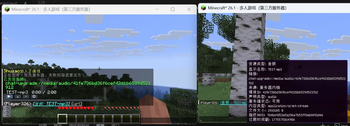
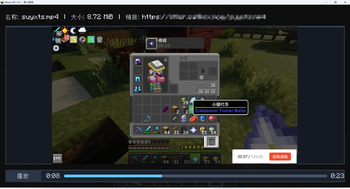
- Inline media preview: Recognizes
[[ChatUpgrade,url=…]]payloads and replaces links with placeholders. Renders images, audio players, and video players directly inside the chat message area. - Inline emojis: Uses
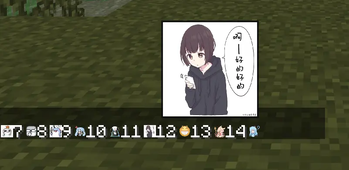
[:token]syntax (e.g.[:bilibili_tv_gif-2]) and a mapping fromowo.jsonto display square emoji images. - Flexible upload modes:
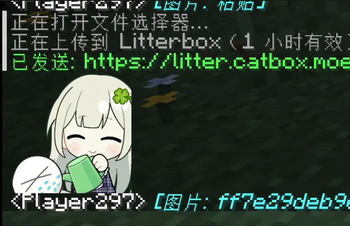
- Auto mode (default): If the server supports media uploads, files go directly to the server. Otherwise, uses third‑party hosting (Litterbox, ~1h expiry).
- Server mode / Third‑party mode: Forced routing via commands or config.
- Optional server‑side storage: When installed on the server, clients upload media directly to the server. Other clients fetch the bytes via server packets and render them.
- Rich command system: Upload from folder, picker, or clipboard; adjust volumes, limits, manual reveal toggles, and plugin management (FFmpeg, APNG).
- High‑definition rendering: Uses supersampling and proper texture scaling to keep previews sharp at any GUI scale or window size.
- ChatImage compatibility mode: Can send images using the
[[CICode,…]]format for compatibility with ChatImage.
Commands (Client‑side, /chatupgrade …)
send,sendaudio,sendvideo– Send a URL as a media payload.upload folder|pick|paste– Upload and send image from local path/file picker/clipboard.uploadaudio,uploadvideo– Same for audio or video files.config …– Change upload mode, manual reveal, volumes, size limits, smooth scroll, etc.plugin status|load|download– Manage FFmpeg and APNG plugins (auto‑downloaded on first use).
Configuration
File: config/chat-upgrade/chat-upgrade.json
Options include: ciCompatibility, manualImageReveal, audioVolumePercent, maxReceiveBytes, uploadMode, and more. Reloadable in‑game.
Notes
- FFmpeg and APNG plugins are not bundled – they are downloaded automatically on first use to
config/chat-upgrade/libs/. - Server‑side direct upload mode does not support the
CICodecompatibility format. - Supported formats: images (png, apng, jpg, gif, webp, bmp, tif, ico, etc.), audio (ogg, wav, mp3, flac, m4a, aac, opus, webm), video (mp4, webm, mov, mkv, m4v, avi).
中文说明
Chat Upgrade 是一款基于 Fabric 的模组,让 Minecraft 聊天支持丰富的多媒体渲染。
主要功能
- 内联媒体预览:识别形如
[[ChatUpgrade,url=…]]的载荷文本,将链接替换为占位符,并在聊天消息区域内直接渲染图片、音频播放器和视频播放器。 - 行内表情:使用
[:token]语法(例如[:bilibili_tv_gif-2]),配合owo.json的映射表显示方形表情图片。 - 灵活的上传模式:
- 自动模式(默认):如果服务端支持媒体上传,文件直接上传到服务器;否则使用第三方托管(Litterbox,约 1 小时有效期)。
- 服务端模式 / 第三方模式:通过命令或配置强制指定路由。
- 可选的服务端存储:当服务端也安装本模组后,客户端直接上传到服务器,其他客户端通过服务端数据包拉取媒体并渲染。
- 丰富的命令系统:支持从文件夹、文件选择器或剪贴板上传;调整音量、体积限制、手动触发开关;管理 FFmpeg 和 APNG 插件。
- 高清渲染:使用超采样和合适的纹理缩放,在任何 GUI 缩放比例或窗口大小下都能保持预览清晰。
- ChatImage 兼容模式:可切换为
[[CICode,…]]格式发送图片,与 ChatImage 模组兼容。
命令(客户端命令,/chatupgrade …)
send/sendaudio/sendvideo– 将某个 URL 作为媒体载荷发送到聊天。upload folder|pick|paste– 从本地路径/文件选择器/剪贴板上传并发送图片。uploadaudio/uploadvideo– 同理,上传音频或视频文件。config …– 修改上传模式、手动触发开关、音量、大小限制、平滑滚动等。plugin status|load|download– 管理 FFmpeg 和 APNG 插件(首次使用时会自动下载)。
配置文件
位置:config/chat-upgrade/chat-upgrade.json
选项包括:ciCompatibility、manualImageReveal、audioVolumePercent、maxReceiveBytes、uploadMode 等。可在游戏中重载配置。
注意事项
- FFmpeg 和 APNG 插件不内置 – 首次使用时自动下载到
config/chat-upgrade/libs/。 - 服务端直传模式不支持
CICode兼容格式。 - 支持格式:图片(png、apng、jpg、gif、webp、bmp、tif、ico 等)、音频(ogg、wav、mp3、flac、m4a、aac、opus、webm)、视频(mp4、webm、mov、mkv、m4v、avi)。
Available Versions
How to Install Chat Upgrade on Your Server
Order Server
Order a Minecraft Java server with at least 3 GB RAM (4 GB recommended).
Set fabric Loader
In the panel under "Egg", select the fabric loader and matching Minecraft version (26.1.1).
Install Mod
Open the mod browser in the dashboard and search for "Chat Upgrade". Click "Install" – done! Alternatively, upload the .jar via SFTP to the /mods folder.
Compatibility
Mod Loaders
Minecraft Versions
26.1.1, 26.1
Server-side
~ OptionalRecommended RAM
4 GB(min. 3 GB)Frequently Asked Questions
Chat Upgrade server crashes on startup – what to do?
Most common cause: wrong fabric version or insufficient RAM. Check the server log (latest.log) for "OutOfMemoryError" or "Mixin" errors. With Mado Hosting: ensure at least 3 GB RAM is allocated and the loader matches the mod version (26.1.1). You can switch loaders with one click in the panel.
Is Chat Upgrade compatible with fabric?
Chat Upgrade officially supports fabric for Minecraft 26.1.1, 26.1. The Mado dashboard automatically detects incompatible loader combinations.
Server lagging with Chat Upgrade – how to optimize performance?
Recommended RAM: 4 GB (per 8 players). Use /spark profiler to check if Chat Upgrade consumes the most tick time. Common fixes: reduce server view-distance to 8-10, install "performant" or "starlight" as supplementary mods on Forge. With Mado Hosting, your server runs on NVMe SSDs with dedicated CPU cores for minimal latency.
Similar Mods






Rent Modded Server
Install Chat Upgrade with just one click on your server.