
Chat Wheel
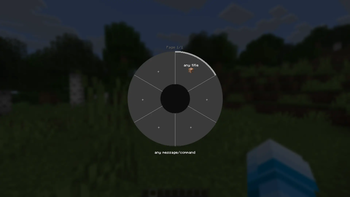
Chat Wheel adds a radial menu to Minecraft that lets you quickly send chat messages with a simple mouse gesture – fully customizable with your own entries.
Screenshots
About this Mod
Chat Wheel
Chat Wheel is a Minecraft Fabric mod that adds a radial menu to quickly send chat messages and commands using your mouse — no typing needed. Whether you're playing on a multiplayer server or in singleplayer, Chat Wheel makes communication faster and more convenient than ever.
Features
- Radial menu — Hold a keybind, move your mouse toward the desired entry, release — the message is sent instantly.
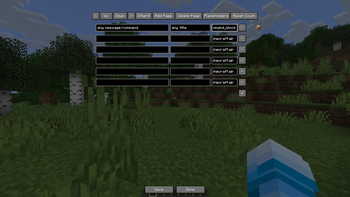
- Fully customizable — Set your own messages, commands or phrases for each slot of the wheel.
- Multiple pages — Organize your entries across multiple pages to have access to as many messages as you need.
- Placeholder support — Dynamically insert things like your current coordinates or other context into messages.
- Client-side only — Works on any server without any installation required on the server side.
- In-chat support — Hold Ctrl + your keybind while the chat is open to insert the selected entry at your cursor position and send it immediately.
How to use
In-game:
- Press and hold the Chat Wheel keybind (configurable in the controls menu)
- Move your mouse toward the desired entry
- Release — the message is sent automatically
In chat:
- Open the chat
- Hold Ctrl + the Chat Wheel keybind
- The selected entry is inserted at your cursor position and sent immediately
Requirements
- Minecraft 1.21.11
- Fabric Loader ≥ 0.18
- Fabric API
- Java 21+
Support
Found a bug, have a suggestion or need help? Join our Discord and open a ticket!
https://discord.gg/Z3b8NvWb9n
Available Versions
How to Install Chat Wheel on Your Server
Order Server
Order a Minecraft Java server with at least 3 GB RAM (4 GB recommended).
Set fabric Loader
In the panel under "Egg", select the fabric loader and matching Minecraft version (1.21.11).
Install Mod
Open the mod browser in the dashboard and search for "Chat Wheel". Click "Install" – done! Alternatively, upload the .jar via SFTP to the /mods folder.
Compatibility
Mod Loaders
Minecraft Versions
1.21.11, 1.21.10, 1.21.4
Server-side
✗ UnsupportedRecommended RAM
4 GB(min. 3 GB)Frequently Asked Questions
Chat Wheel server crashes on startup – what to do?
Most common cause: wrong fabric version or insufficient RAM. Check the server log (latest.log) for "OutOfMemoryError" or "Mixin" errors. With Mado Hosting: ensure at least 3 GB RAM is allocated and the loader matches the mod version (1.21.11). You can switch loaders with one click in the panel.
Is Chat Wheel compatible with fabric?
Chat Wheel officially supports fabric for Minecraft 1.21.11, 1.21.10, 1.21.4. The Mado dashboard automatically detects incompatible loader combinations.
Server lagging with Chat Wheel – how to optimize performance?
Recommended RAM: 4 GB (per 8 players). Use /spark profiler to check if Chat Wheel consumes the most tick time. Common fixes: reduce server view-distance to 8-10, install "performant" or "starlight" as supplementary mods on Forge. With Mado Hosting, your server runs on NVMe SSDs with dedicated CPU cores for minimal latency.
Similar Mods






Rent Modded Server
Install Chat Wheel with just one click on your server.