
Chat Mover
Chat Logger Mod. Saves or exports game chat to various sources.
Screenshots
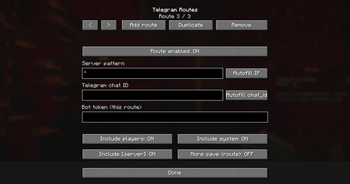
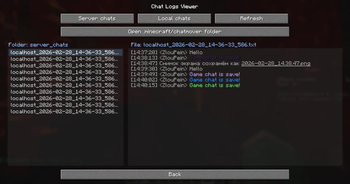
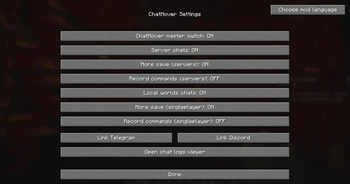
About this Mod
Description
Have you ever wanted to save certain in-game moments without taking thousands of screenshots?
This mod allows you to automatically save your chat to any location of your choice via a user-friendly menu. It supports saving chat logs both in plain text and with colors (#HEX codes).
Save Options:
- TXT files
- Telegram
- Discord
Features:
- Chat Logging: Save chat from both servers and local worlds.
- Clean Logs: Option to save chat without formatting.
- External Integration: Forward messages to Telegram or Discord (no additional server required).
- Two-Way Communication: Send messages from Telegram or Discord directly to the in-game chat while on a server (includes a customizable prefix for sending).
- Multi-Channel Support: Send logs to multiple sources simultaneously.
- Character Filtering: Built-in whitelist for specific characters.
- Toggleable Categories: Separately enable or disable system messages and player messages.
- Anti-Spam Filter: Experimental spam protection (Beta).
- Localization: Support for multiple languages with fully customizable configs.
Available Versions
How to Install Chat Mover on Your Server
Order Server
Order a Minecraft Java server with at least 3 GB RAM (4 GB recommended).
Set fabric Loader
In the panel under "Egg", select the fabric loader and matching Minecraft version (1.21.11).
Install Mod
Open the mod browser in the dashboard and search for "Chat Mover". Click "Install" – done! Alternatively, upload the .jar via SFTP to the /mods folder.
Compatibility
Mod Loaders
Minecraft Versions
1.21.11
Server-side
✗ UnsupportedRecommended RAM
4 GB(min. 3 GB)Frequently Asked Questions
Chat Mover server crashes on startup – what to do?
Most common cause: wrong fabric version or insufficient RAM. Check the server log (latest.log) for "OutOfMemoryError" or "Mixin" errors. With Mado Hosting: ensure at least 3 GB RAM is allocated and the loader matches the mod version (1.21.11). You can switch loaders with one click in the panel.
Is Chat Mover compatible with fabric?
Chat Mover officially supports fabric for Minecraft 1.21.11. The Mado dashboard automatically detects incompatible loader combinations.
Server lagging with Chat Mover – how to optimize performance?
Recommended RAM: 4 GB (per 8 players). Use /spark profiler to check if Chat Mover consumes the most tick time. Common fixes: reduce server view-distance to 8-10, install "performant" or "starlight" as supplementary mods on Forge. With Mado Hosting, your server runs on NVMe SSDs with dedicated CPU cores for minimal latency.
Similar Mods






Rent Modded Server
Install Chat Mover with just one click on your server.