
ChatReply
Multipurpose advanced ChatUtils Mod
Screenshots

About this Mod
ChatReply (Client Mod)

A lightweight, client-side mod that automatically responds to configurable chat messages and handles scheduled text intervals.
Features
- Auto-Response: Triggers customized replies to specific phrases.
- Message Recall: Instantly access and reuse previous chat history.
- Response Delay: Prevent instant replies by adding a custom time buffer.
- Scheduled Loop: Send text automatically at custom intervals (e.g., every 10s or 20s).
- In-Game GUI: Toggle features and modify settings on the fly.
- Quick Keybinds: Enable, disable, or open menus instantly via hotkeys.
- Client-Side: Runs purely on your system with zero server footprint.
Configuration Menu
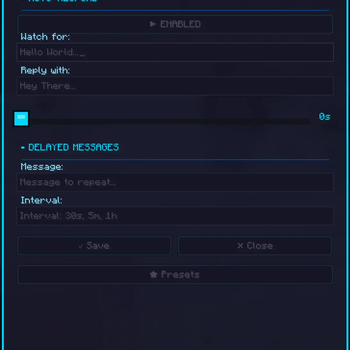
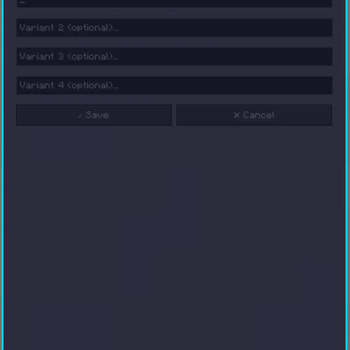
ChatReply features a clean, in-game configuration menu. All changes take effect immediately without requiring a game restart.
Auto-Respond Settings
- Toggle: Instantly enable or disable the automated response engine.
- Watch For: Define the exact keyword or phrase that triggers the mod.
- Reply With: Set the custom message sent back when triggered.
Delayed Messages
- Interval Loops: Create automated messages that broadcast at custom times.
- Live Editing: Tweak the output text and timing delays directly in-game.
Commands
/chatreply on                     - Enables automatic chat responding
/chatreply off                    - Disables automatic chat responding
/chatreply setmessage <text>      - Sets the trigger phrase to listen for
/chatreply setresponse <text>     - Sets the automated reply message
/chatreply senddelay <text> <sec> - Loops a message at custom intervals
/chatreply stopsenddelay          - Stops the active scheduled interval loop
Keybinds
- C — Opens the message recall menu.
- H — Toggles the entire response system on or off.
- I — Opens the main configuration GUI.
Note: All hotkeys can be remapped anytime in the standard Minecraft controls menu.
Installation & Recommendations
Setup Guide
- Download the mod file matching your Minecraft version.
- Place the file inside your local client
modsfolder. - Launch the game and type
/chatreplyto verify installation.
Recommendations
- Always Update: Use the latest file version for the best stability.
- Interface Scaling: Set your game GUI size to 3 for the best layout look.
Client Compatibility
This mod runs on standard Minecraft clients supporting client-side mods, and has been tested on:
- Feather Client
- Lunar Client
Note: Total compatibility with all third-party launchers cannot be guaranteed.
Transparency & Security
- Purely Client-Side: Runs exclusively on your game instance.
- No Data Collection: Does not gather, store, or transmit personal details.
- No Account Tracking: Never accesses tokens, passwords, or session data.
- No External Links: Does not connect to outside master servers.
- Vanilla Mimicry: Dispatches messages safely through standard vanilla chat protocols.
Server Warning & Disclaimer
⚠️ Important Warning: This mod automates chat actions. Many multiplayer servers classify this behavior as a macro or illegal automation. Using this mod on public servers that restrict automation can result in player mutes, kicks, or permanent account bans.
User Responsibility
- You must verify individual server rules regarding chat macros.
- You assume full responsibility for any server punishments or bans incurred.
- The developer holds zero liability for rule violations or player bans.
Suggested Use Cases
- Personal or private survival worlds.
- Servers where automated chat macros are explicitly permitted.
- Repetitive AFK status messages with pre-approved staff consent.
Available Versions
How to Install ChatReply on Your Server
Order Server
Order a Minecraft Java server with at least 3 GB RAM (4 GB recommended).
Set fabric Loader
In the panel under "Egg", select the fabric loader and matching Minecraft version (1.21.11).
Install Mod
Open the mod browser in the dashboard and search for "ChatReply". Click "Install" – done! Alternatively, upload the .jar via SFTP to the /mods folder.
Compatibility
Mod Loaders
Minecraft Versions
1.21.11, 1.21.10, 1.21.9 (+9 more)
Server-side
✗ UnsupportedRecommended RAM
4 GB(min. 3 GB)Frequently Asked Questions
ChatReply server crashes on startup – what to do?
Most common cause: wrong fabric version or insufficient RAM. Check the server log (latest.log) for "OutOfMemoryError" or "Mixin" errors. With Mado Hosting: ensure at least 3 GB RAM is allocated and the loader matches the mod version (1.21.11). You can switch loaders with one click in the panel.
Is ChatReply compatible with fabric?
ChatReply officially supports fabric for Minecraft 1.21.11, 1.21.10, 1.21.9. The Mado dashboard automatically detects incompatible loader combinations.
Server lagging with ChatReply – how to optimize performance?
Recommended RAM: 4 GB (per 8 players). Use /spark profiler to check if ChatReply consumes the most tick time. Common fixes: reduce server view-distance to 8-10, install "performant" or "starlight" as supplementary mods on Forge. With Mado Hosting, your server runs on NVMe SSDs with dedicated CPU cores for minimal latency.
Similar Mods






Rent Modded Server
Install ChatReply with just one click on your server.