
ChatSocket
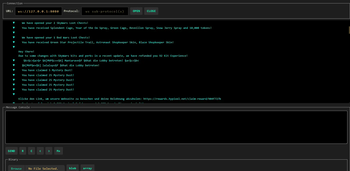
Game minimized, chat maximized! Lets send Minecraft chat messages via WebSockets.
Screenshots
About this Mod
ChatSocket
A simple mod providing a web socket connection for sending and receiving chat messages / commands. Made for lazy people having Minecraft in the background while
playing other games or developing.
Config
Ingame Config is available via owo-config (also accessible via mod-menu). There you can configure
- port (default: 8080)
- host: (default: 127.0.0.1)
- enabled: (default: true)
- communication type: (default: PLAIN_TEXT)
- PLAIN_TEXT
- JSON
Usage
For testing purposes, I recommend using a browser extension like Weasel Websocket. Once you connected
to the websocket (ws://127.0.0.1:8080), you will already receive messages and be able to send some.
For different purposes, there are currently two modes: PLAIN_TEXT and JSON.
PLAIN_TEXT Mode
In this mode, messages are being sent and received in full plain text. No json whatsoever.
This is intended for IntelliJ websocket plugins or other tools that are not able to parse JSON.
Mind that the communicationType update event is still being sent as a json object.
JSON Mode
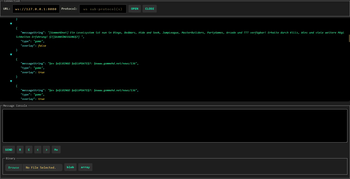
To provide more flexibility, the JSON mode is available. In this mode, messages are being sent and received as JSON objects.
The following JSON objects are being sent:
Incoming messages
Chat Message
{
  "type": "chat",
  "messageString": "Hello World",
  "gameProfile": {
    "uuid": "8661e1be-bbf5-4cd6-86ba-60cc35f8f7e0",
    "name": "AriVanHouten"
  },
  "timestamp": "2011-12-03T10:15:30Z"
}
Game Message
// most of the time these are being sent by the server
{
  "type": "game",
  "messageString": "Hello World",
  "overlay": false,
}
CommunicationType Change
// Will be sent regardless of the mode
{
  "type": "communicationType",
  "communicationType": "PLAIN_TEXT" // or "JSON"
}
Error
// Will be sent regardless of the mode
{
  type: "error",
  "error": "Error message"
}
Outgoing messages
Sending a chat message
{
  "type": "chat", // Alternatively: 'command' => will only prepend a slash to the message
  "message": "Hello World",
}
Available Versions
How to Install ChatSocket on Your Server
Order Server
Order a Minecraft Java server with at least 3 GB RAM (4 GB recommended).
Set fabric Loader
In the panel under "Egg", select the fabric loader and matching Minecraft version (1.21.5).
Install Mod
Open the mod browser in the dashboard and search for "ChatSocket". Click "Install" – done! Alternatively, upload the .jar via SFTP to the /mods folder.
Compatibility
Mod Loaders
Minecraft Versions
1.21.5
Server-side
✗ UnsupportedRecommended RAM
4 GB(min. 3 GB)Frequently Asked Questions
ChatSocket server crashes on startup – what to do?
Most common cause: wrong fabric version or insufficient RAM. Check the server log (latest.log) for "OutOfMemoryError" or "Mixin" errors. With Mado Hosting: ensure at least 3 GB RAM is allocated and the loader matches the mod version (1.21.5). You can switch loaders with one click in the panel.
Is ChatSocket compatible with fabric?
ChatSocket officially supports fabric for Minecraft 1.21.5. The Mado dashboard automatically detects incompatible loader combinations.
Server lagging with ChatSocket – how to optimize performance?
Recommended RAM: 4 GB (per 8 players). Use /spark profiler to check if ChatSocket consumes the most tick time. Common fixes: reduce server view-distance to 8-10, install "performant" or "starlight" as supplementary mods on Forge. With Mado Hosting, your server runs on NVMe SSDs with dedicated CPU cores for minimal latency.
Similar Mods






Rent Modded Server
Install ChatSocket with just one click on your server.