
Chef's Dream
An immersive cooking datapack for Minecraft.
Screenshots
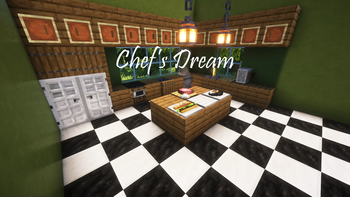
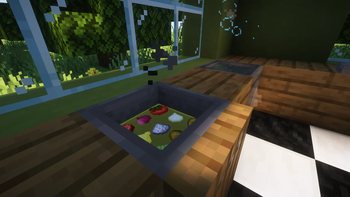
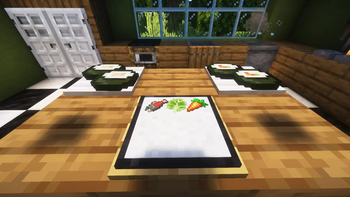
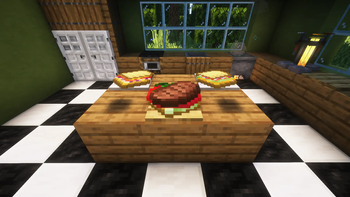
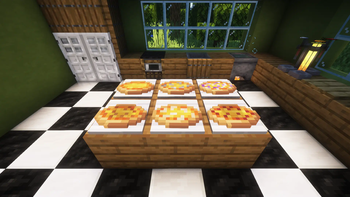
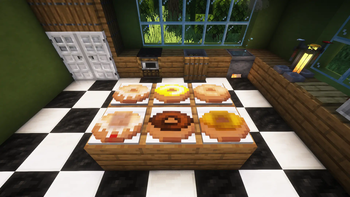
About this Mod
Introduction
Chef's Dream is an immersive cooking datapack for Minecraft 1.20.5 and up. The datapack focuses on interacting with vanilla blocks to cook foods rather than crafting. You will be able to cook soups using a cauldron, fry foods using a hopper, and more!
Features
Cooking Stations: 10 different cooking stations derived from vanilla blocks. A cauldron will become a cooking pot, and a smoker will become an oven!
New Foods: Over 200 new foods to cook
New Drinks: 37 new drinks to brew
New Fruits and Vegetables: 4 new fruits that drop from trees and 5 new vegetables that drop from grasses and ferns
Interactive Cooking: Put oil in a fryer, cut ham on a preparation board, make a sushi roll, cook meat on a grill, and more!
Guide
You will get a starting guide when you first load up the datapack. For more guides, right click with a Cooking Station Maker while standing right in front of a chiseled bookshelf to fill it up with guides and cookbooks. You can get a Cooking Station Maker by loading up the datapack or by using the command /trigger start_cooking.
By crouch-right clicking with a Cooking Station Maker right in front of certain blocks, you can turn them into cooking stations. For example, using the Cooking Station Maker on a hopper will turn it into a fryer!
For a more detailed guide, you can visit the wiki on the Chef's Dream Github page. The wiki also contains a cookbook with all recipes listed in alphabetical order if you prefer that over the in-game cookbooks.
Installation
Download the datapack and the required resource pack. Put the datapack in the 'datapack' folder of your world, and put the resource pack in the 'resourcepack' folder of Minecraft. If you load up the world and you get the advancement "Chef's Dream," you have successfully installed the datapack! (If you install it into an existing world, use the command /reload to load your datapack.)
Updating
To update Chef's Dream to the newest version, simply redownload the datapack file and the resource pack file and replace the current files in your minecraft folder.
Discord
If you would like to report bugs or give suggestions about the datapack, you can join the Chef's Dream discord server here.
Known Issues
A list of known bugs can be found here. Please take a look at the bugs document before reporting a problem - it may be a known issue that will be fixed later. If you find a bug that is not listed, please use the discord or file an issue on the Github detailing the steps you took that led to the bug so that we can quickly diagnose the issue. Thank you!
Debugging/Uninstallation
If a bug happens or you need to uninstall the pack, you may need to force delete some cooking stations from your world first. The following command will force destroy all cooking stations within a 10 block radius from where it is executed: /function chefsdream:destroy_stations
For faster deletion, the following command will destroy all cooking stations in loaded chunks: /function chefsdream:destroy_all_stations
If you are uninstalling the pack, after all cooking stations are deleted, please delete the datapack from your world's folder.
Credits and License
Datapack created by: YJMinecraft
Resource Pack created by: masterliv531 and YJMinecraft
The resource pack modifies or uses some textures from the Croptopia mod and the Farmer's Delight mod, both under the MIT License.
More Information
You can use `/function chefsdream:give/get_all_veggies` to get every custom vegetable, `/function chefsdream:give/get_all_fruits` to get every custom fruit, or `/function chefsdream:give/get_all_barrel_foods` to get some custom food made from barrels.For a more technical documentation fo the datapack, please look at the documentation on the Github.
Available Versions
How to Install Chef's Dream on Your Server
Order Server
Order a Minecraft Java server with at least 3 GB RAM (4 GB recommended).
Set datapack Loader
In the panel under "Egg", select the datapack loader and matching Minecraft version (26.2).
Install Mod
Open the mod browser in the dashboard and search for "Chef's Dream". Click "Install" – done! Alternatively, upload the .jar via SFTP to the /mods folder.
Compatibility
Mod Loaders
Minecraft Versions
26.2, 1.21.10, 1.21.9 (+9 more)
Server-side
✓ RequiredRecommended RAM
4 GB(min. 3 GB)Frequently Asked Questions
Chef's Dream server crashes on startup – what to do?
Most common cause: wrong datapack version or insufficient RAM. Check the server log (latest.log) for "OutOfMemoryError" or "Mixin" errors. With Mado Hosting: ensure at least 3 GB RAM is allocated and the loader matches the mod version (26.2). You can switch loaders with one click in the panel.
Is Chef's Dream compatible with datapack and fabric and forge and neoforge and quilt?
Chef's Dream officially supports datapack, fabric, forge, neoforge, quilt for Minecraft 26.2, 1.21.10, 1.21.9. Note: Forge and Fabric mods are NOT cross-compatible – pick one loader and stick with it. The Mado dashboard automatically detects incompatible loader combinations.
Server lagging with Chef's Dream – how to optimize performance?
Recommended RAM: 4 GB (per 8 players). Use /spark profiler to check if Chef's Dream consumes the most tick time. Common fixes: reduce server view-distance to 8-10, install "performant" or "starlight" as supplementary mods on Forge. With Mado Hosting, your server runs on NVMe SSDs with dedicated CPU cores for minimal latency.
Similar Mods



Rent Modded Server
Install Chef's Dream with just one click on your server.