
Chest helper
Chest Helper is a client-side Fabric mod that remembers opened storage containers and turns them into a searchable item list
Screenshots
About this Mod
Features
- Remembers opened chests, barrels, and shulker boxes per server, world, and dimension.
- Saves remembered container data between game sessions.
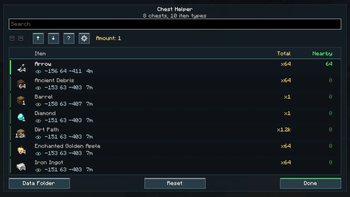
- Shows a searchable GUI with item names, icons, total stored amount, and amount currently available nearby.
- Displays large counts in compact form, such as 125, 1k, or 1.5k.
- Supports precise item matching with stack components, so renamed items, enchanted items, potions, books, tools, and filled shulker boxes are not merged only by item ID.
- Lets you take items from remembered containers within 6 blocks using normal client inventory actions.
- Hides the opened container screen during automatic pickup and shows a short result message instead.
- Updates remembered contents after taking or moving items.
- Supports bulk matching actions:
- Up arrow: deposit matching inventory items into nearby remembered containers that already contain those item types.
- Down arrow: withdraw matching items from nearby remembered containers into your inventory.
- Includes optional menu reopening after taking items.
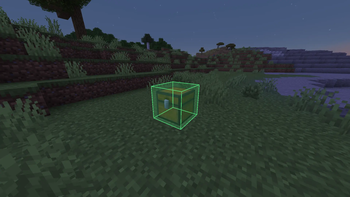
- Includes a temporary x-ray highlight button for the container that stores a selected item.
- Can reset saved data or open the data folder from the GUI.
Controls
- Default B: open Chest Helper.
- Left click an item row: take one stack from nearby remembered containers.
- Right click an item row: take the selected amount.
- Shift + click an item row: take all matching items from nearby remembered containers.
- Shift + mouse wheel: change the right-click take amount.
- Eye button near an item location: highlight the related container for 5 seconds.
Settings
- Reopen Chest Helper after taking items.
- Ignore ender chests.
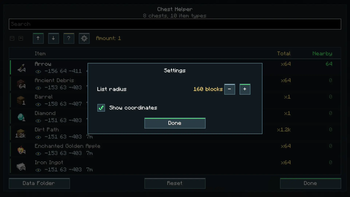
- List radius: hides remembered containers farther than the configured distance from the GUI list. The default is 160 blocks.
- Show or hide coordinates in item rows.
Available Versions
How to Install Chest helper on Your Server
Order Server
Order a Minecraft Java server with at least 3 GB RAM (4 GB recommended).
Set fabric Loader
In the panel under "Egg", select the fabric loader and matching Minecraft version (26.1.2).
Install Mod
Open the mod browser in the dashboard and search for "Chest helper". Click "Install" – done! Alternatively, upload the .jar via SFTP to the /mods folder.
Compatibility
Mod Loaders
Minecraft Versions
26.1.2, 26.1.1, 26.1 (+1 more)
Server-side
✗ UnsupportedRecommended RAM
4 GB(min. 3 GB)Frequently Asked Questions
Chest helper server crashes on startup – what to do?
Most common cause: wrong fabric version or insufficient RAM. Check the server log (latest.log) for "OutOfMemoryError" or "Mixin" errors. With Mado Hosting: ensure at least 3 GB RAM is allocated and the loader matches the mod version (26.1.2). You can switch loaders with one click in the panel.
Is Chest helper compatible with fabric and forge and neoforge and quilt?
Chest helper officially supports fabric, forge, neoforge, quilt for Minecraft 26.1.2, 26.1.1, 26.1. Note: Forge and Fabric mods are NOT cross-compatible – pick one loader and stick with it. The Mado dashboard automatically detects incompatible loader combinations.
Server lagging with Chest helper – how to optimize performance?
Recommended RAM: 4 GB (per 8 players). Use /spark profiler to check if Chest helper consumes the most tick time. Common fixes: reduce server view-distance to 8-10, install "performant" or "starlight" as supplementary mods on Forge. With Mado Hosting, your server runs on NVMe SSDs with dedicated CPU cores for minimal latency.
Similar Mods


Rent Modded Server
Install Chest helper with just one click on your server.