Chest Tracker (NeoForge port)
Client side item storage - remember where you've put things. Unofficial port for NeoForge
Screenshots
About this Mod
Chest Tracker - Unofficial NeoForge Port
Client-side item storage and searching for Minecraft 1.21.1 on NeoForge.
Chest Tracker helps you remember where you stored your items. Open containers as you play, then search your saved storage data later from a client-side GUI. No server-side installation is required.
Unofficial port
This is an unofficial NeoForge 1.21.1 port of Chest Tracker by JackFred. This project has been approved by the original author. If you use Fabric or Quilt, use the original project instead.
What It Does
Chest Tracker stores remembered container contents locally on your client. This means it can work in singleplayer, multiplayer, and Realms-style environments without requiring the server to install the mod.
You can use it to:
- Find which chest, barrel, shulker, or other remembered container has an item.
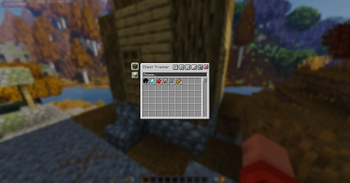
- Search saved storage from the in-game Chest Tracker GUI.
- Highlight matching containers in the world.
- Keep separate local storage data through memory banks.
- Display remembered or custom container names.
Features
- Client-side storage memory.
- Main searchable storage browser.
- Item search from the Chest Tracker GUI.
- World highlights for matching containers.
- Remembered/custom container names.
- Local memory banks.
- Works without a server-side mod.
Usage
- Open containers while playing so Chest Tracker can remember their contents.
- Press the Grave key, usually
`, to open the Chest Tracker GUI. - Click an item in the GUI to search for it in remembered containers.
- Use the search bar and filters to narrow down stored items.
Requirements
| Requirement | Version |
|---|---|
| Minecraft | 1.21.1 |
| Loader | NeoForge 21.1.x |
| Dependency | YetAnotherConfigLib for NeoForge 1.21.1 |
Differences From The Original Fabric Version
This port focuses on the core Chest Tracker experience for NeoForge. Some optional Fabric-side integrations from the original project are not included here.
Known differences:
- Targets NeoForge 1.21.1 only.
- No Fabric API dependency.
- No ModMenu integration.
- Litematica integration is not included.
- Jade/WTHIT integration is not included.
- Shulker Box Tooltip integration is not included.
- Searchables integration is disabled in this build.
Compatibility Notes
This mod is client-side. It should not need to be installed on servers.
Because this is an unofficial port, compatibility with large modpacks may vary. If you find a crash or broken behavior, include your latest log and mod list when reporting it.
Credits
- Original mod: Chest Tracker
- Original author: JackFred
- Original source: GitHub
All original project ownership and credit belong to the original author. This project is only an unofficial NeoForge compatibility port.
📩 For questions and bug reports: Telegram / Discord — @b1nt1n
Available Versions
How to Install Chest Tracker (NeoForge port) on Your Server
Order Server
Order a Minecraft Java server with at least 3 GB RAM (4 GB recommended).
Set neoforge Loader
In the panel under "Egg", select the neoforge loader and matching Minecraft version (1.21.1).
Install Mod
Open the mod browser in the dashboard and search for "Chest Tracker (NeoForge port)". Click "Install" – done! Alternatively, upload the .jar via SFTP to the /mods folder.
Compatibility
Mod Loaders
Minecraft Versions
1.21.1
Server-side
✗ UnsupportedRecommended RAM
4 GB(min. 3 GB)Frequently Asked Questions
Chest Tracker (NeoForge port) server crashes on startup – what to do?
Most common cause: wrong neoforge version or insufficient RAM. Check the server log (latest.log) for "OutOfMemoryError" or "Mixin" errors. With Mado Hosting: ensure at least 3 GB RAM is allocated and the loader matches the mod version (1.21.1). You can switch loaders with one click in the panel.
Is Chest Tracker (NeoForge port) compatible with neoforge?
Chest Tracker (NeoForge port) officially supports neoforge for Minecraft 1.21.1. The Mado dashboard automatically detects incompatible loader combinations.
Server lagging with Chest Tracker (NeoForge port) – how to optimize performance?
Recommended RAM: 4 GB (per 8 players). Use /spark profiler to check if Chest Tracker (NeoForge port) consumes the most tick time. Common fixes: reduce server view-distance to 8-10, install "performant" or "starlight" as supplementary mods on Forge. With Mado Hosting, your server runs on NVMe SSDs with dedicated CPU cores for minimal latency.
Similar Mods






Rent Modded Server
Install Chest Tracker (NeoForge port) with just one click on your server.