
Chestmonster
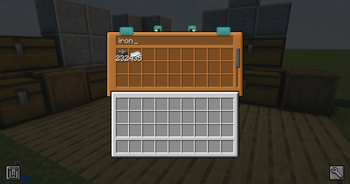
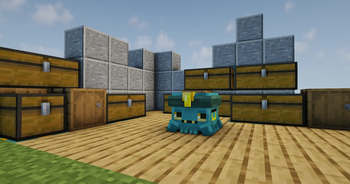
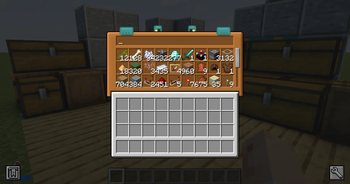
Storage solution with a grid and hands. View your storage inside of the grid and deposit easily!
Screenshots
About this Mod

Tired of digging through endless chests?
Chestmonster is a storage helper mod that makes early-game chest organisation much easier, without turning your base into a full storage network.
Link your nearby containers, open the Chestmonster, and instantly search through your messy chest setup from one simple interface.

Chestmonster gives each player their own searchable storage hub.
Instead of opening chest after chest looking for that one missing item, you can use the Chestmonster to browse, search, and pull items from linked containers nearby.
It is designed for early-game storage control: simple, useful, and intentionally not overpowered.

Chestmonster
The main block used to access your linked storage.
Open it to view a searchable 9x3 storage grid showing items from nearby linked containers.
Chestmonster Hand
Place this next to containers to link them to a nearby Chestmonster.
Once linked, those containers can be searched and accessed through the Chestmonster interface.

- Searchable 9x3 storage view
- Scroll through linked storage contents
- Click an item to take one item onto your cursor
- Shift-click an item to take up to one stack onto your cursor
- Optional item storing back into linked storage
- Optional vanilla-inventory deloot button
- Deposit matching items into nearby containers
- One Chestmonster per player
- Lightweight by design

Chestmonster uses a JSON config file and can be reloaded in-game with:
/chestmonster reload
Default Config:
{
  "gridstoreitems": false,
  "searchradius": 12,
  "enableDeloot": true,
  "delootDimensions": [
    "minecraft:overworld",
    "minecraft:the_nether",
    "minecraft:the_end"
  ]
}
| Key | Description |
|---|---|
gridstoreitems |
Enables or disables storing items back into linked storage from the Chestmonster grid. |
searchradius |
Controls how far the Chestmonster searches for linked containers. |
enableDeloot |
Enables or disables the vanilla-inventory deloot button. |
delootDimensions |
Defines which dimensions the deloot feature can be used in. |
Available Versions
How to Install Chestmonster on Your Server
Order Server
Order a Minecraft Java server with at least 3 GB RAM (4 GB recommended).
Set forge Loader
In the panel under "Egg", select the forge loader and matching Minecraft version (26.1.2).
Install Mod
Open the mod browser in the dashboard and search for "Chestmonster". Click "Install" – done! Alternatively, upload the .jar via SFTP to the /mods folder.
Compatibility
Mod Loaders
Minecraft Versions
26.1.2, 1.21.1, 1.20.1 (+1 more)
Server-side
✓ RequiredRecommended RAM
4 GB(min. 3 GB)Frequently Asked Questions
Chestmonster server crashes on startup – what to do?
Most common cause: wrong forge version or insufficient RAM. Check the server log (latest.log) for "OutOfMemoryError" or "Mixin" errors. With Mado Hosting: ensure at least 3 GB RAM is allocated and the loader matches the mod version (26.1.2). You can switch loaders with one click in the panel.
Is Chestmonster compatible with forge and neoforge?
Chestmonster officially supports forge, neoforge for Minecraft 26.1.2, 1.21.1, 1.20.1. The Mado dashboard automatically detects incompatible loader combinations.
Server lagging with Chestmonster – how to optimize performance?
Recommended RAM: 4 GB (per 8 players). Use /spark profiler to check if Chestmonster consumes the most tick time. Common fixes: reduce server view-distance to 8-10, install "performant" or "starlight" as supplementary mods on Forge. With Mado Hosting, your server runs on NVMe SSDs with dedicated CPU cores for minimal latency.
Similar Mods


Rent Modded Server
Install Chestmonster with just one click on your server.