
ChestProtection
Locks chests or creates a trading chest!
Screenshots
About this Mod
CHEST PROTECTION
Easy to use, vanilla friendly, fully server side trading and locking fabric mod for modern versions of Minecraft
Locking
Sign a book “LOCK”, put it in the first slot of a chest. It is now locked! Only you can open it. This protects against:
- explosions, eg. TNT, end crystals
- Wither break mechanics
- Placing chests next to it to move the book out of the first slot
- Breaking
- hoppers
Selling
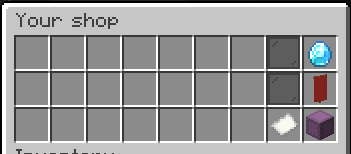
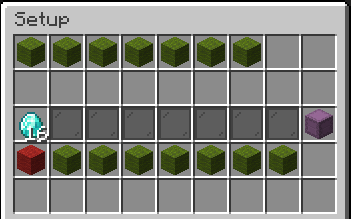
Sign the book “SELL”, put it in the first slot of the chest. The same protections exist as locking. When you open the chest it will prompt you to put some items in the left and right hand middle slot. You can no longer buy or sell stacks greater than the max stack size. When you put items in some green wool will appear. These let you choose what data you want to keep with the item. For example buying swords, but you don’t care about its damage or enchantments or name. So click those prices of wool so they turn red then close the chest. Another example is selling shulker. But you don’t care what colour box it is so click the green wool called Item so it turns red then close the chest. Most of the time you will not have to mess with the wool at all
Enjoy, any problems create a issue request on the GitHub page.
I’ll slowly update this project to newer versions when I have the time
Available Versions
How to Install ChestProtection on Your Server
Order Server
Order a Minecraft Java server with at least 3 GB RAM (4 GB recommended).
Set fabric Loader
In the panel under "Egg", select the fabric loader and matching Minecraft version (1.21.11).
Install Mod
Open the mod browser in the dashboard and search for "ChestProtection". Click "Install" – done! Alternatively, upload the .jar via SFTP to the /mods folder.
Compatibility
Mod Loaders
Minecraft Versions
1.21.11, 1.21.10, 1.21.9 (+8 more)
Server-side
✓ RequiredRecommended RAM
4 GB(min. 3 GB)Frequently Asked Questions
ChestProtection server crashes on startup – what to do?
Most common cause: wrong fabric version or insufficient RAM. Check the server log (latest.log) for "OutOfMemoryError" or "Mixin" errors. With Mado Hosting: ensure at least 3 GB RAM is allocated and the loader matches the mod version (1.21.11). You can switch loaders with one click in the panel.
Is ChestProtection compatible with fabric?
ChestProtection officially supports fabric for Minecraft 1.21.11, 1.21.10, 1.21.9. The Mado dashboard automatically detects incompatible loader combinations.
Server lagging with ChestProtection – how to optimize performance?
Recommended RAM: 4 GB (per 8 players). Use /spark profiler to check if ChestProtection consumes the most tick time. Common fixes: reduce server view-distance to 8-10, install "performant" or "starlight" as supplementary mods on Forge. With Mado Hosting, your server runs on NVMe SSDs with dedicated CPU cores for minimal latency.
Similar Mods




![CobbleDollars [Cobblemon Addon]](https://cdn.modrinth.com/data/s7N7AsqL/684040a264fc1d7f9b856ec5d2da39767398c7ad.png)
Rent Modded Server
Install ChestProtection with just one click on your server.